Softimage Resources: plugins, scripts, compounds and shaders
All 1119 entries of the Softimage Resources as a simple list, 201–250 on this page. To search and filter by tags, use the interactive Resources page.
 User Normal Translator osAll js modeling
 This plugin extends the normal editing toolset in Softimage. It adds functions such
as numerical transform, spherize around center, invert and smooth. It also supports
back-and-forth conversion to a colormap, which makes the normals editable with the
vertex paint tool, or using Softimage's spreadsheet editor for weights.
Introduction and demo on vimeo. Documentation available here with a screenshot of the GUI.
local backup: UserNormalTranslator.xsiaddon
Introduction and demo on vimeo. Documentation available here with a screenshot of the GUI.
local backup: UserNormalTranslator.xsiaddon
author @ vimeo / site: http://artifacts.sakura.ne.jp/sakanaya/works (archive) / blog: http://gotetz-log.blogspot.jp / author @ github / si-community thread
Envelope Scripts osAll vbs js rigging compilation
A collection of 7 weight painting helper scripts that will register inside the »Animate/Envelope«
menu.
Normalize Envelope Weights: In case automatic envelope normalization breaks, this fixes it. It could be done in the weight editor before but this is more obvious and accessible. Select Points by Envelope Weight: Detect envelope anomalies by selecting points with a total weight of either <100, =100 or >100. Swap Envelope Weights: swaps the weights of two picked deformers. Select deformed object>run the command>pick first>pick second. Merge Envelope Weights: Merges the weights of the picked deformers. Select deformed object>run the command>pick source>pick one or more targets Save Weights: Saves the current envelope weights as a .preset, no interaction, automatic filename used based on the mesh name stored in [PROJECT]Envelope Load Weights: Loads the .preset based on the mesh name. Mesh must have an existing envelope. Lock Unselected Deformers: Locks all unselected deformers. Select mesh and deformers>run the command.
Note: This was on rray before but has now been merged with some scripts discovered recently. Most of the GUI is in Japanese. Some of the scripts are from 2010, but verified running in SI 2015 SP1.
local backup: EnvelopeWeightTools.xsiaddon (repackaged for local backup)
Normalize Envelope Weights: In case automatic envelope normalization breaks, this fixes it. It could be done in the weight editor before but this is more obvious and accessible. Select Points by Envelope Weight: Detect envelope anomalies by selecting points with a total weight of either <100, =100 or >100. Swap Envelope Weights: swaps the weights of two picked deformers. Select deformed object>run the command>pick first>pick second. Merge Envelope Weights: Merges the weights of the picked deformers. Select deformed object>run the command>pick source>pick one or more targets Save Weights: Saves the current envelope weights as a .preset, no interaction, automatic filename used based on the mesh name stored in [PROJECT]Envelope Load Weights: Loads the .preset based on the mesh name. Mesh must have an existing envelope. Lock Unselected Deformers: Locks all unselected deformers. Select mesh and deformers>run the command.
Note: This was on rray before but has now been merged with some scripts discovered recently. Most of the GUI is in Japanese. Some of the scripts are from 2010, but verified running in SI 2015 SP1.
local backup: EnvelopeWeightTools.xsiaddon (repackaged for local backup)
author @ vimeo / site: http://artifacts.sakura.ne.jp/sakanaya/works (archive) / download: ../08/softimage.htm / blog: http://gotetz-log.blogspot.jp
pb_PolyIslandToDeformer osAll ICE rigging
When using meshes instead of nulls as envelope deformers, it would be preferable to
use the mesh surfaces rather than the mesh centers for the automatic weight assignment.
pb_PolyIslandToDeformer deals with just that: it overrides the automatic assignment
and sets the weights depending on the proximity of the deformer surface.
The ICE computation relies on a merged mesh and polygon island computation, so the workflow is a little involved, but well explained in the first part of ICE Envelope Weights Utilities. A very useful side effect of having a 'live' assignment is that the meshes can be changed at any point and the weight assignment will update automatically until the ICE tree is frozen. Also have a look at Pedro's other plugins by clicking on his name above.
local backup: pb_PolyIslandToDeformer.xsicompound
The ICE computation relies on a merged mesh and polygon island computation, so the workflow is a little involved, but well explained in the first part of ICE Envelope Weights Utilities. A very useful side effect of having a 'live' assignment is that the meshes can be changed at any point and the weight assignment will update automatically until the ICE tree is frozen. Also have a look at Pedro's other plugins by clicking on his name above.
local backup: pb_PolyIslandToDeformer.xsicompound
pb_SmoothEnvelopeWeights osAll ICE rigging
A recreation of the built-in envelope weight smooth function with the same set of
controls and the added features of filtering (=not affecting) either a group of deformers
or a point cluster.
See the second part of ICE Envelope Weights Utilities for a usage demo (Use the extra timeline at the bottom of the video to quickly find
it).
local backup: pb_SmoothEnvelopeWeights.xsicompound
local backup: pb_SmoothEnvelopeWeights.xsicompound
pb_CopyClosestSampleWeights osAll ICE rigging
A versatile tool for transferring envelope weights between points. This ICE compound
operates in 3 modes: ClusterToCluster: For each point in the 'affected' cluster, copies weights from the closest point
that is in the 'samples' cluster (on same or different mesh). Having only a few points
in the 'samples' cluster and matching nearby points in the 'affected' cluster allows
clean few-to-many copy operations as shown in the demo video IslandToCluster: copies from closest points (can be filtered by 'sample' cluster again) to islands
on the target mesh IslandToLocation: copies from closest locations to islands on a target mesh. For the two 'Island'
operation modes, all points on the island will get the same weight value.
For the demo see the third part of ICE Envelope Weights Utilities (Use the extra timeline at the bottom of the video to quickly find it).
local backup: pb_CopyClosestSampleWeights.xsicompound
For the demo see the third part of ICE Envelope Weights Utilities (Use the extra timeline at the bottom of the video to quickly find it).
local backup: pb_CopyClosestSampleWeights.xsicompound
pb_MirrorOverlapWeights osAll ICE rigging
Mirrors deformer weights from a source group of deformers to a matching target group
of deformers across a configurable symmetry plane. Using deformers instead of points
allows weights to overlap the symmetry plane.
See the fourth part of ICE Envelope Weights Utilities for a usage demo (Use the extra timeline at the bottom of the video to quickly find
it).
local backup: pb_MirrorOverlapWeights.xsicompound
local backup: pb_MirrorOverlapWeights.xsicompound
 3Delight osAll commercial renderer
 v4.0.41 updated Feb 21st 2015. 3Delight is a fast, high quality, RenderMan®-compliant renderer designed to produce
photo-realistic images in demanding production environments. The renderer was introduced
to the public in the year 2000 after being used for more than a year as the sole renderer
in a sister production company. It is now widely used and earning a reputation as
a benchmark in rendering technology. [..] (cont'd on product page)
DNA research recently released the 4.0.41 upgrade and extended the free license to support up to 8-core CPUs. Highlights from the changelog (archive): Volumetric Smoke and Shards Any shader as light source projection Exposure, Gamma Controls Mesh Light support ESC to stop render. Last year's big 4.0 update introduced features such as: support for deep EXR files Native MARI textures support Improved sampling of environment maps Added the physically plausible 3Delight Material "Continuous rendering" is now enabled by default Up to x2 acceleration in hair/fur rendering Memory usage is down 30% when using the path tracer Skin shader for 3Delight for Softimage Motion Map property is now supported
A list of movie projects rendered with the 3Delight renderer. As mentioned the product is free of charge for the first 8-core license. Additional quad-core licenses are available for 400$ each and unlimited multi-core licenses for 900$ each. Yearly support and updates 190$/290$ resp.
DNA research recently released the 4.0.41 upgrade and extended the free license to support up to 8-core CPUs. Highlights from the changelog (archive): Volumetric Smoke and Shards Any shader as light source projection Exposure, Gamma Controls Mesh Light support ESC to stop render. Last year's big 4.0 update introduced features such as: support for deep EXR files Native MARI textures support Improved sampling of environment maps Added the physically plausible 3Delight Material "Continuous rendering" is now enabled by default Up to x2 acceleration in hair/fur rendering Memory usage is down 30% when using the path tracer Skin shader for 3Delight for Softimage Motion Map property is now supported
A list of movie projects rendered with the 3Delight renderer. As mentioned the product is free of charge for the first 8-core license. Additional quad-core licenses are available for 400$ each and unlimited multi-core licenses for 900$ each. Yearly support and updates 190$/290$ resp.
company page: http://www.3delight.com / product page: /en/index.php?page=3DFS_features / resource base (archive) / si-community thread (updates) / si-community thread (render tests) /
 Softimage 2 Headus UVLayout osAll js workflow shadingworkflow interop
 Version 19, updated Dec 14th 2014. A 1-click export/reimport solution for working with the popular »UVLayout«
UV editing software.
Slava has recently added a number of updates, including automatic sending of selected edges as cut edges, the option of replacing only the UVs (not the mesh) on import and some bugfixes. The author link contains an embedded tutorial video.
local backup: ss_HeadusUVLayout19.xsiaddon
Slava has recently added a number of updates, including automatic sending of selected edges as cut edges, the option of replacing only the UVs (not the mesh) on import and some bugfixes. The author link contains an embedded tutorial video.
local backup: ss_HeadusUVLayout19.xsiaddon
author link: http://www.sshadows2005.narod.ru/.../headusuvlayout.htm / author @ vimeo / author @github
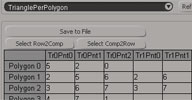 Structure Explorer osAll js workflow
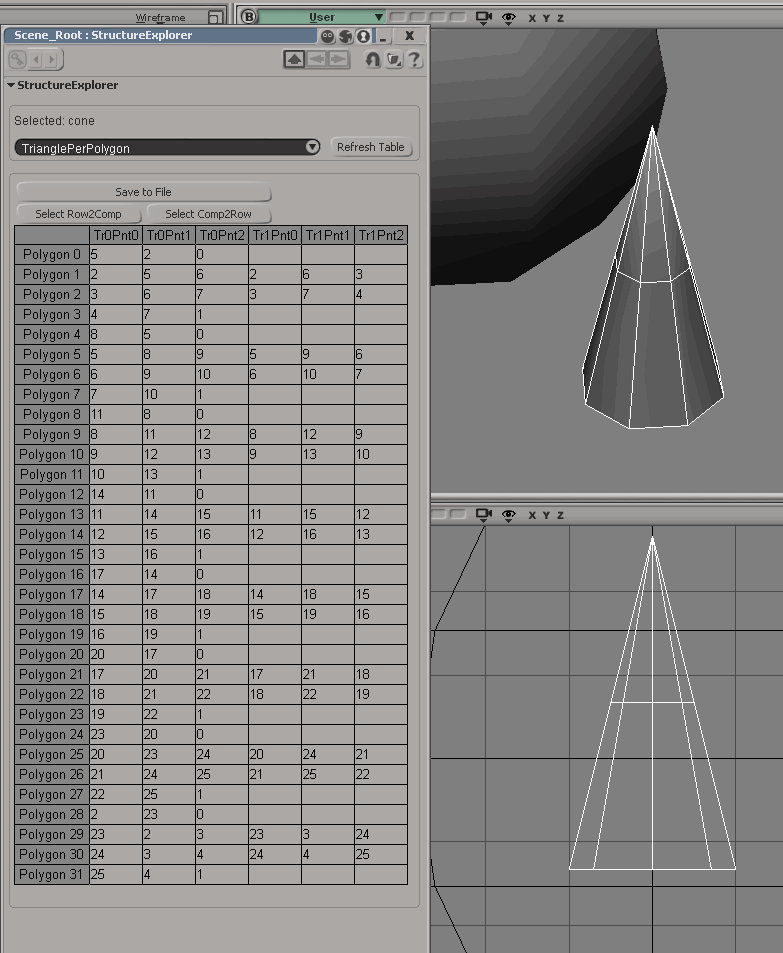
 updated Dec 14th 2014. Structure explorer opens a spreadsheet view (screenshot) of polygon mesh internal connectivity data. Lets you toggle between PolygonToPoints, PolygonToTriangles and Points (Positions) mode. Buttons for selection synchronization/file export. Installs a menu
entry in Model>Get>Property
local backup: Structure Explorer.xsiaddon
local backup: Structure Explorer.xsiaddon
author link: http://www.sshadows2005.narod.ru/.../structureexplorer.htm / author @ vimeo / author @ github
Select Similar Polygons osAll js modeling
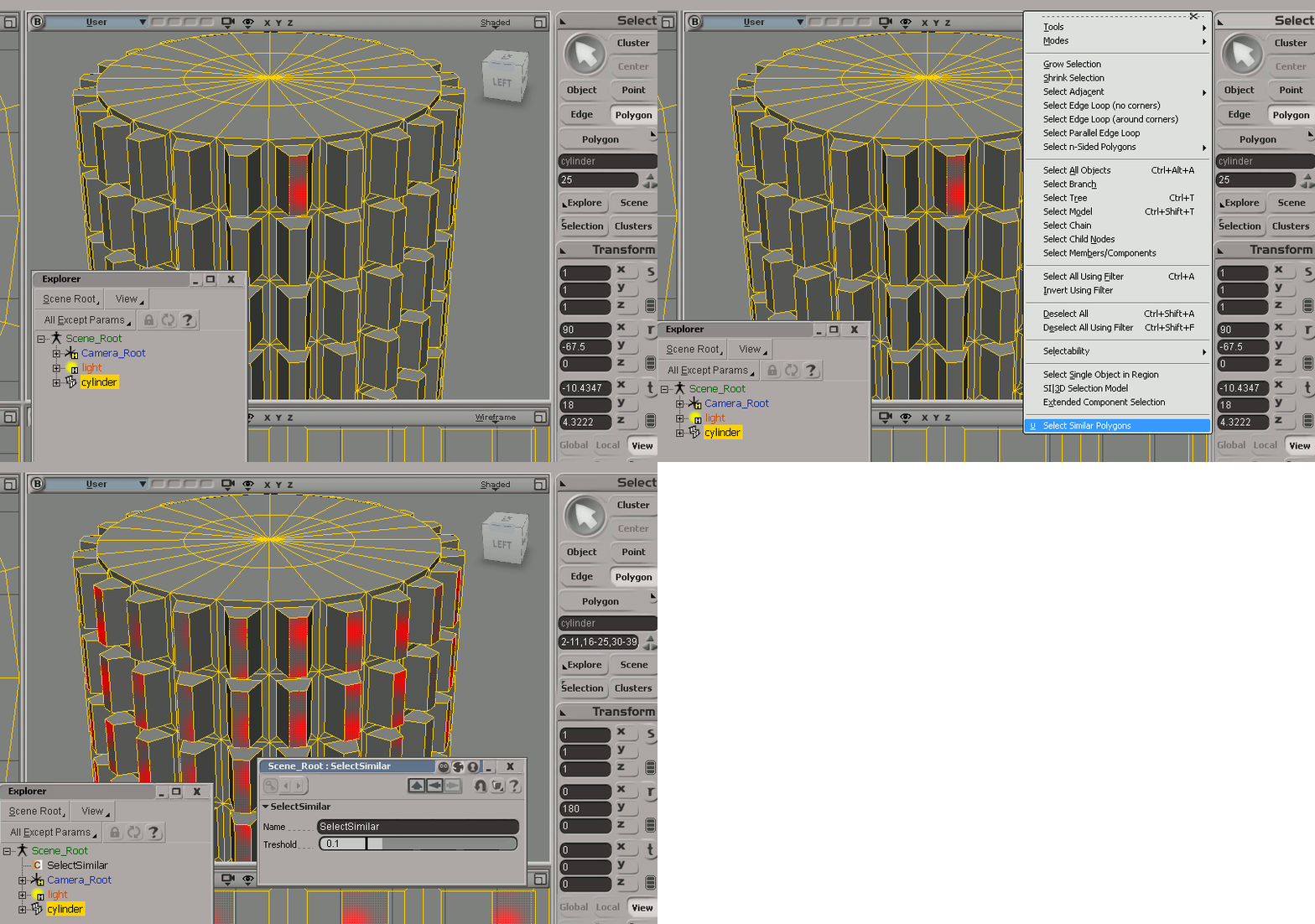
updated Dec 15th 2014. Selects polygons similar to the currently selected one (See screenshot animated gif)
local backup: ss_SelectSimilarPolys.xsiaddon
local backup: ss_SelectSimilarPolys.xsiaddon
author link: http://www.sshadows2005.narod.ru/.../selectsimilar.htm / author @ vimeo / author @ github
Select Polygons by Angle osAll js modeling src
updated Jan 2nd 2015. This selects polygons based on an input angle. As a C# plugin this needs to be compiled
for each version/service pack — Currently it will work only for 2015 and 2015
SP1.
local backup: ss_PolyByAngleCS_2015.dll ss_PolyByAngleCS_2015.dll (select file matching your version and place in [USER/WORKGROUP PATH]/Application/Plugins
local backup: ss_PolyByAngleCS_2015.dll ss_PolyByAngleCS_2015.dll (select file matching your version and place in [USER/WORKGROUP PATH]/Application/Plugins
author link: http://www.sshadows2005.narod.ru/.../selectbyangle.htm / author @ vimeo / author @ github
 AppLink for 3DCoat osAll interop
 updated June 28th 2014. Interop plugin for the volumetric detail modeler 3DCoat 3 and 4. See Softimage to 3DCoat and back, and some videos for older versions: Softimage To 3DCoat Applink. HowTo Install. Also a How-To video and a general demo video of the old version are available.
local backup: AppLink_3DCoat.zip
local backup: AppLink_3DCoat.zip
author link: http://www.sshadows2005.narod.ru/.../3dcoat.htm / author @ vimeo / author @ github / si-community thread
 Primitives osAll
 Adds a number of popular primitives to the »Get>Primitive>Polygon Mesh«
menu: Utah Teapot Blender's Suzanne Monkey Basket Ball Golf Ball Rugby Ball Soccer Ball Table Tennis Ball Volley Ball
local backup: ss_Primitives_x64.xsiaddon (64 bit version) SPrimitiveS.xsiaddon (32 bit version)
local backup: ss_Primitives_x64.xsiaddon (64 bit version) SPrimitiveS.xsiaddon (32 bit version)
Float on Surface osAll ICE particle
Japanese Softimage artist msk shares this compound which lets objects float on a water surface, following the wave
movements. Demo video (archive).
local backup: msk Float On Surface.xsicompound
local backup: msk Float On Surface.xsicompound
Voronoi Shatter osAll ICE particle shatter
A plugin from 2010; from a first test, it appears to be compatible with Softimage
2015. Creates a toolbar with buttons to shatter a polygon mesh object randomly or
using a point cloud for placing the fragment centers. To install, follow the instructions
in the demo video (archive): 1. Install ika's "voronoi.dll" to softimage — 2. Copy "Add Bouding Box Point.1.1"
to Compounds folder of softimage — 3. Install "Voronoi_Shatter_Suite.xsiaddon"
— Execute voronoi shatter from "View/Toolbars/Voronoi Shatter Suite"
local backup: msk_voronoi_shatter.zip
local backup: msk_voronoi_shatter.zip
 Advanced Softlight winAll shader shadercompound mentalray
 This light shader adds a number of options that can be very useful for mental ray
lighting optimization:
A performance option to disable shadow softness for the finalgather prepass Gamma corrected light color for a correct preview of the light's color when using linear workflow Secondary falloff settings for more control over the falloff shape The »Soft Screen« feature that basically allows you to texture the light's sampling quality using a texture in screen space.
A comment from the author on »Soft Screen«: Since i discovered this feature about one and a half year ago i use it all the time. It is great! You just take a preview of your render in photoshop and paint with a white brush on a black background over the parts that you want sampled more intensively. For instance you can leave the background, and other areas in which soft shadows might not be noticed, black. it can save huge amounts of render time. Especially the feature to control the amount of lightsamples with a texture seems very interesting to me, so if anybody is interested he or she can download the compound. I just put it together and have not tested it to a great extent, so there might still be some issues/ bugs hidden somewhere.
Of course being a compound this plugin can be edited and customized at will. Usage screenshot. See the si-community thread for more details on this shader compound.
local backup: Advanced Softlight v1.00.xsirtcompound
A performance option to disable shadow softness for the finalgather prepass Gamma corrected light color for a correct preview of the light's color when using linear workflow Secondary falloff settings for more control over the falloff shape The »Soft Screen« feature that basically allows you to texture the light's sampling quality using a texture in screen space.
A comment from the author on »Soft Screen«: Since i discovered this feature about one and a half year ago i use it all the time. It is great! You just take a preview of your render in photoshop and paint with a white brush on a black background over the parts that you want sampled more intensively. For instance you can leave the background, and other areas in which soft shadows might not be noticed, black. it can save huge amounts of render time. Especially the feature to control the amount of lightsamples with a texture seems very interesting to me, so if anybody is interested he or she can download the compound. I just put it together and have not tested it to a great extent, so there might still be some issues/ bugs hidden somewhere.
Of course being a compound this plugin can be edited and customized at will. Usage screenshot. See the si-community thread for more details on this shader compound.
local backup: Advanced Softlight v1.00.xsirtcompound
author site: n/a / si-community thread
Architectural Material Specular Highlight fix winAll shader shadercompound mentalray
This shader compound modifies the mental ray archmat's specular highlights so they
approximate real-world light reflections much more closely than the factory behavior
does. The shader does not work with finalgathering. See the si-community thread for
more details on this shader compound.
local backup: ArchMatSpec2015.xsirtcompound
local backup: ArchMatSpec2015.xsirtcompound
author site: n/a / si-community thread
 Conquering The Code ebook
 Jared wrote and shares this ebook about python scripting in Softimage.
From the introduction: Hi there! This Guide will cover Basic to Advanced Scripting, Programming, Plugin Development, Class Creation and much more. Including lots of handy titbits and explanations, like how to successfully use the Softimage help files. The goal being to equip you with the knowledge and tools you need to create awesome scripts, plugins and even external tools that speed up your workflow and make you a super programming genius!!! Which all results in your life being made a whole lot easier and giving you more time to spend on the artistic side of things, or you could even move over completely and work as a super programming genius. Either way this book puts the power in your hands Hope you enjoy!
Also visit Jared's site for the 'source' material for this ebook which concludes with writing the plugins MultiModelImporter and CopyAnimation.
local backup: ConqueringTheCodeInSoftimage.pdf
From the introduction: Hi there! This Guide will cover Basic to Advanced Scripting, Programming, Plugin Development, Class Creation and much more. Including lots of handy titbits and explanations, like how to successfully use the Softimage help files. The goal being to equip you with the knowledge and tools you need to create awesome scripts, plugins and even external tools that speed up your workflow and make you a super programming genius!!! Which all results in your life being made a whole lot easier and giving you more time to spend on the artistic side of things, or you could even move over completely and work as a super programming genius. Either way this book puts the power in your hands Hope you enjoy!
Also visit Jared's site for the 'source' material for this ebook which concludes with writing the plugins MultiModelImporter and CopyAnimation.
local backup:
ConqueringTheCodeInSoftimage.pdf
author blog: https://codingforxsi.wordpress.com
Exocortex | Crate osAll workflow interop
As of December 2014 (see blog entry) the Softimage, Maya, Max, Arnold and Python versions of Crate have been open sourced
and made available as free downloads.
The Exocortex Crate product suite is a set of professional grade, consistent and commercially supported Alembic plugins and tools that enable VFX studios and independent VFX professionals to standardize their tool chains around the Alembic file format as the core data interchange and automation format. At a high level, the biggest benefit of the Exocortex Crate suite is that it enables your artists to use their preferred content creation tools while providing a professional, consistent, fast and reliable data interchange method to the other tools in your pipeline
[..] We support the following scene elements for Alembic import/export: Animated meshes Dynamic topology meshes Per-frame Alembic files Particle systems (including PFlow, Thinking Particles, ICE) Round trips of Softimage Models and Maya namespaces Instanced particle systems (Softimage ICE, Thinking Particles, PFlow and Maya) Animated transforms/nulls/dummy objects Scene hierarchies (we can optionally flatten hierarchies) Point caches + transform caches Material metadata ICE strands, ICE particles, custom ICE attributes Multiple indexed UV sets Explicit indexed normals Subdivision meshes (imported as PolyMesh with MeshSmooth in 3DS Max) NURBS curves, ICE strands, Softimage hair, Maya curves, and 3DS Max splines Imported data is compatible with V-Ray, Arnold, Mental Ray, FumeFx, GrowFX, and many other plugins We also offer first class priority support [..]
(Cont'd on product page)
The Exocortex Crate product suite is a set of professional grade, consistent and commercially supported Alembic plugins and tools that enable VFX studios and independent VFX professionals to standardize their tool chains around the Alembic file format as the core data interchange and automation format. At a high level, the biggest benefit of the Exocortex Crate suite is that it enables your artists to use their preferred content creation tools while providing a professional, consistent, fast and reliable data interchange method to the other tools in your pipeline
[..] We support the following scene elements for Alembic import/export: Animated meshes Dynamic topology meshes Per-frame Alembic files Particle systems (including PFlow, Thinking Particles, ICE) Round trips of Softimage Models and Maya namespaces Instanced particle systems (Softimage ICE, Thinking Particles, PFlow and Maya) Animated transforms/nulls/dummy objects Scene hierarchies (we can optionally flatten hierarchies) Point caches + transform caches Material metadata ICE strands, ICE particles, custom ICE attributes Multiple indexed UV sets Explicit indexed normals Subdivision meshes (imported as PolyMesh with MeshSmooth in 3DS Max) NURBS curves, ICE strands, Softimage hair, Maya curves, and 3DS Max splines Imported data is compatible with V-Ray, Arnold, Mental Ray, FumeFx, GrowFX, and many other plugins We also offer first class priority support [..]
(Cont'd on product page)
author (company) site: http://www.exocortex.com / product page: /products/crate/description
Find Integer in Name new osAll ICE
A useful compound that converts any number from the object's name to an integer,
making it accessible in ICE. Connect the compound to an execute port of the modeling
stack, then access the number using the »intValue« attribute. Can be used
to automatically rearrange objects in a queue by just changing their name etc. Compound screenshot.
local backup: Find Integer In Name.xsicompound
local backup: Find Integer In Name.xsicompound
author site: n/a / si-community thread
Most Common Array Element new osAll ICE
Returns the most common element from an array. Works in object and per component context.
Can be modified to find the second most common element and so on. Compound screenshot.
local backup: Get Popular Number.xsicompound
local backup: Get Popular Number.xsicompound
 V-Ray 3.0 for Softimage renderer winAll vray commercial
 Chaosgroup recently released the Softimage plugin for VRay 3.0.
Built on V-Ray's core platform of rendering speed, stability, and quality, V-Ray® for Autodesk® Softimage® is an advanced rendering solution for the VFX and animation industries. VRay for Softimage includes ICE support, efficient Global Illumination, versatile shaders, and much more.
What's New in V-Ray 3.0 for Softimage? New progressive production renderer for interactive and production rendering New VRaySkinMtl with layered reflections and artist friendly controls Render Mask to specify render regions using an object selection or image mask Deep Image support including OpenEXR 2.0 output emFluid 5 is integrated with V-Ray for SI. For a full list of improvements, see V-Ray-3.0-for-Softimage.pdf (archive)
Price per license is 750€ / $1040 / 650£ or 74€ / $103 / 64£ for an educational license. It is a free upgrade for all current V-Ray for Softimage users.
 Link to the vray online documentation (archive). For a previous version, the thread V-Ray for Softimage: Tutorials and Walkthrough was created on si-community.com as a means to gather community knowledge, starting
with an indoor lighting video tutorial created by Oliver Weingarten.
Link to the vray online documentation (archive). For a previous version, the thread V-Ray for Softimage: Tutorials and Walkthrough was created on si-community.com as a means to gather community knowledge, starting
with an indoor lighting video tutorial created by Oliver Weingarten.
Built on V-Ray's core platform of rendering speed, stability, and quality, V-Ray® for Autodesk® Softimage® is an advanced rendering solution for the VFX and animation industries. VRay for Softimage includes ICE support, efficient Global Illumination, versatile shaders, and much more.
What's New in V-Ray 3.0 for Softimage? New progressive production renderer for interactive and production rendering New VRaySkinMtl with layered reflections and artist friendly controls Render Mask to specify render regions using an object selection or image mask Deep Image support including OpenEXR 2.0 output emFluid 5 is integrated with V-Ray for SI. For a full list of improvements, see
V-Ray-3.0-for-Softimage.pdf (archive)
Price per license is 750€ / $1040 / 650£ or 74€ / $103 / 64£ for an educational license. It is a free upgrade for all current V-Ray for Softimage users.
Link to the vray online documentation (archive). For a previous version, the thread V-Ray for Softimage: Tutorials and Walkthrough was created on si-community.com as a means to gather community knowledge, starting
with an indoor lighting video tutorial created by Oliver Weingarten.
product page: http://www.chaosgroup.com/en/2/vray_softimage.html?our=0215 (archive) / si-community thread (V1.5) / si-community thread (V3.0)
 Maxwell Render Plugin osAll renderer commercial
 Updated October 2014. The Softimage integration of Next Limit's Maxwell Render Engine. Supports features such as Multilight, ICE strands and particle instancing, FIRE
script commands, MXS references, previewing embedded materials.
The previous updates added support for Softimage 2015, the render region, MXM script functions and had a number of bugfixes (See the release notes (archive) for the Softimage plug-in).
The previous updates added support for Softimage 2015, the render region, MXM script functions and had a number of bugfixes (See the release notes (archive) for the Softimage plug-in).
product page: http://www.maxwellrender.com/ / si-community thread
 VorleX Muscle System 2.01 PRO osAll ICE rigging
 VorleX is a toolset for setting up a full body muscle rig. With VorleX 3.0 still in
development, VorleX 2.01 has been made available for free. Have a look at the VorleX Muscle System Short Reel
for a preview of the upcoming version 3.0 — for videos demonstrating Version
2.01, see the VorleX group on vimeo.
From the si-community thread linked below: The system is far superior to other similar products. The features and functions: Simple construction Classic control by means of 3 nulls Easy setup Incredible performance Realistic optimized dynamics The ability of symmetric duplication Unique skinning algorithm Skin sliding effect
local backup: VorleXMuscleSystem2PRO.xsiaddon VorleXMuscleSystem2PRO.zip (supplementary files - docs and samples)
From the si-community thread linked below: The system is far superior to other similar products. The features and functions: Simple construction Classic control by means of 3 nulls Easy setup Incredible performance Realistic optimized dynamics The ability of symmetric duplication Unique skinning algorithm Skin sliding effect
local backup: VorleXMuscleSystem2PRO.xsiaddon VorleXMuscleSystem2PRO.zip (supplementary files - docs and samples)
author link: http://vimeo.com/groups/vorlex / si-community thread
CSV Export osAll ICE workflow interop
From the si-community thread: this is a exporter to create CSV (Comma Separated Values) files from ice simulations.
local backup: CSV_Export_Plugin.zip (zipped python file)
local backup: CSV_Export_Plugin.zip (zipped python file)
author link: n/a / si-community thread
SPDL Syntax Highlighter osAll cppsrc shader rendering workflow
A set of SPDL (Softimage Plugin Definition Language) Syntax highlight definitions
for Notepad++, TextWrangler and BBEdit. The SPDL format has been replaced by dynamic
API callbacks during the last few years, but SPDL editing isn't deprecated and is
still needed when updating older projects.
local backup: Softimage-SPDL-Syntax-Highlighter-master.zip (repository snapshot from Nov 11th 2014)
local backup: Softimage-SPDL-Syntax-Highlighter-master.zip (repository snapshot from Nov 11th 2014)
author site: http://www.andrewhazelden.com / download: blog/downloads / project @github / si-community thread
 Flubber osAll js ICE deformer secondary motion
 A nice wobbly effect for meshes — demo video . From the si-community thread:
I'm experimenting with elastic and fluid like deformation (simulated). It's not yet well documented, but I think it's easy to understand the nodes. Feel free to make better versions and share here!
Usage: put flubber_initialise in the modeling stack, put flubber_simulation in a simulation stack of a mesh object, add deforming mesh to flubber_simulation. Cheers, Wim
local backup: flubber_initialise.xsicompound flubber_simulation.xsicompound
I'm experimenting with elastic and fluid like deformation (simulated). It's not yet well documented, but I think it's easy to understand the nodes. Feel free to make better versions and share here!
Usage: put flubber_initialise in the modeling stack, put flubber_simulation in a simulation stack of a mesh object, add deforming mesh to flubber_simulation. Cheers, Wim
local backup: flubber_initialise.xsicompound flubber_simulation.xsicompound
m|Symm2 2.0 osAll js modeling symmetry
Updated September 2014 with support for multiple objects. mSymm2 provides a number
of features for modeling with Symmetry: Symmetrize Polygon, Weights and UV with one click Realign points symmetry Select Mirror Components UV Mirroring Subtracts polygons and clusters and merges them back without losing properties.
Download page includes detailed usage instructions (Note: Top of that page is japanese/bottom is english). Introduction available on vimeo - Video of an earlier beta version.
local backup: mSymm.xsiaddon
Download page includes detailed usage instructions (Note: Top of that page is japanese/bottom is english). Introduction available on vimeo - Video of an earlier beta version.
local backup: mSymm.xsiaddon
 m|Cleaner 1.41 osAll workflow js
 Updated July 2014. mCleaner is a »dashboard« full of functions for quickly
cleaning various sections of the current scene like unneeded clusters/properties/groups/material
libs/UVs/clips/layers etc. Each of mCleaner's functions may also be executed in »check
only« mode which only logs the objects that would be deleted. See this screenshot for a feature overview of an older version of mCleaner.
The 1.41 update adds the following (from the si-community thread): Undo, you can undo ! yay! Added Delete ICE trees, Partitions, and some other garbage Move unused textures to your backup folder option added (Only works with textures inside the picture folder) Everything has been reorganized in separated commands so you can customize your own tool some other minor changes, gui adjustments, etc. to make my life easier, and hopefully yours too.
The download page includes updated usage instructions (archive). Visit Martin's new company website http://www.skymill.co.jp (Japanese)
local backup: mCleaner.xsiaddon
The 1.41 update adds the following (from the si-community thread): Undo, you can undo ! yay! Added Delete ICE trees, Partitions, and some other garbage Move unused textures to your backup folder option added (Only works with textures inside the picture folder) Everything has been reorganized in separated commands so you can customize your own tool some other minor changes, gui adjustments, etc. to make my life easier, and hopefully yours too.
The download page includes updated usage instructions (archive). Visit Martin's new company website http://www.skymill.co.jp (Japanese)
local backup: mCleaner.xsiaddon
RealLens v2.2 osAll python workflow
Updated July 2014. Converts real-world cameras and lenses to the Softimage camera
angle and back. From this mailing list post: I finally updated my old plugin RealLens, 9 years later (!). It now creates a camera
rig, applies the plugin on the camera and stays live on the camera. Usage: Get -> Primitive -> Camera -> RealLens2. We've been using it in production here at Oblique since February. It seems to work
fine. If you find any bugs or have any comments, feel free to ping me.
local backup: RealLens2.2.xsiaddon
local backup: RealLens2.2.xsiaddon
author link: http://francoislord.com/XSITools/index.html (archive) / mailing list entry @mail-archive.com / si-community thread
Smooth Weightmap osAll ICE rigging
The »Smooth« compound will apply an advanced smooth effect on weightmaps,
protecting fully white and black areas and allowing control over black/white bleed.
Video instructions for Pedro's new compounds »Merge Envelope Weights«, »Filter Envelope Weights« and »Smooth Weightmap«. Also have a look at Pedro's other plugins by clicking on his name above.
local backup: pb_SmoothWeight.xsicompound
Video instructions for Pedro's new compounds »Merge Envelope Weights«, »Filter Envelope Weights« and »Smooth Weightmap«. Also have a look at Pedro's other plugins by clicking on his name above.
local backup: pb_SmoothWeight.xsicompound
author site: http://probiner.xyz / author site: http://probiner.xyz / author @ vimeo / si-community thread
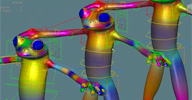 Merge Envelope Weights osAll ICE rigging
 This ICE compound lets you blend envelope weights of two source meshes into a target
mesh using a weightmap on the target.
Video instructions for Pedro's new compounds »Merge Envelope Weights«, »Filter Envelope Weights« and »Smooth Weightmap«. Also have a look at Pedro's other plugins by clicking on his name above.
local backup: pb_MergeEnvelopeWeights.xsicompound
Video instructions for Pedro's new compounds »Merge Envelope Weights«, »Filter Envelope Weights« and »Smooth Weightmap«. Also have a look at Pedro's other plugins by clicking on his name above.
local backup: pb_MergeEnvelopeWeights.xsicompound
author site: http://probiner.xyz / author site: http://probiner.xyz / author @ vimeo / si-community thread
Filter Envelope Weights osAll ICE rigging
This compound sets small weight residuals to zero in order to simplify tabular editing
in the weight editor. Includes tuning options like falloff for 'close candidates'
and a choice of the modulation method.
Video instructions for Pedro's new compounds »Merge Envelope Weights«, »Filter Envelope Weights« and »Smooth Weightmap«. Also have a look at Pedro's other plugins by clicking on his name above.
local backup: pb_FilterEnvelopeWeights.xsicompound
Video instructions for Pedro's new compounds »Merge Envelope Weights«, »Filter Envelope Weights« and »Smooth Weightmap«. Also have a look at Pedro's other plugins by clicking on his name above.
local backup: pb_FilterEnvelopeWeights.xsicompound
author site: http://probiner.xyz / author site: http://probiner.xyz / author @ vimeo / si-community thread
 Softimage Alembic Plugin win64 importexport workflow cppsrc
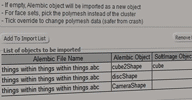
 Autodesk's OpenSource Softimage Alembic Plugin is ahead of the version shipped with
the last release. The added feature of the current release is the ability to import
and map individual Alembic objects selectively instead of loading the whole file (see
this screenshot). Hans Adrian has made the binaries available on SourceForge. For installation, this
should probably overwrite the shipped build under C:Program FilesAutodeskSoftimage
2015Application (in PluginsAbcImportExport.dll, binAbcFramework.dll and the two
files in dict) in order to avoid versioning conflicts.
local backup: Softimage Alembic Plugin.zip src.zip (Source snapshot for Alembic plugins of all apps)
local backup: Softimage Alembic Plugin.zip src.zip (Source snapshot for Alembic plugins of all apps)
author site: n/a / repository @sourceforge / si-community thread
 CrowdFX - Override Bones Animation osAll ICE crowd
 Another goodie presented by Autodesk Intern Hans Adrian on the Softimage mailing list:
Hey all, here is another CrowdFX Compound. This one is used to override bones animation.
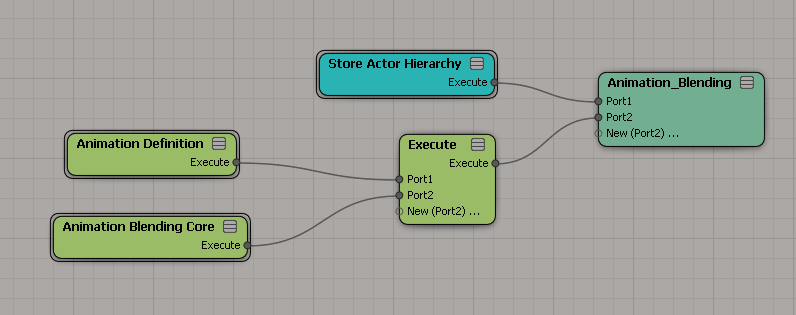
Demo - blending upper body with aim animation. [..] How to use: Execute 'Store Actor Hierarchy' compound - see attached 'Store Actor Hierarchy.PNG' In 'Animation Definition', connect 'Override Animation' to the animation state's
pose modifier which you would like to override - see attached 'Animation Definition.PNG' Parent Bone is the bone which animation and descendants' animation (children, grandchildren
etc.) will be overridden. You can find all bones that you could use from Crowd > Actors_Proxies
> [Model]_mesh > Deformers_Proxy > [Bone Name] see attached 'Get Bone.PNG' For animation index, you can debug 'self.__CrowdFX_CycleNames' or go to 'Get_Animations_Sources'
ICE tree of the crowd and get the index of the animation that you want (index is 0
based) 'On Condition' is the condition in which animation is overridden; if you would like
the animation to override at all time, put it as true. Otherwise, you can use conditions.
For frame mode, you have the options to manually specify which frame of animation
you would like to use or you can put it on loop. 'Frame to Use' is the frame number
used if you choose to specify the animation frame. Transition duration is the duration in which the overriding is being blended.
Also see the included Readme - Animation Blending system for CrowdFX.pdf
local backup: Store Actor Hierarchy.xsicompound Override Animation.xsicompound.xsicompound SoftImage ICE CrowdFX - Override Animation.scn (demo scene)
An extension was provided a week later, enabling the actors to trigger a secondary animation, in this case shooting bullets ( video demo / Readme - Shoot Bullet System for CrowdFX.pdf )
local backup: Shoot Bullets.xsicompound Is In Blending Mode.xsicompound Is At State.xsicompound SoftImage ICE CrowdFX - Shoot Bullets.scn (demo scene)
Also see the included
Readme - Animation Blending system for CrowdFX.pdf
local backup: Store Actor Hierarchy.xsicompound Override Animation.xsicompound.xsicompound SoftImage ICE CrowdFX - Override Animation.scn (demo scene)
An extension was provided a week later, enabling the actors to trigger a secondary animation, in this case shooting bullets ( video demo /
Readme - Shoot Bullet System for CrowdFX.pdf )
local backup: Shoot Bullets.xsicompound Is In Blending Mode.xsicompound Is At State.xsicompound SoftImage ICE CrowdFX - Shoot Bullets.scn (demo scene)
author site: n/a / source: mailing list @google groups/ original download link @google docs / si-community thread
 Softimage Surface Pro ArtDock win64 workflow
 From the si-community thread: Our favorite 3d application doesn't lend itself perfectly to running on a tablet and
being controlled solely by pen and touch. For one thing, Softimage only runs in small
fonts mode, so menus and touch targets can be tiny. But that didn't stop me from trying
— Today I published a very beta ArtDock that I've tested successfully with Softimage
2015 on the Surface Pro 1 and 2. I probably went overboard with the keyboard shortcuts,
but I think it's pretty cool to run XSI with only my fingertip and pen. Also, the
latest version of the Mudbox dock is very "handy." :)) — If any of you have
Surface Pros, I welcome your feedback.
Requires AutoHotkey. For more details and feedback, see Rick's entry on the Surface Pro Artist (archive) site
local backup: ArtDock.zip
Requires AutoHotkey. For more details and feedback, see Rick's entry on the Surface Pro Artist (archive) site
local backup: ArtDock.zip
author link: n/a / si-community thread




 Generate Orbital Points osAll ICE particle
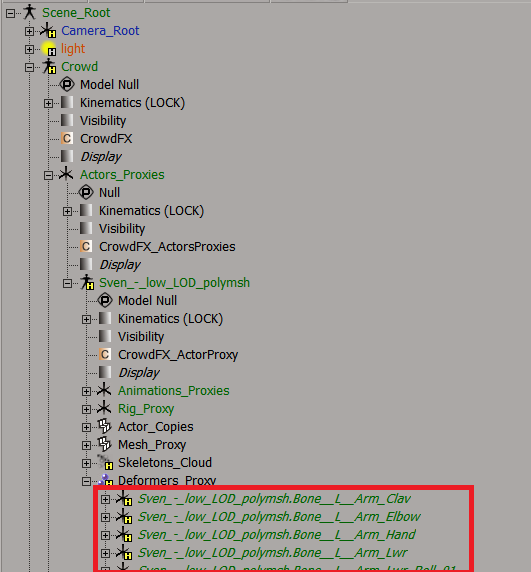
 Japanese Softimage artist msk shares this compound which emits points on a (not stable) orbit.
local backup: msk Generate Orbital Points.xsicompound
local backup: msk Generate Orbital Points.xsicompound
author on twitter
Plutonia win64 ICE scene fluids
Oleg appears to be working on a new fluid simulation plugin for Softimage and shares
a workgroup/scene. The current status/production-readiness of this is unknown, so
until further notice one should assume that some restrictions will apply. Spotted
by si-community.com admin Hirazi Blue in Stephen Blair's famous »Screenshots of the Week« — in turn spotted on the softimage.ru forums.
local backup: plutonia_attachments_from_softimage_ru_post.zip
local backup: plutonia_attachments_from_softimage_ru_post.zip
Oblique Shaders os64 shader arnold compilation
A collection of Arnold shaders created by Marc-Antoine Desjardins at Oblique FX. The July 2014 update adds support for Arnold-4.2.0.6, makes the »Obq_Hair shader« (archive) public and adds »Obq_Color«, an accelerated untexturable color which should be used in place of »Color_Savestate«
and similar nodes.
The collection contains these shaders: Obq_AngularCamera - A camera shader that allows you to create angular maps of 3D scenes Obq_Atmosphere - a shader made for planetary atmosphere, but can also be used as a simple ray marcher Obq_Bend4Stereo - a passthrough node that changes the ray direction for camera rays. Used with stereo cameras, this allows the shading of the two cameras to be calculated from a single one Obq_ChangeRange - an upgraded version of the Scalar Change Range. It lets you remap a scalar parameter expressed in an old min/max range to a new min/max range and adds a clamp, a bias and a gain Obq_Environment - an upgraded version of sta_environment. You can also plug it in the environment port of a material to use with Phong, Reflection shaders and more Obq_Etching Obq_Fresnel - a texture node that outputs the proportion of light reflected/refracted from a surface based on the refractive indices and the extinction coefficients Obq_Hair - a dual scattering hair shader implementation of Sadeghi et al. "An artist friendly hair shading system" using Ou et al. ISHair: Importance Sampling for Hair Scattering (archive) (also see alShaders below) Obq_IESLightFilter Obq_MeasuredMaterial Obq_Opacity Obq_RandomColor Obq_RGBComEmit Obq_RGBComLightFilter Obq_Root2Tip Obq_Shadow Obq_Simbiont - a Darktree 2.5 loader node in Softimage that reads .dsts files for the Arnold Renderer Obq_StereoLens - renders a pair of stereo frames from the center camera of a stereo rig into a single frame Obq_SurfaceEnvironment - an upgraded version of sta_environment that you can use directly without using an environment port. This is usually mixed in the beauty or used with the AOV passthrough Obq_Thickness - measures the thickness of a pixel/surface in a chosen direction. It is not affected by opacity cutouts Obq_TransformUV Obq_UVRemapLensDistortion Obq_VolumeThickness - a particle density shader ideal for rendering smoke or other volumes
The collection contains these shaders: Obq_AngularCamera - A camera shader that allows you to create angular maps of 3D scenes Obq_Atmosphere - a shader made for planetary atmosphere, but can also be used as a simple ray marcher Obq_Bend4Stereo - a passthrough node that changes the ray direction for camera rays. Used with stereo cameras, this allows the shading of the two cameras to be calculated from a single one Obq_ChangeRange - an upgraded version of the Scalar Change Range. It lets you remap a scalar parameter expressed in an old min/max range to a new min/max range and adds a clamp, a bias and a gain Obq_Environment - an upgraded version of sta_environment. You can also plug it in the environment port of a material to use with Phong, Reflection shaders and more Obq_Etching Obq_Fresnel - a texture node that outputs the proportion of light reflected/refracted from a surface based on the refractive indices and the extinction coefficients Obq_Hair - a dual scattering hair shader implementation of Sadeghi et al. "An artist friendly hair shading system" using Ou et al. ISHair: Importance Sampling for Hair Scattering (archive) (also see alShaders below) Obq_IESLightFilter Obq_MeasuredMaterial Obq_Opacity Obq_RandomColor Obq_RGBComEmit Obq_RGBComLightFilter Obq_Root2Tip Obq_Shadow Obq_Simbiont - a Darktree 2.5 loader node in Softimage that reads .dsts files for the Arnold Renderer Obq_StereoLens - renders a pair of stereo frames from the center camera of a stereo rig into a single frame Obq_SurfaceEnvironment - an upgraded version of sta_environment that you can use directly without using an environment port. This is usually mixed in the beauty or used with the AOV passthrough Obq_Thickness - measures the thickness of a pixel/surface in a chosen direction. It is not affected by opacity cutouts Obq_TransformUV Obq_UVRemapLensDistortion Obq_VolumeThickness - a particle density shader ideal for rendering smoke or other volumes
 Shockwave deformer osAll ICE tutorial
 Follow Ola's walkthrough-style online tutorial »Build your own Shockwave deformer
using ICE« (no files)
The shockwave will be constructed by two sets of waves - a somewhat smaller, condensed part followed by the larger more intense pulse. Even though a shockwave is an ideal candidate for simulation, it has a slight drawback - namely that it is simulated. Whenever you want to change a value or reposition the shockwave, you have to rewind and run the simulation again. An alternative approach is to do a bit of high school math. Don't worry; it's not as frightening as it sounds. The waveform is essentially nothing more than a sine wave; altered over time and its distance from the origin. [..]
Video demo. Visit Ola's blog caffeineabuse for a lot of technical insight and tutorials like this one, most of them including ready-to-use project files.
The shockwave will be constructed by two sets of waves - a somewhat smaller, condensed part followed by the larger more intense pulse. Even though a shockwave is an ideal candidate for simulation, it has a slight drawback - namely that it is simulated. Whenever you want to change a value or reposition the shockwave, you have to rewind and run the simulation again. An alternative approach is to do a bit of high school math. Don't worry; it's not as frightening as it sounds. The waveform is essentially nothing more than a sine wave; altered over time and its distance from the origin. [..]
Video demo. Visit Ola's blog caffeineabuse for a lot of technical insight and tutorials like this one, most of them including ready-to-use project files.
author blog: http://caffeineabuse.blogspot.de / tutorial: /2014/07/build-your-own-shockwave-deformer-using.html
UDIM Tools osAll texturing js
A 'runnable' js script which presents a property-page dashboard with buttons that
facilitate moving around UV islands on UDIM tiles. Also supports 'tile aware' half size/double size/flip functions. This approach is
a little easier than using the UV transform panel. Video demo.
Also useful in that context: Szabolcs Matefy's »Jester's toolkit« which contains fit and fill functions for maximizing UV ranges of selected islands.
If anybody knows about a UDIM rendertree setup script/compound and maybe a pack selected
islands function, please submit it using the form at the top of this page!
local backup: UDIM_run.zip
Also useful in that context: Szabolcs Matefy's »Jester's toolkit« which contains fit and fill functions for maximizing UV ranges of selected islands.
If anybody knows about a UDIM rendertree setup script/compound and maybe a pack selected
islands function, please submit it using the form at the top of this page!
local backup: UDIM_run.zip
 Kristinka Hair 3.2 osAll ICE particle strands scene hair
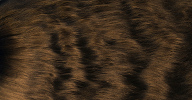
 The July 2014 update is another big one introducing new nodes like »Fit NURBS«,
»Curls advanced«, »Curvature Amplifier«, »Grouping in
Form« »Follow CurveList« »Stretch Hair« »Hair
Filler Rounded« — for a full description see the si-community thread and the updated documentation.
The Kristinka Hair toolset is a new and unique way to set up, style and simulate hair using ICE nodes. A set of fully customizable ICE nodes Scalable, from only a few basic compounds for building basic hair, to very complex structures. Hair styling that always considers the whole shape of the hair. Styling works well for short and for long hair. Unlimited hair length, unlimited number of hair segments. Automatic, procedural generation of details - always with full control. Locks, clumps, curls, turbulence, are created by ICE compounds Additional modifiers, like cutting hairs by external geometry, constant strand length for key frame animation, resampling and subdividing strands, morphing with another hair, modulating hair's distribution over emitter, so user can increase density on most visible areas Full support for the Softimage's built-in Strand Dynamics Framework simulation engine. Only factory ICE nodes were used, it should work nicely with any Softimage version from 7.01 on.
Other media available: Version 3.1's online 'first steps' tutorial. si-community user Bronco67 has created a video introduction for an earlier version available here. Also: A rendering tests thread, a TV ad by PsyOp featuring Kristinka Hair.
In case you want to apply kH3 nodes and dynamics on top of strands that were not generated by kH3 itself, here is a setup to enable that.
local backup: kristinka_hair_32_02july2014.rar
The Kristinka Hair toolset is a new and unique way to set up, style and simulate hair using ICE nodes. A set of fully customizable ICE nodes Scalable, from only a few basic compounds for building basic hair, to very complex structures. Hair styling that always considers the whole shape of the hair. Styling works well for short and for long hair. Unlimited hair length, unlimited number of hair segments. Automatic, procedural generation of details - always with full control. Locks, clumps, curls, turbulence, are created by ICE compounds Additional modifiers, like cutting hairs by external geometry, constant strand length for key frame animation, resampling and subdividing strands, morphing with another hair, modulating hair's distribution over emitter, so user can increase density on most visible areas Full support for the Softimage's built-in Strand Dynamics Framework simulation engine. Only factory ICE nodes were used, it should work nicely with any Softimage version from 7.01 on.
Other media available: Version 3.1's online 'first steps' tutorial. si-community user Bronco67 has created a video introduction for an earlier version available here. Also: A rendering tests thread, a TV ad by PsyOp featuring Kristinka Hair.
In case you want to apply kH3 nodes and dynamics on top of strands that were not generated by kH3 itself, here is a setup to enable that.
local backup: kristinka_hair_32_02july2014.rar
 Weird Spawn osAll ICE scene
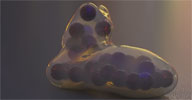
 Sam Howell, known for his cool and technically brilliant clips (Make sure to visit
his vimeo channel), shares the scene file from this clip: Another test transferring animation from Softimage to Thea Render, this time with
Lagoa particles. Some liberal use of FX Nut's save rendermesh plugin to get the particles
across as mesh data is a big help. This fact obviously limits the amount of particles
that it is practical to transfer. Still quite handy though until another solution
presents itself. [..]
Continue reading on the video page. Also have a look at Sam's demo reel.
local backup: Weird_Spawn.scn
Continue reading on the video page. Also have a look at Sam's demo reel.
local backup: Weird_Spawn.scn
author vimeo channel
 Momentum 4 + ImplosiaFX 4 osAll particle rigging ICE topo commercial shatter fabric
 Announced by Ben Houston, CEO of Exocortex here on the Softimage mailing list — We are pleased to announce the general availability of Momentum 4 + ImplosiaFX 4 as
a single package. One Softimage Alembic license + 2 readers are also included so
you can start using Alembic as well. I recommend only purchasing RLM licenses because
you need the farm licenses of Alembic. Here is the official list of improvements:
ImplosiaFX 4: Rewritten from the ground up as result has a huge improvements in GUI Added operator-based fracturing as well as the boolean operator Extended ICE nodes set to bring more flexible workflow Speed increased about 2x times while memory consumption is half of original Fixed memory leaks Fixed most of crashes, now it just throws an error message Fixed an awful execution time on some of extremely hi-poly meshes Added slicer feature to define arbitrary regions on geometry to be fractured Added painting fracture masks by WM or by using BW textures as well as user-defined scalar per-point attribute Added baking of ICE generated geometry into the regular mesh with regular clusters
Momentum 4: Alembic IO instead of the old plot system Ability to modify the simulation state of objects via null Improved speed of clusters creationdeletion Fixed multiple environment creation each time a scene has been opened Fixed particle rigid body initialization after frame 1 Simulation doesn't stop even with minimized XSI window MOM ICE nodes honor the Global Momentum properties mute state The "mute" param is now presented in the main MOM PPG Added simulation speed control in the main MOM PPG Added explicit maximum number of Rigidbodies in scene Fixed collision issues between GImpacts and softbodies Added an experimental collision shape mode - tetrahedron decomposition from each triangle - very stable since it is a native bullet shape. [..]
Continue reading by following the mailing list/si-community link below. Note that there is no mention of this package on the main Exocortex website, so as things stand Momentum 3 and ImplosiaFX will remain listed here on rray.de as separately available products.
Related plugins: Implosia FX, Emit SRT matched instances, StudioNEST Kratos, XSIShatter, Polygon Islands
Transformation using ICE, DafengIslandSeperation.
ImplosiaFX 4: Rewritten from the ground up as result has a huge improvements in GUI Added operator-based fracturing as well as the boolean operator Extended ICE nodes set to bring more flexible workflow Speed increased about 2x times while memory consumption is half of original Fixed memory leaks Fixed most of crashes, now it just throws an error message Fixed an awful execution time on some of extremely hi-poly meshes Added slicer feature to define arbitrary regions on geometry to be fractured Added painting fracture masks by WM or by using BW textures as well as user-defined scalar per-point attribute Added baking of ICE generated geometry into the regular mesh with regular clusters
Momentum 4: Alembic IO instead of the old plot system Ability to modify the simulation state of objects via null Improved speed of clusters creationdeletion Fixed multiple environment creation each time a scene has been opened Fixed particle rigid body initialization after frame 1 Simulation doesn't stop even with minimized XSI window MOM ICE nodes honor the Global Momentum properties mute state The "mute" param is now presented in the main MOM PPG Added simulation speed control in the main MOM PPG Added explicit maximum number of Rigidbodies in scene Fixed collision issues between GImpacts and softbodies Added an experimental collision shape mode - tetrahedron decomposition from each triangle - very stable since it is a native bullet shape. [..]
Continue reading by following the mailing list/si-community link below. Note that there is no mention of this package on the main Exocortex website, so as things stand Momentum 3 and ImplosiaFX will remain listed here on rray.de as separately available products.
Related plugins: Implosia FX, Emit SRT matched instances, StudioNEST Kratos, XSIShatter, Polygon Islands
Transformation using ICE, DafengIslandSeperation.
author (company) site: http://www.exocortex.com / product page: /products/momentum-4 (archive) / mailing list announcement @google groups / si-community thread
 Unfurl osAll ICE scene
 Disclaimer: This is from the resourcedump thread on si-community.com so »some restrictions may apply« (but usually don't)
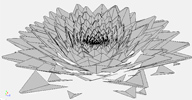
Video demo here. Rob shares a scene relating to an inquiry by si-community user Maximus: I've setup this and now i want every single particle (instance) to point outwards locally, not all together. I tried to modify the particle orientation but everything i do is done on all particles not on single also i cant find a way to have a proper orientation.I am having this problem quite often and would be nice to create a compound that works once for all. [..]
Continue reading in the si-community thread which seems to provide a few additional solutions to Maximus' question.
local backup: fibbonnaci_send.scn
Video demo here. Rob shares a scene relating to an inquiry by si-community user Maximus: I've setup this and now i want every single particle (instance) to point outwards locally, not all together. I tried to modify the particle orientation but everything i do is done on all particles not on single also i cant find a way to have a proper orientation.I am having this problem quite often and would be nice to create a compound that works once for all. [..]
Continue reading in the si-community thread which seems to provide a few additional solutions to Maximus' question.
local backup: fibbonnaci_send.scn
author site: https://sites.google.com/site/tekanoice / si-community thread
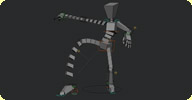 ccRig 1.1 osAll rigging
 Going through his website logs, Christopher recently found consistent entries requesting a deleted page for his 2008 ccRig (archive). This led him to put the rig back online — due to its prototype status, for educational
purposes only. This rig was originally a prototype developed as an answer to specific production
needs. The arms and legs had to be stretchable, bendable and reliable. The rigging
structure is organized as a list of models, each model defining a type of member (arm,
leg, ...), so it could be easily generated by script.
It's marked as beta since this release aims to share with other technical artists the idea behind the bendable rigging structure. However the rig is fully functionable and can be used by animators, but at the moment there is no interface (other than the controls box), no utility scripts and no facial.
local backup: ccRig.zip
It's marked as beta since this release aims to share with other technical artists the idea behind the bendable rigging structure. However the rig is fully functionable and can be used by animators, but at the moment there is no interface (other than the controls box), no utility scripts and no facial.
local backup: ccRig.zip
author site: http://www.christophercrouzet.com / download: /resources_ccRig.php (archive) / si-community thread
Sort Controller osAll vbs rendering
Andy Jones and Jonah Friedman from Psyop London (vimeo channel) release this very helpful partitioning plugin: I'm pleased to announce the release of one of my favorite tools we have at
Psyop- the Sort Controller! The premise is simple: using a simple 'partition = group'
markup language, you write rules for procedurally sorting your passes. Groups are
used as something like metadata tagging, and the sort controller sorts your partitions
with it. By adding a layer of proceduralism to passes and partitions, the Sort Controller
puts Softimage passes another five years ahead of... well.. never mind! A simple example
to show how this works — Sort Code:
Background_Objects_Partitions = *
characters = sg_characters
set = sg_set
Result: The first line puts everything into background objects to start clean. All objects in group(s) named "sg_characters" are sorted into the "characters" partition. All objects in group(s) named "sg_set" are sorted into the "set" partition.
So if geometry is added to your characters, or more characters were added, or you're using the same passes in a different shot with different characters, your passes can be kept up to date. [..] Follow the mailing list link to continue reading.
local backup: SortController.py
Background_Objects_Partitions = *
characters = sg_characters
set = sg_set
Result: The first line puts everything into background objects to start clean. All objects in group(s) named "sg_characters" are sorted into the "characters" partition. All objects in group(s) named "sg_set" are sorted into the "set" partition.
So if geometry is added to your characters, or more characters were added, or you're using the same passes in a different shot with different characters, your passes can be kept up to date. [..] Follow the mailing list link to continue reading.
local backup: SortController.py
author's site: http://www.jonahfriedman.com / download @github / full documentation / si-community thread / mailing list thread @google groups
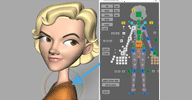 AnimSchool Picker osAll rigging
 AnimSchool recently released the qt-based AnimSchool Picker for Softimage. It can be used with the popular Malcolm Rig (see below) or with custom
characters.
AnimSchool's Picker is the best way to select and interact with 3D characters available anywhere. And it's free for friends of AnimSchool! (some restrictions apply).
AnimSchool Picker can be used with most 3D characters, not just AnimSchool ones. The main restriction is that it cannot be used with 3D characters from other online schools, workshops, or classes. AnimSchool Picker is tightly integrated into Maya and Softimage, highlighting when you make a selection in Maya, as well as picking from the buttons. Users can zoom and pan using standard Maya/Softimage navigation hotkeys.
Authoring a picker is very easy. Make single or multiple object buttons — even vertices. Make script/command buttons. Move buttons or groups of buttons with the control key. Nudge buttons precisely with the arrow keys. Arrange and distribute buttons horizontally or vertically. Reuse pickers in an instant by switching it to another character's namespace. AnimSchool Picker automatically changes all buttons and scripts to update to the new character. [..]
Follow the download link for the Softimage installation instructions and a how-to video.
AnimSchool's Picker is the best way to select and interact with 3D characters available anywhere. And it's free for friends of AnimSchool! (some restrictions apply).
AnimSchool Picker can be used with most 3D characters, not just AnimSchool ones. The main restriction is that it cannot be used with 3D characters from other online schools, workshops, or classes. AnimSchool Picker is tightly integrated into Maya and Softimage, highlighting when you make a selection in Maya, as well as picking from the buttons. Users can zoom and pan using standard Maya/Softimage navigation hotkeys.
Authoring a picker is very easy. Make single or multiple object buttons — even vertices. Make script/command buttons. Move buttons or groups of buttons with the control key. Nudge buttons precisely with the arrow keys. Arrange and distribute buttons horizontally or vertically. Reuse pickers in an instant by switching it to another character's namespace. AnimSchool Picker automatically changes all buttons and scripts to update to the new character. [..]
Follow the download link for the Softimage installation instructions and a how-to video.
author link: http://www.animschool.com / download: /pickerInfo.aspx
 Malcolm Rig osAll rigging
 Malcolm is a fully flexible, detailed character rig from AnimSchool. This film-quality
rig includes super-expressive facial controls.
AnimSchool students and instructors have full-throttle animation fun with characters like this! AND NOW most anyone can download and use Malcolm! [..]
Follow the download link to continue reading. To use the Malcolm character, qualified users must abide by the Terms of Use.
AnimSchool students and instructors have full-throttle animation fun with characters like this! AND NOW most anyone can download and use Malcolm! [..]
Follow the download link to continue reading. To use the Malcolm character, qualified users must abide by the Terms of Use.
author link: http://www.animschool.com / download: /DownloadOffer.aspx