Softimage Resources: plugins, scripts, compounds and shaders
All 1119 entries of the Softimage Resources as a simple list, 801–850 on this page. To search and filter by tags, use the interactive Resources page.
Mossman's small scripts osAll js workflow compilation
MM_Matte_Pass: This script will create all your necessary mattes at once, based on your selection
[..]
MM_Depth_Pass: MM_Depth_Pass creates a Depth Pass that can be used to create Depth of Field effects in compositing. The main advantage of this script is that it gives precise control over the depth range [..]
MM_Group: A simple script to group several objects under one null. The null will be at the COG of all selected objects and in the same hierarchy as the first selected object.
Continue reading on the author's blog. The first two scripts are self-installing plugins; copy them to a plugins folder of your choice.
local backup: MossmansPlugins.zip
MM_Depth_Pass: MM_Depth_Pass creates a Depth Pass that can be used to create Depth of Field effects in compositing. The main advantage of this script is that it gives precise control over the depth range [..]
MM_Group: A simple script to group several objects under one null. The null will be at the COG of all selected objects and in the same hierarchy as the first selected object.
Continue reading on the author's blog. The first two scripts are self-installing plugins; copy them to a plugins folder of your choice.
local backup: MossmansPlugins.zip
author site: http://felixgeremus.com / si-community thread
Submit to Backburner osAll vbs shadingworkflow workflow
Here is a plugin that can submit renderjobs to backburner direct from xsi.
before installation you have to do some system setup:
copy the »xsibatch.bat« from your application/bin to c: on every client
you want to use
make a system variable called »backburner« on every client you want to
use, the value of the variable should point to »cmdjob.exe« (installation
path of backburner)
restart computer
install the addon
the plugin can be found in xsi under render-menu »submit_to_backburner«
feel free to modify: pluginmanager-installpath to backburner-plugins-submit_to_backburnerPlugin-right
click edit
start a backburner manager, a backburner monitor, on every client backburner server
when you press the »submit«-button, the plugin will generate a tasklist(txt
file) for the backburner. just save it in a location of your choice (except on the
desktop, backburner seems not to have permissions for the desktop)
submit renderjobs
successfully tested with backburner v2007 and v2008
(at the moment you have to type the passes names manually and comma-separated, or the »all« option.)
local backup: submit_to_backburner.xsiaddon
successfully tested with backburner v2007 and v2008
(at the moment you have to type the passes names manually and comma-separated, or the »all« option.)
local backup: submit_to_backburner.xsiaddon
author site: http://www.soulcage-department.de / The Area thread
Particle Density osAll ICE particle workflow scene
A compound that assigns particles a gradient color depending on the local particle
density. Look at the author's vimeo video for details.
local backup: tcParticleDensity.1.6.xsicompound
local backup: tcParticleDensity.1.6.xsicompound
author site: http://thiagocosta.net
Realtime Stereo Addon winAll commercial workflow scene
Realtime anaglyph stereo viewport for Softimage. The addon has been updated and now
features control over the anaglyph color mixing and output. This can be used to produce
optimized anaglyphs with decreased »retinal rivalry« as well as anaglyphs
for different color filter systems [..]
Read more on the author's page. The price is US$ 50 for a single user or US$ 100 for a site license.
Note: Stereo display is now included in Softimage 2011.5. This Addon provides stereo display for earlier versions.
Read more on the author's page. The price is US$ 50 for a single user or US$ 100 for a site license.
Note: Stereo display is now included in Softimage 2011.5. This Addon provides stereo display for earlier versions.
author link: http://www.shaders.moederogall.com (archive)
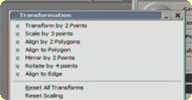 Architectural modeling tools osAll vbs compilation workflow align measure
 A collection of tools implementing the standard workflow found in popular CAD/Archviz
programs: Draw (by picked points) Box, Cone, Cube, Cylinder and Sphere 4-point rotate, 2 point transform, 3 point scale mirror about 2 points align objects by 2 polygons align object - polygon to edge align object to polygon measuring property fixed polygon camera
Look at the author's vimeo video for details.
local backup: rm_Archtools.xsiaddon
Look at the author's vimeo video for details.
local backup: rm_Archtools.xsiaddon
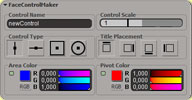 Face Control Maker osAll rigging workflow js controllers
 This small tool generates various slider controls for facial rigging as seen in Jason
Osipa's »Stop Staring« book. It also creates the expression presets in
the property set. Installed into the Animate > Create > Parameter menu.
local backup: FaceControlMaker.xsiaddon
local backup: FaceControlMaker.xsiaddon
author link: http://www.geosamfx.com / source: The Area
Sub Frame Simulator osAll ICE
Small ICE framework that allows for a simulation to be timed at sub-frame steps. From
the area page: At each iteration : 1. set SimulatedFrameFraction to the value proportional to number
of iterations (CalculateFrameFraction.xsicompound) — 2. apply all we need in
simulation (forces we need to apply through AddForces.xsicompound) — 3. apply
Simulation Node.
Look at the author's vimeo video for a short tutorial. Since Softimage 2012, subframe simulations are factory supported.
local backup: SubFrameCompounds.zip
Look at the author's vimeo video for a short tutorial.
Since Softimage 2012, subframe simulations are factory supported.
local backup: SubFrameCompounds.zip
author link: http://www.geosamfx.com / source: The Area
ICE Shrink Wrap osAll ICE deformer scene
ICE implementation of a shrinkwrap operator (mesh on mesh projection). Smoothing option
for mesh border/inside - controllable profile. Example scene available in the area
download (backup).
local backup: ShrinkWrap_ICE.1.1.xsicompound
local backup: ShrinkWrap_ICE.1.1.xsicompound
source: The Area
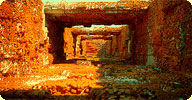 ICE Scatter Compound osAll ICE particle scatter
 Allows you to scatter ICE instances across a mesh, it has functionality to avoid intersection
between the instances as well as the ability to stick the instances to a secondary
deformed mesh without the instances jumping around when animated (this requires Softimage
2011 to work). If you layer several compounds on top of eachother each one will only
affect its own set of instances.
local backup: abScatter.xsicompound
local backup: abScatter.xsicompound
author site: http://www.wurp.net
 Strandwire Compound osAll ICE strands
 Here's another little compound that takes any polygon object as an input and draws
strands along all the edges turning it into a wireframe mesh.
Related plugins: WireD, Wiremaker, DL3D Wireframe Shader
local backup: abStrandWire.xsicompound
Related plugins: WireD, Wiremaker, DL3D Wireframe Shader
local backup: abStrandWire.xsicompound
author site: http://www.wurp.net
Get & Set Transform Components osAll ICE kinematics
Two helper nodes to get/set kine.global as individual SRT values for further processing in the ICE tree.
local backup: TransformComponents.zip
local backup: TransformComponents.zip
source: The Area
 StudioNEST Kratos osAll cppsrc shatter
 V1.2 - StudioNEST Kratos is a toolset for volumetric as well as polygon-based shattering
for Autodesk® Softimage®. In conjunction with studioNEST Momentum Kratos can be used
to create realistic destruction effects.
StudioNEST channel
Related plugins: Implosia FX, Momentum, Emit SRT matched instances, XSIShatter, Polygon Islands Transformation
using ICE, DafengIslandSeperation
local backup: kratos.zip
StudioNEST channel
Related plugins: Implosia FX, Momentum, Emit SRT matched instances, XSIShatter, Polygon Islands Transformation
using ICE, DafengIslandSeperation
local backup: kratos.zip
author (company) site: http://www.studionestbarcelona.com (archive) / product page: http://opensource.studionestbarcelona.... (archive)
 StudioNEST Momentum osAll rigging ICE particle cppsrc
 V1.3 - StudioNEST Momentum is an implementation of the Bullet Physics engine for Autodesk® Softimage®.
Momentum allows you to do very precise rigid body dynamics with high performance including full control over the simulation using the ICE framework.
StudioNEST channel
local backup: momentum.zip
Momentum allows you to do very precise rigid body dynamics with high performance including full control over the simulation using the ICE framework.
StudioNEST channel
local backup: momentum.zip
author (company) site: http://www.studionestbarcelona.com (archive) / product page: http://opensource.studionestbarcelona.... (archive)
 StudioNEST Pixel Particles osAll ICE shadingworkflow workflow
 V1.5 - This addon (previously released under the Sixbirds label) implements a very novel and interesting concept by Helge Mathee: For each
pixel of a texture image, an ICE particle is created and positioned at the UV projected
position of that pixel on an object. The particle remains associated with the pixel
and the texture can be regenerated at any point from the particles, whatever modifications
are applied to them using ICE.
This can be used for baking surface effects, procedural texture (or texture sequence) generation, feather systems and for probably a lot more. Sourcecode of the compiled operator (C++) is released by Studio Nest under the GPL license and is included in the archive. For documentation and video examples see the Softimage Blog link. Installed under ICE Tree > Task > Particles > Pixels. Video introduction available here.
StudioNEST channel
Note that the local backup contains a bugfixed and repackaged version of the addon
(»1.5b«). The original version can be downloaded here.
Related plugins: Image I/O from ICE, Image ICE Node
local backup: nest_pixelparticles1.5b.xsiaddon
This can be used for baking surface effects, procedural texture (or texture sequence) generation, feather systems and for probably a lot more. Sourcecode of the compiled operator (C++) is released by Studio Nest under the GPL license and is included in the archive. For documentation and video examples see the Softimage Blog link. Installed under ICE Tree > Task > Particles > Pixels. Video introduction available here.
StudioNEST channel
Note that the local backup contains a bugfixed and repackaged version of the addon
(»1.5b«). The original version can be downloaded here.
Related plugins: Image I/O from ICE, Image ICE Node
local backup: nest_pixelparticles1.5b.xsiaddon
 StudioNEST Brigks Rigging Toolset osAll rigging workflow python cppsrc rigtoolset
 V1.5 - A collection of 12 rigging operators written in python and C++, kindly released
to the public by Helge's employer Studio Nest (archive), Spain. It was formerly released as »Rigging solvers« under the Sixbirds label. This toolset includes the following solvers: Transform Spring, Directional
Spring, IK 2 Bone, IK FK 2 Bone, Simple Spline, Rolling Spline, 4 Point Surface, Interpolated
Pose, Squash and Stretch, Null 2 Curve Projection, Curve Sliding, Curve Collision.
Sourcecode is released by Studio Nest under the GPL license and is included in the archive. For documentation and video examples see the Softimage Blog link. Version available in local backup contains a fix.
StudioNEST channel
local backup: brigks.zip
Sourcecode is released by Studio Nest under the GPL license and is included in the archive. For documentation and video examples see the Softimage Blog link. Version available in local backup contains a fix.
StudioNEST channel
local backup: brigks.zip
author (company) site: http://www.studionestbarcelona.com (archive) / product page: http://opensource.studionestbarcelona.... (archive) / Softimage Blog link
 StudioNEST Essence osAll workflow cppsrc
 StudioNEST Essence is the base library of all of our 3D tools. It contains several
C++ classes from simple string operations down to complex geometric operations. Essence
can give you a boost when developing, by providing all of the basic framework you
need.
StudioNEST channel
local backup: essence.zip
StudioNEST channel
local backup: essence.zip
author (company) site: http://www.studionestbarcelona.com (archive) / product page: http://opensource.studionestbarcelona.... (archive)
 StudioNEST Melena Hair osAll ICE python strands hair cppsrc
 V1.4 - StudioNEST's Melena is a hair styling and simulation framework based on the
Autodesk® Softimage® ICE platform. Its toolset features various hair generation tools,
effects as well as custom simulation nodes and forces. By supporting lattices for
styling as well as for simulation, Melena enables artists to create controllable simulations.
Melena has been used in production to create the stylized hair for our No Pets Allowed
project, and is now released under GPL for download.
StudioNEST channel
local backup: melena.zip
StudioNEST channel
local backup: melena.zip
author (company) site: http://www.studionestbarcelona.com (archive) / product page: http://opensource.studionestbarcelona.... (archive)
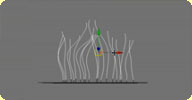 strandsToCurves osAll ICE js modeling workflow curves strands
 Build curves from strands of a pointcloud. It creates a snapshot of the strands at
the moment the command is called, then the curves are ICE deformed to follow the original
strand animation.
See the si-community link for more details. Also have a look at the introduction vimeo video.
local backup: strandsToCurves.xsiaddon
See the si-community link for more details. Also have a look at the introduction vimeo video.
local backup: strandsToCurves.xsiaddon
author link: http://iceduous.blogspot.com/...to-curves.html / si-community thread
Mootzoid scripts osAll vbs compilation
on my web page in the »Softimage|XSI Corner« you can find some VB scripts.
They are nothing really special - just some little tools - but they sometimes come
in handy.
Contains: emListGroupsOfSelObjects (Lists the groups that contain one or more of the selected objects) emListSubdivPolyMeshes (Lists and selects all polygon meshes with a subdivision level greater than zero) emPointMesh (Creates a polygon mesh that contains points but no polygons) emPointMeshFromPolyCtr (Creates a polygon mesh that contains points but no polygons. The points of the created mesh correspond to the polygon centers of the source mesh) emRemoveSelFromGroups (Removes the selected objects from any group they are in)
local backup: emScripts.zip
Contains: emListGroupsOfSelObjects (Lists the groups that contain one or more of the selected objects) emListSubdivPolyMeshes (Lists and selects all polygon meshes with a subdivision level greater than zero) emPointMesh (Creates a polygon mesh that contains points but no polygons) emPointMeshFromPolyCtr (Creates a polygon mesh that contains points but no polygons. The points of the created mesh correspond to the polygon centers of the source mesh) emRemoveSelFromGroups (Removes the selected objects from any group they are in)
local backup: emScripts.zip
author link: http://www.mootzoid.com (archive)
emCubicMapping osAll
A .Preset file that adds cubic mapping to (possibly old) versions of XSI.
local backup: emCubicMapping.zip
local backup: emCubicMapping.zip
author link: http://www.mootzoid.com (archive)
XGS Slate win32 cppsrc
XGS_Slate is a demonstration of how to use C++ code to create a custom Softimage viewport
display hook. It is pretty old (developed for XSI 4.2) but the technique might still
be valid.
local backup: Xgs_Slate_v1.5_XSI_4.2.xsiaddon src.zip (source code)
local backup: Xgs_Slate_v1.5_XSI_4.2.xsiaddon src.zip (source code)
author link: n/a
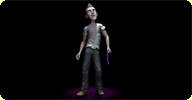 Roman Rig osAll rigging scene
 Biped rig and rigged character model that Thomas Cannell developed and used on his
reel. Watch his reel here!
For information see readme.txt inside the download archive. Developed for Softimage 2011.
local backup: roman_project.rar
For information see readme.txt inside the download archive. Developed for Softimage 2011.
local backup: roman_project.rar
author site: http://www.puppetstring.com / source: si-community thread
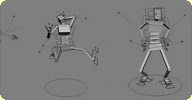 Craft Rig 1 osAll rigging
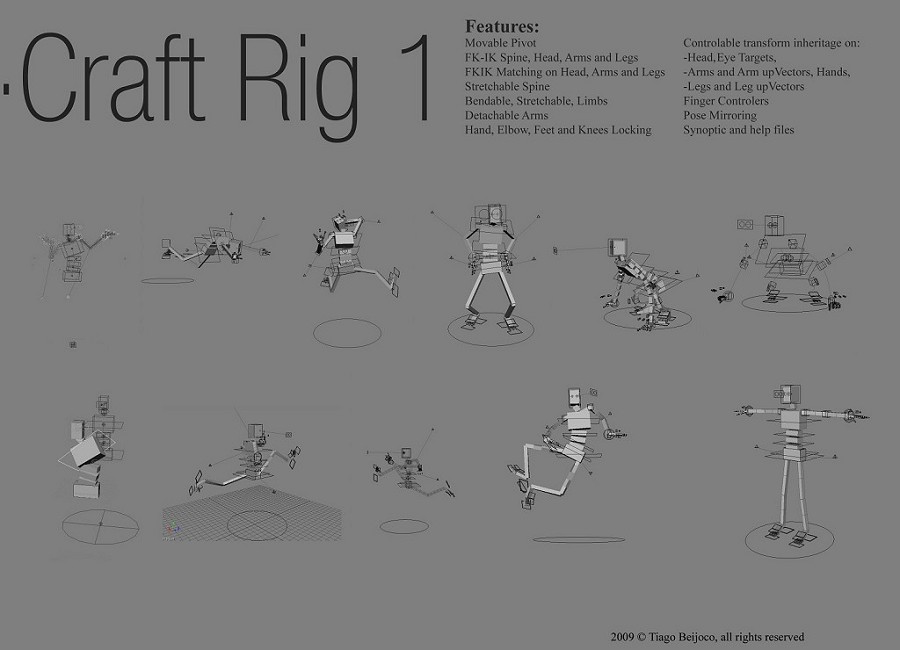
 The craft rig is a biped rig with a lot of interesting features such as bendable and
detachable arms, locking functions, pose mirroring, FK/IK matching etc.
For all the features see this image. A demonstration video can be found on the author's site. Developed for Softimage 2011.
local backup: Craft_Rig.rar
For all the features see this image. A demonstration video can be found on the author's site. Developed for Softimage 2011.
local backup: Craft_Rig.rar
 Rogelio Rig osAll rigging
 Features of this biped are IK/FK arms and legs, stretchy arms and legs, deformers
(»a lot«), bone-based facial rig, reverse and straight feet, synoptic
view. Developed for XSI 6.5.
A pdf manual is included in the download archive.
local backup: Rogelio_and_manuals.zip
A pdf manual is included in the download archive.
local backup: Rogelio_and_manuals.zip
author site: http://josempan.blogspot.com/2008/09/rogelio-v10.html (archive) / source: si-community thread
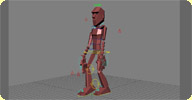 IK Joe XSI osAll rigging
 Biped rig originally developed for Maya by Javier Solsona, converted to XSI 3.5 by
Stefan Andersson. Contains a toolbar addon. Original cgsociety posting by Stefan can
be found here
local backup: sanders.zip
local backup: sanders.zip
 Moom Rig osAll rigging
 Character rig originally developed for Maya by Ramtin, converted to XSI 6.0 by Josef
Sy. Features IK/FK stretchable arms, head look-at, hide/unhide geo options and a synoptic
view.
local backup: MoomXSI_v03.1.zip
local backup: MoomXSI_v03.1.zip
author site: http://www.josefsy.com (archive) / http://www.creativecrash.com/.../moomxsi / source: si-community thread
 Flaco Rig osAll rigging
 This is an easy rig to be used in animation practices. It is based on the rig provided
by XSI on its Biped Guide. I have personalized it and adapted it to the needs I have
found all along my animation practices so that it can be useful for me and my students.
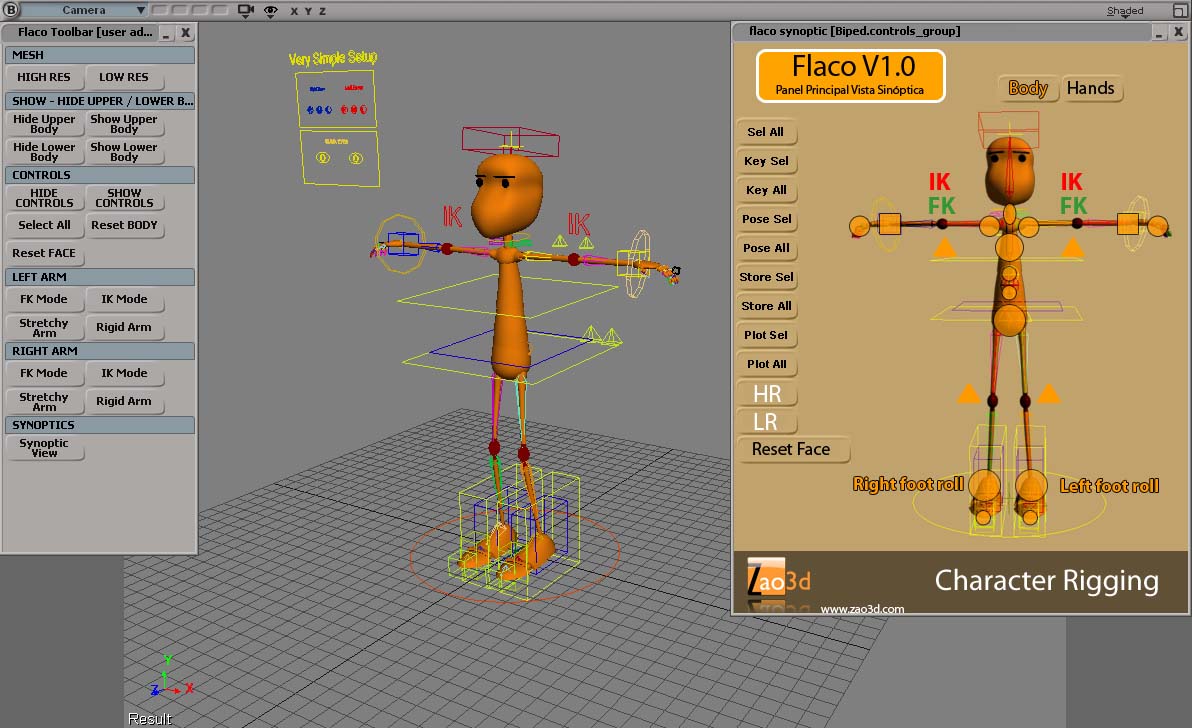
Developed for Softimage 2011. For a screenshot see here. Watch Javier's reel here.
local backup: FLACO.rar
Developed for Softimage 2011. For a screenshot see here. Watch Javier's reel here.
local backup: FLACO.rar
author site: http://www.zao3d.com / source: si-community thread
 Flacobot Rig osAll rigging
 This builds upon the Flaco rig. It is an easy rig to be used in animation practices.
It is based on the rig provided by XSI on its Biped Guide. I have personalized it
and adapted it to the needs I have found all along my animation practices so that
it can be useful for me and my students.
Developed for Softimage 2011. A Flacobot demonstration video is available here on vimeo. Watch Javier's reel here.
local backup: FLACOBOT_V1.rar
Developed for Softimage 2011. A Flacobot demonstration video is available here on vimeo. Watch Javier's reel here.
local backup: FLACOBOT_V1.rar
author site: http://www.zao3d.com / source: si-community thread
 Edgard Rig osAll rigging scene
 A rig and rigged character developed for XSI 4.0. The rig features synoptic view,
2 independent face rig controls, custom hand and body poses, face shapes.
Download archive contains an AVI demonstration video.
local backup: Edgard_Download.zip
Download archive contains an AVI demonstration video.
local backup: Edgard_Download.zip
author site: http://www.mrsolo.com (archive) / download: /mrs_edgard.html (archive) / source: si-community thread
 Guy Rig osAll rigging
 A rig and rigged character developed for XSI 5.0. The rig features IK/FK blending
for the arms, FK/IK squash and stretch with volume preservation, IK stretchy legs,
arms and spine, different orientation controls for head/neck, hands and arms, pin
controls, »stop staring« based facial and hand controls, synoptic view.
Download archive contains an AVI demonstration video.
local backup: guy_v1.zip
Download archive contains an AVI demonstration video.
local backup: guy_v1.zip
author site: http://davidjhammer.com / source: si-community thread
 Human body rig osAll rigging
 A very feature-rich human body rig developed for XSI 6.02. Features include auto rigging
(fitting!), pinning of hands, elbows and knees, mirroring, roll controls, and a lot
more.
local backup: am_body_rig.rar
local backup: am_body_rig.rar
 Simple Bot Rig osAll rigging
 Production-proven cartoon rig of a 2-legged character. Not for commercial use.
local backup: Bot_RIG.rar
local backup: Bot_RIG.rar
author link: http://www.creativecrash.com/.../simple-bot-rig / source: si-community thread
 BeeBoy Rig osAll rigging
 Rig and rigged character originally developed for Maya by Rodrigo Ribeiro, converted
to Softimage 2011 by everyFrame. Features include: IK/FK arms and legs with G/L aligns,
stretchy limbs, stretchy mesh, full FK finger, lip, and footroll controls, FK torso,
global scaling.
local backup: BeeBoy.zip
local backup: BeeBoy.zip
author link: http://www.creativecrash.com/.../beeboy-for-softimage-2010 / source: si-community thread
 Walter Rig osAll rigging
 Human body rig used by Lucas Martell in his short film »Pigeon Impossible«.
See author site for the film and more details.
local backup: WalterRig.zip
local backup: WalterRig.zip
CC_Menu win32 cppsrc workflow
This plug-in scans all the custom commands available and populates a menu with the
ones matching some pre-defined filters. The resulting menu is named »CC_tools«
and is located in the top menu bar. [..] read more on the author's download page.
local backup: CC_menu_1.0.zip
local backup: CC_menu_1.0.zip
CC_proxyCurve win32 cppsrc curves
This plug-in contains an operator that allows you to linearly fit a curve to another
curve. It does the exact same thing than creating a cluster center for each point
of a curve then linearly path constraining those points to a driving curve. To apply
the operator [..] read more on the author's download page.
local backup: CC_proxyCurve_1.1.zip
local backup: CC_proxyCurve_1.1.zip
CC_replaceShapeKey win32 cppsrc workflow
This plug-in contains a command that acts the exact same way than the built-in »ReplaceShapeKey«
command except that this one retrieves the deform operations on the stack and apply
them to the desired shape key without adding the other active shape key deformations. [..] read more on the author's download page.
local backup: CC_replaceShapeKey_1.0.zip
local backup: CC_replaceShapeKey_1.0.zip
author site: http://www.christophercrouzet.com / download: /resources_CC_replaceShapeKey.php (archive)
CC_runOnce win32 cppsrc workflow
This plug-in is a time saver for C++ developers. No more need to unload, compile then
reload to test a C++ Softimage|XSI plug-in. Just specify the location of your .dll
file, put some optional code to be fired while your plug-in is loaded, and click the
»run« button. Everything else is handled. [..] read more on the author's download page.
local backup: CC_runOnce_1.2.zip
local backup: CC_runOnce_1.2.zip
ccEyeRig osAll rigging
Eyelids prototype for cartoon characters. Made available just to share the global
idea behind the rig. Check this (archive) post for more details on the rig. [..] read more on the author's download page.
local backup: ccEyeRig_0.1.zip
local backup: ccEyeRig_0.1.zip
xsiPluginWizard osAll workflow
Wizard that creates Softimage|XSI plug-ins projects for Visual Studio 2005 and Visual
Studio 2005 Express. [..] read more on the author's download page.
local backup: xsiPluginWizard_1.11.zip
local backup: xsiPluginWizard_1.11.zip
 AoN:XSI Beta winAll shader mentalray compilation
 A work-in-progress (currently on hold but with very interesting results already) on
converting Thomas' well-known Project Messiah shaders to XSI. Includes:
AoN_Grid , AoN_Mixer, AoN_Distance, AoN_ReplaceAlpha. See the si-community discussion for a very detailed and illustrated introduction.
local backup: AoN_XSI.zip
AoN_Grid , AoN_Mixer, AoN_Distance, AoN_ReplaceAlpha. See the si-community discussion for a very detailed and illustrated introduction.
local backup: AoN_XSI.zip
author link: http://www.screendream.de/AoN_XSI.htm / author site: http://www.screendream.de / si-community thread
SPH motion vectors to mesh osAll ICE particle fluids
Here are a couple of little Softimage ICE compounds that I've found to be very useful
over the last couple of months, when dealing with meshes generated from particle simulations.
In particular, I've been working with the great SPH solver from Thiago Costa and Grant Kot, which when used in conjunction with a mesher, such as Pwrapper can make some awfully cool, splashy fluids. Unfortunately, Pwrapper lacks the vital ability to render correct 3D motion blur, nor can 2D motion vectors be generated from its meshes. I've also heard that meshes produced by RealFlow can suffer from broken motion vectors. [..] (cont'd on author link page)
local backup: motionv.zip
In particular, I've been working with the great SPH solver from Thiago Costa and Grant Kot, which when used in conjunction with a mesher, such as Pwrapper can make some awfully cool, splashy fluids. Unfortunately, Pwrapper lacks the vital ability to render correct 3D motion blur, nor can 2D motion vectors be generated from its meshes. I've also heard that meshes produced by RealFlow can suffer from broken motion vectors. [..] (cont'd on author link page)
local backup: motionv.zip
Fast Volume Emission using signed distance fields osAll ICE particle
Softimage ICE is fast, no doubt. But, there are more than a few occasions when even
ICE grinds to a halt. Dealing with stupid numbers of particles is usually not so much
of an issue (as long as you have the memory). But, when all those particles have to
interact with geometry, more often than not things aren't so smooth.
One issue that users may have to deal with very regularly is emitting particles from a geometry volume. The built-in node does a fine job, making sure each .. (cont'd on author link page)
local backup: SDF.zip
One issue that users may have to deal with very regularly is emitting particles from a geometry volume. The built-in node does a fine job, making sure each .. (cont'd on author link page)
local backup: SDF.zip
 Create Grass osAll ICE particle strands vegetation
 Makes strands on a given surface that are curvy to look like grass blades. The zip
contains a shader preset for the grass; copy it to your »DSPresets/Shaders/Material«
folder
Related plugins: New Grass
local backup: Create Grass v1.1.rar
Related plugins: New Grass
local backup: Create Grass v1.1.rar
author site: n/a / si-community thread
UV Thinner osAll vegetation texturing shadingworkflow ICE
Averages the positions of points with similar U or V coordinates. Useful with TGen
and cylindrical objects, for making growing vines. Please see the vimeo video for more details.
local backup: UV Thinner.1.2.rar
local backup: UV Thinner.1.2.rar
author site: n/a / si-community thread
Edges 2 NURBS osAll vbs workflow
Convert polygons to NURBS by selecting parallel edge loops. Please see the vimeo video or the si-community discussion thread for more details.
local backup: Edges 2 Nurbs.zip
local backup: Edges 2 Nurbs.zip
author site: n/a / si-community thread
Mapify osAll js workflow
Mapify allows management of render mapping (texture baking) across multiple objects:
The RenderMap properties of multiple objects can be controlled very easily. Any object added to the list which doesn't have a RenderMap property is automatically
given one. Three properties can be set across selected objects from within the UI. Advanced properties can be changed by selecting objects and hitting »View RenderMap
PPG«. All images are put in a sub-folder named after the object the RenderMap belongs to
under the path given by the user. Mapify lets the user automatically set the render mapped images that have been generated
after the mapping process as a constant material. Mapify also ships with a function which allows the map generation to be done using
xsibatch. This is useful if you would like to RenderMap across a render farm. Please
read the help doc (by clicking on the »?« icon in the top right of the
Mapify PPG) for more information.
local backup: Mapify.xsiaddon / doc backup
local backup: Mapify.xsiaddon / doc backup
author link: http://www.sajjadamjad.com / download: /plugins.html#Mapify%20?
Capchan 3 osAll js workflow
It's a viewport capture tool, basically a re-organized UI for XSI's standard viewport
capture with a bunch of extra features.
local backup: Capchan3.xsiaddon
local backup: Capchan3.xsiaddon
author site: junkithejunkie.cocolog-nifty.com / author @ vimeo
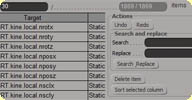 Advanced Grids for editors win32 workflow
 Each time I was using the built-in Action editor or Template editor, I was surprised
of how poor the grid implementation is. No filtering or search feature, no way to
show/hide columns, untyped sorting (the one that will display 10 before than 2...
because it works only with strings). So I used the Grid PPGItem and I wrote a little
library that will add all the features we can see in modern data grids.
My GridItem library handles : Multi-Edit Per-page display (choosing the number of items per page) Typed sorting Columns visibilities Columns re-ordering Custom filters list per columns Undo/Redo Grid edit Multi edit Box with Abs/Add/Add% modes (such as the XSI's weight editor)
Then I wrote some editors using this library : Action Editor Expression Editor Template Editor Constraints Editor (WIP) X3DObject Spreadsheet (WIP)
Win32 only. For usage and an embedded demo video, see the author link.
local backup: CG_Editors_XSI7_win32.rar
My GridItem library handles : Multi-Edit Per-page display (choosing the number of items per page) Typed sorting Columns visibilities Columns re-ordering Custom filters list per columns Undo/Redo Grid edit Multi edit Box with Abs/Add/Add% modes (such as the XSI's weight editor)
Then I wrote some editors using this library : Action Editor Expression Editor Template Editor Constraints Editor (WIP) X3DObject Spreadsheet (WIP)
Win32 only. For usage and an embedded demo video, see the author link.
local backup: CG_Editors_XSI7_win32.rar
author link: http://www.studionham.com/index.php?opti... (archive)
Edit multiple parameters osAll js rigging workflow
It's obviously an interesting approach to be able to edit several parameters at the
same time. It can save a lot of time for animation or settings purposes, for example
rotate all the finger controls at the same time or set a dynamic parameter on all
segments of a chain. We usually do this by creating a new parameter and link all the
other parameters we want to control to this one. The main problem of this technique
is you can't change these values anymore, because they will typically have expressions
on them.
The MultiEdit uses another way. It stores the list of parameters that have to be changed and creates a single parameter of the same type. Then is reacts on the PPG callback to set all the parameters with the changing value.
For usage and an embedded demo video, see the author link.
Related plugins: Expression Manager, Mia Expression Manager
local backup: CG_MultiEdit.rar
The MultiEdit uses another way. It stores the list of parameters that have to be changed and creates a single parameter of the same type. Then is reacts on the PPG callback to set all the parameters with the changing value.
For usage and an embedded demo video, see the author link.
Related plugins: Expression Manager, Mia Expression Manager
local backup: CG_MultiEdit.rar
author link: http://www.studionham.com/index.php?opti... (archive)