







































quickinset
Plugins linking to this thread: (hide)
 QuickInset
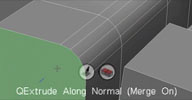
 Updated May 2013 (info) — Rewrite of the original QuickExtrude tool. This tool performs quick modo-like
interactive extrude, bevel and inset operations without showing a property page. Piotrek's
notes from the si-community thread: Extruding along normal is available only in 2012 SAP
for operations that relies on SI units you drag in component's normal direction,
for other ops (like point skirting ratio/bevel subdivisions) just drag across screen
subdivision highlighting is supported only for level 1 and only catmull-clark
J, L hotkeys change subdivision on extrude K hotkey is for repeating operation on highlighted component/subselection ENTER shows op PPG shift makes operations 10x slower
LMB is extruding, LMB and then RMB - changes inset ratio of extrusion MMB is beveling, , MMB and then RMB - changes bevel subdivisions RMB is insetting tool can also work in supra mode if you hotkey the tool
I've used it to model few production objects and it's pretty useful.
Developed with the interactive tool SDK. See Piotrek's video for a quick introduction
local backup: quickextrude_0.2.xsiaddon (June 2013) pmQuickExtrude2012.xsiaddon (older but SI 2012 compatible version) quickextrude_src.rar
Developed with the interactive tool SDK. See Piotrek's video for a quick introduction
local backup: quickextrude_0.2.xsiaddon (June 2013) pmQuickExtrude2012.xsiaddon (older but SI 2012 compatible version) quickextrude_src.rar
-
wireframex

- Posts: 399
- Joined: 08 Jun 2009, 23:02
- Location: France
Re: quickinset
Thanks for sharing
"without mastery, power is nothing" - Softimage Addict User
CPU 3990x 128 Threads / 2 x 3090 RTX - 24 Go / 96 Go memory
CPU 3990x 128 Threads / 2 x 3090 RTX - 24 Go / 96 Go memory

Re: quickinset
Thanks. Forgot to mention you may need this if plugin won't load http://www.microsoft.com/en-us/download ... x?id=30679
Re: quickinset
Great update, selecting feature was annoying, now it works perfectly, thanks!

Re: quickinset
Thank you so much ~ I found it
 .
.I wont let Softimage die - I'm gonna learn it. I love it already. Much better than Max and Maya. I hope someone from Autodesk just steels XSI and leaks it to the world.....that shit should be open source.
Legends Never Die

Re: quickinset
Hello. Who knows how to build this plugin from source. I wanted to compile the plugin with my custom hotkeys. I tried to compile, but I get errors. Thanks in advance.

Re: quickinset
When I try to compile the solution, I get this error:
1>------ Build started: Project: pmQuickExtrude, Configuration: Release x64 ------
1>C:\Program Files (x86)\MSBuild\Microsoft.Cpp\v4.0\Platforms\x64\Microsoft.Cpp.x64.targets(152,5): error MSB6006: "CL.exe" exited with code -1073741515.
========== Build: 0 succeeded, 1 failed, 0 up-to-date, 0 skipped ==========
I tried to compile in visual studio 2010 express and in vs 2012, but I get the same error.
1>------ Build started: Project: pmQuickExtrude, Configuration: Release x64 ------
1>C:\Program Files (x86)\MSBuild\Microsoft.Cpp\v4.0\Platforms\x64\Microsoft.Cpp.x64.targets(152,5): error MSB6006: "CL.exe" exited with code -1073741515.
========== Build: 0 succeeded, 1 failed, 0 up-to-date, 0 skipped ==========
I tried to compile in visual studio 2010 express and in vs 2012, but I get the same error.
Re: quickinset
I started getting this error when I added the path C:\Program Files (x86)\Microsoft Visual Studio 11.0\VC\bin\ to the environment variable.
Without this path I received an error
1>------ Build started: Project: cable, Configuration: Release x64 ------
1>TRACKER : error TRK0005: Failed to locate: "CL.exe". The system cannot find the file specified.
1>
1>
========== Build: 0 succeeded, 1 failed, 0 up-to-date, 0 skipped ==========
Without this path I received an error
1>------ Build started: Project: cable, Configuration: Release x64 ------
1>TRACKER : error TRK0005: Failed to locate: "CL.exe". The system cannot find the file specified.
1>
1>
========== Build: 0 succeeded, 1 failed, 0 up-to-date, 0 skipped ==========
Re: quickinset
Sorry for the name of the cable in the message. I tried to compile an empty project. Same error with quickExtrude
Re: quickinset
If this happens for simple Hello world project too, it's an issue with the Visual Studio installation. In that case I would try reinstalling VS (maybe upgrade to community version 2017)
softimage resources section updated Jan 5th 2024
Re: quickinset
TRACKER : error TRK0005: Failed to locate: "CL.exe". The system cannot find the file specified.
I only get this message when I run visual studio using the bat file.
Maybe someone knows how to overcome this error? I am using Visual studio 2012.
I only get this message when I run visual studio using the bat file.
Maybe someone knows how to overcome this error? I am using Visual studio 2012.
Re: quickinset
This is an error when compiling a project.
Re: quickinset
Which bat file do you mean? Can you post it? It might change some path to point VS to the wrong CL.exe
softimage resources section updated Jan 5th 2024
Who is online
Users browsing this forum: No registered users and 35 guests