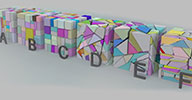

Tool time^^ This one does split a polygon mesh obj into two parts using a random plane, then closes both parts.
This is already all it does

When used repeatedly it can be used to shatter an object. Gets installed in Create->Polymesh menu.


Some usage tips:
* You can use a predefined axis (X,Y,Z) for the split but that will be for special cases only. For normal behavior, use "Random" or "Axis with longest Extent"
* Use "longest extent" remove the long and flat parts that you see in A becuase it splits the long parts through their longest axis
* Reducing "Offset" shifts the split plane more to the center, producing more regularly sized chunks (see C)
* Increasing "Random Angle" produce more D like splits.
* With "Min Volume" set to OFF(0), chunks that happen to be very small get broken up into even smaller chunks which might not be what you want. (Starts to happen a bit in D)
* A good way to produce rather evenly-spaced chunks is to bisect using a high "Minimul...." setting like 10 until there's nothing more to bisect. Repeat this with a slightly lower setting. Repeat again... (Seee E, you'll notice this probably more when using smaller pieces)
* Note that of course you can use different settings for each iteration (See F), or localize the scatter effect by deselecting objects (see top right corner of F)
* Auto generated normals will get messed up. Using a pre baked normal map probably could help you get back the original smooth surface.
Here's the download (not linked yet from the main site)
rray.de/xsi/bak/rray/rcBisect.xsiaddon
Ray
_______________
Ed:
Recetly discovered that a plugin like this already exists
 - XSIShatter by Michele Sandrioni (http://www.threesixty3d.com/software/). It uses the same approach with splitting planesm, in addition has settings for fragment spacing, color and UV options for the internal surfaces, does a better job at closing the holes (see a few posts down for an example where mine fails), and a direct control of the fragment count.
A setup where mine could be of use is if you want the grid like splitting that it doesn't do.