Discussions concerning programming of SOFTIMAGE©
-
VitLoss
- Posts: 16
- Joined: 08 May 2018, 12:15
Post
by VitLoss » 16 Mar 2025, 23:24
Hey, everybody!
I'm trying to write a script for softimage using (JScript or VBScript) very little experience in writing scripts, sorry if anything

The question is
How can I activate the Tweak Component Tool (key “M”) using JScript or VBScript?
Can I know if this Tool is active now or not?
-
Kolya
- Posts: 45
- Joined: 03 Oct 2017, 17:17
Post
by Kolya » 17 Mar 2025, 08:51
Hello! to activate Tweak Component Tool use TweakTool() command,
to know if it is currently active check if ActiveToolName property equals to "TweakTool", if(ActiveToolName == "TweakTool")
-
myara
- Posts: 406
- Joined: 28 Sep 2011, 08:33
Post
by myara » 17 Mar 2025, 08:58
I find it strange that you would want to learning scripting for Softimage now. But if you are starting with scripting, I'd recommend start with Python, at least that knowledge would translate to other DCC software like Maya.
But to answer your question, in JScript (similar but not the same as JavaScript).
To activate :
//JScript
Code: Select all
Commands("Move Component Tool").Execute()
or
To query:
Code: Select all
if (ActiveToolName=='TweakTool'){
}
M.Yara
Character Modeler | Softimage Generalist (sort of)
-
myara
- Posts: 406
- Joined: 28 Sep 2011, 08:33
Post
by myara » 17 Mar 2025, 09:01
Kolya wrote: 17 Mar 2025, 08:51
Hello! to activate Tweak Component Tool use TweakTool() command,
That would be simpler

M.Yara
Character Modeler | Softimage Generalist (sort of)
-
VitLoss
- Posts: 16
- Joined: 08 May 2018, 12:15
Post
by VitLoss » 17 Mar 2025, 20:50
"I find it strange that you would want to learning scripting for Softimage now."
yeah...
but I still can't break up with Softimage. )))
Thank you All! I'll try it.
-
VitLoss
- Posts: 16
- Joined: 08 May 2018, 12:15
Post
by VitLoss » 17 Mar 2025, 21:59
This is exactly what I needed
Thank you All again! =)
-
VitLoss
- Posts: 16
- Joined: 08 May 2018, 12:15
Post
by VitLoss » 12 Apr 2025, 14:52
Hey, everybody!
help please.
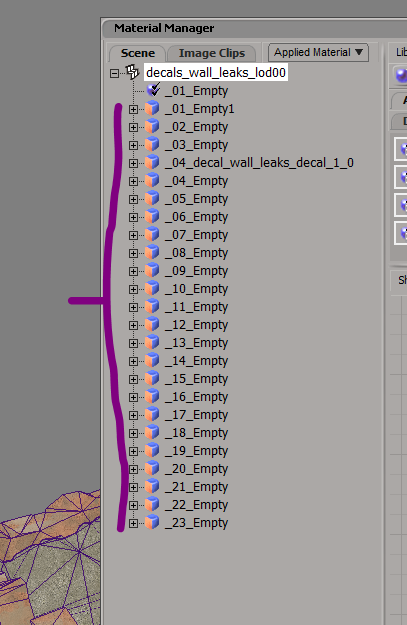
How can I get a list (array) of all texture clusters of a selected object? using JScript
-
myara
- Posts: 406
- Joined: 28 Sep 2011, 08:33
Post
by myara » 12 Apr 2025, 15:36
This would give you collections, not arrays.
Code: Select all
// Get All Clusters
var oSampleCls = oObj.ActivePrimitive.Geometry.Clusters.Filter("sample");
var oPointCls = oObj.ActivePrimitive.Geometry.Clusters.Filter("pnt");
var oPolyCls = oObj.ActivePrimitive.Geometry.Clusters.Filter("poly");
var oEdgeCls = oObj.ActivePrimitive.Geometry.Clusters.Filter("edge");
Last edited by myara on 14 Apr 2025, 22:24, edited 3 times in total.
M.Yara
Character Modeler | Softimage Generalist (sort of)
-
VitLoss
- Posts: 16
- Joined: 08 May 2018, 12:15
Post
by VitLoss » 12 Apr 2025, 16:17
Thank You!