















Pin Points

Plugins linking to this thread: (hide)

Pin PointsAuthor: Reinhard Claus
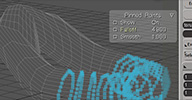
Installs the command "Pin Points" in the Constrain menu on the right. It freezes/pins the selected subcomponents. Then they can't be moved until the command is called again.

There's a displayInfo in the viewport that 1. lets you know something is frozen / 2. lets you set a falloff so points near the freeze region are a little frozen as well which makes the transition smoother / 3. set smoothness / 4. show or hide the blueish effect of the frozen region in the viewport

download: PinPoints.xsiaddon

User avatar
rray
Moderator
Posts: 1810
Joined: 26 Sep 2009, 13:51
Location: Bonn, Germany

Pin Points

Post by rray » 02 Mar 2018, 01:49

A modeling helper plugin which I've been meaning to share in 2009 or so and forgot 8-x

Installs the command "Pin Points" in the Constrain menu on the right. It freezes/pins the selected subcomponents. Then they can't be moved until the command is called again.

There's a displayInfo in the viewport that 1. lets you know something is frozen / 2. lets you set a falloff so points near the freeze region are a little frozen as well which makes the transition smoother / 3. set smoothness / 4. show or hide the blueish effect of the frozen region in the viewport

let me know if there's bugs!
You do not have the required permissions to view the files attached to this post.
softimage resources section updated Sep 26th 2026

User avatar
Draise
Posts: 894
Joined: 09 Oct 2012, 18:48
Skype: ondraise
Location: Colombia

Re: Pin Points

Post by Draise » 02 Mar 2018, 12:22

Like modeling masking!? WOAH.

User avatar
mc_axe
Posts: 420
Joined: 12 Mar 2013, 17:44

Re: Pin Points

Post by mc_axe » 02 Mar 2018, 17:53

Very helpful, i hope it works vs move-proportional tool!

anyheart
Posts: 46
Joined: 26 Jun 2011, 04:42

Re: Pin Points

Post by anyheart » 28 Feb 2019, 10:27

Very cool tool,works on Curves and polygon

User avatar
rray
Moderator
Posts: 1810
Joined: 26 Sep 2009, 13:51
Location: Bonn, Germany

Re: Pin Points

Post by rray » 28 Feb 2019, 10:34

Nice, never planned to have it work it for curves, just for polygons... but because of the generic SI object model it works for anything that's made out of points.
softimage resources section updated Sep 26th 2026

opoppopopp
Posts: 213
Joined: 16 Jun 2009, 04:23

Re: Pin Points

Post by opoppopopp » 20 Mar 2020, 19:17

just use it today for a small work, thank U

btw. pin by weight maps will be more intuitive...and quick...

User avatar
rray
Moderator
Posts: 1810
Joined: 26 Sep 2009, 13:51
Location: Bonn, Germany

Re: Pin Points

Post by rray » 23 Mar 2020, 12:13

Hey thanks for using it! It sound good. I'll check if it's easy to make
softimage resources section updated Sep 26th 2026

opoppopopp
Posts: 213
Joined: 16 Jun 2009, 04:23

Re: Pin Points

Post by opoppopopp » 28 Mar 2020, 13:34

rray wrote: 23 Mar 2020, 12:13 Hey thanks for using it! It sound good. I'll check if it's easy to make
IF
"press w, paint some wight, move other points, smooth some weight, move a little more, click a button to turn off pin" wow @-)

Thanks again!

Talik
Posts: 63
Joined: 09 May 2017, 09:13
Skype: nihao00042

Re: Pin Points

Post by Talik » 12 May 2022, 19:12

Would be nice if it could freeze the bone's and deformer's deformation. I would use it to move the bones after the weights are painted

opoppopopp
Posts: 213
Joined: 16 Jun 2009, 04:23

Re: Pin Points

Post by opoppopopp » 13 May 2022, 19:57

Talik wrote: 12 May 2022, 19:12 Would be nice if it could freeze the bone's and deformer's deformation. I would use it to move the bones after the weights are painted
You can adjust Static_KineState property of your deformer(bone) object, to a compensate value, to adjust deformer position after envelop.

Envelop operator only need deformer's transformation value(so that everything in XSI, can be used as deformer, not only bone object)
But not the transform information in Kinematic node, but the Static_KineState node.

opoppopopp
Posts: 213
Joined: 16 Jun 2009, 04:23

Re: Pin Points

Post by opoppopopp » 13 May 2022, 20:06

Talik wrote: 12 May 2022, 19:12 Would be nice if it could freeze the bone's and deformer's deformation. I would use it to move the bones after the weights are painted
This is a better explanation of Static KineState:
http://web.archive.org/web/201104040029 ... chives/209

User avatar
rray
Moderator
Posts: 1810
Joined: 26 Sep 2009, 13:51
Location: Bonn, Germany

Re: Pin Points

Post by rray » 17 Dec 2022, 17:05

There's also the menu command "set reference pose" that resets the mesh to the base pose without moving the bones.

(probably it modifies the Static KineState internally)
softimage resources section updated Sep 26th 2026