








































Hi there!
I had some time to play a little with phogrammetry and Agisoft´s Photoscan. Animated and rendered in XSI with Redshift.
One 8k texture for color and bump-map. Two shaders used driven by a weightmap. The lighter, inner side has a sub-surface-scatter shader. The bark and the ouside a simple achritectural shader. Both share the same texture and the same bump map (generated from the main texture).
Hope you like it!
cheers,
oli
RND Photogrammetry "Chopped Wood"
-
owei

- Administrator
- Posts: 840
- Joined: 03 Jun 2009, 15:25
- Location: Siegen/Germany
-
Grubber

- Posts: 165
- Joined: 22 Jun 2009, 19:11
- Location: Vilnius, Lithuania

-
rray

- Moderator
- Posts: 1810
- Joined: 26 Sep 2009, 13:51
- Location: Bonn, Germany
Re: RND Photogrammetry "Chopped Wood"
That looks great, both the geometric shape and the texture.
I was wondering, what camera did you use to shoot the pictures?
I was wondering, what camera did you use to shoot the pictures?
softimage resources section updated Sep 26th 2026
-
owei
- Administrator
- Posts: 840
- Joined: 03 Jun 2009, 15:25
- Location: Siegen/Germany
Re: RND Photogrammetry "Chopped Wood"
Thanks guys!
@rray
I´ve used a Canon 550D with a 18-55 zoom lens. Nothing fancy. And here is a foto of my setup.
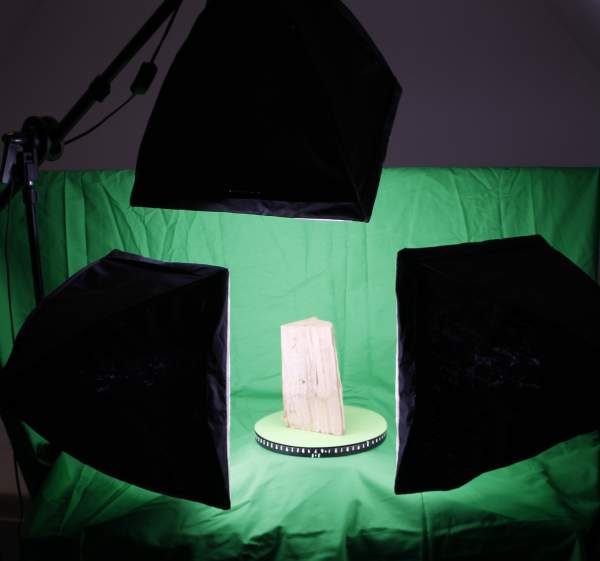
cheers,
oli
@rray
I´ve used a Canon 550D with a 18-55 zoom lens. Nothing fancy. And here is a foto of my setup.
cheers,
oli
Founder of www.si-community.com
http://www.pixelpanic.de
http://www.pixelpanic.de
-
Hirazi Blue

- Administrator
- Posts: 5113
- Joined: 04 Jun 2009, 10:15
Re: RND Photogrammetry "Chopped Wood"
Looks very nice and very convincing! 
Did you use Agisofts professional or standard edition?
And what did the underlying/untextured mesh look like,
i.e how much detail stems from the textures?
;)
Did you use Agisofts professional or standard edition?
And what did the underlying/untextured mesh look like,
i.e how much detail stems from the textures?
;)
Stay safe, sane & healthy!
-
owei
- Administrator
- Posts: 840
- Joined: 03 Jun 2009, 15:25
- Location: Siegen/Germany
Re: RND Photogrammetry "Chopped Wood"
Thanks Hirazi!
I used the standard edition of Photoscan, wich does really a great job, I think.
I´ll try to do small making of, if I get some time to do so. the mesh with 200k polygons is not that high density, so, much of the detail comes with the textures. Currently working on an other piece of wood tha will end up with 500k polygons. Let´s see, how that one look ;)
Here are some screenshot from the actial one.
cheers,
oli
I used the standard edition of Photoscan, wich does really a great job, I think.
I´ll try to do small making of, if I get some time to do so. the mesh with 200k polygons is not that high density, so, much of the detail comes with the textures. Currently working on an other piece of wood tha will end up with 500k polygons. Let´s see, how that one look ;)
Here are some screenshot from the actial one.
cheers,
oli
You do not have the required permissions to view the files attached to this post.
Founder of www.si-community.com
http://www.pixelpanic.de
http://www.pixelpanic.de
-
Bullit
- Moderator
- Posts: 2621
- Joined: 24 May 2012, 07:44
Re: RND Photogrammetry "Chopped Wood"
Just noticed this post. Looks great.
-
Rork

- Posts: 1359
- Joined: 09 Jul 2009, 06:59
- Location: Close to The Hague, Netherlands
Re: RND Photogrammetry "Chopped Wood"
Hi Oli,
Looks great! It's great fun to play with these tools, isn't it?
The only thing the standard version of Photoscan is missing, is a way to align your mesh to a 0,0,0 point in space, and level out the rotation.
Every new mesh from PhotoScan will import in a slightly different rotation and location. This makes it hard to align multiple versions of a mesh in SI.
At least, that's our experience ;-)
cheers!
rob
Looks great! It's great fun to play with these tools, isn't it?
The only thing the standard version of Photoscan is missing, is a way to align your mesh to a 0,0,0 point in space, and level out the rotation.
Every new mesh from PhotoScan will import in a slightly different rotation and location. This makes it hard to align multiple versions of a mesh in SI.
At least, that's our experience ;-)
cheers!
rob
SI UI tutorials: Toolbar http://goo.gl/iYOL0l | Custom Layout http://goo.gl/6iP5xQ | RenderManager View http://goo.gl/b4ZkjQ
So long, and thanks for all the Fish!!
So long, and thanks for all the Fish!!
-
FXDude

- Posts: 1145
- Joined: 19 Jun 2012, 19:59
Re: RND Photogrammetry "Chopped Wood"
Even if most of the detail comes from the texture, it's seems enough to get all the sharp edges in the bark and things.
Making that look like a darn real peice of wood!


Making that look like a darn real peice of wood!
-
julius
- Posts: 248
- Joined: 12 Jun 2009, 08:56
Re: RND Photogrammetry "Chopped Wood"
great !
how much time did you need to finalise your model ?
how much time did you need to finalise your model ?
-
Rork
- Posts: 1359
- Joined: 09 Jul 2009, 06:59
- Location: Close to The Hague, Netherlands
Re: RND Photogrammetry "Chopped Wood"
Some stuff & tips on photography, unreal related, but useful for people who like to look into this:
https://www.unrealengine.com/blog/imper ... perfection
https://www.unrealengine.com/blog/imper ... ion-part-2
cheers!
rob
https://www.unrealengine.com/blog/imper ... perfection
https://www.unrealengine.com/blog/imper ... ion-part-2
cheers!
rob
SI UI tutorials: Toolbar http://goo.gl/iYOL0l | Custom Layout http://goo.gl/6iP5xQ | RenderManager View http://goo.gl/b4ZkjQ
So long, and thanks for all the Fish!!
So long, and thanks for all the Fish!!