








































Hi
The studio I am at the moment uses SI in it's pipeline. I usually feed it with Lightwave models, but I would like to be part of it and am trying to grasp the best modeling practices in SI in terms of speed and control. I am posting because sometimes when moving to another software there's the mistake of trying to make it work like the previous and missing a whole world of features and good mindset. So what's the mindset around SI for modeling speed and control? Recomended readings?
As for my POV I'll trow some operations/features around:
-"Connect" Basically splits polygons on selected opposing vertices/edges or if neighbor polygons are selected. It splits edges if an edge is selected in isolation. I feel like all this is present in SI but quite split over several tools.
-Pictrix plugins and others have a snap system that not only snaps to elements but also to element's axis coordinates (Align on X, etc) and set up guides. SI native snapping system looks great, I'm just missing this line reference snap.
-Align vertices Equidistantly" to select some vertices and have them aligned to custom axis and evenly spaced.
Thanks for any highlights.
Cheers
Best modeling practices on SI for a LW user?
-
Mathaeus

- Posts: 1778
- Joined: 08 Jun 2009, 19:11
- Location: Zagreb, Croatia
Re: Best modeling practices on SI for a LW user?
just some very personal favorites:
- shrink wrap. Today it's present in another apps too, but I think only in Softimage you can apply it directly from component selection (from point, polygons or so), so it's literally two clicks operation. I've used it for all sort of modeling, especially hard surface. For example, create a copy of of hull, before adding details - later on, no big deal to fix the inconsistencies, by shrink - wrapping to subdivided hull.
If you have Shrink Wrap op above modeling, in stack, you can use it interactively, as "post process" to modeling work.
- bevel . Beside standard usage, can do interesting patterns, when it's applied to vertices.
- relax (smooth, but it tries to keep the volume)
From addons
- RC tools for all sorts of selection
- Taut, aligns edges in straight line
- shrink wrap. Today it's present in another apps too, but I think only in Softimage you can apply it directly from component selection (from point, polygons or so), so it's literally two clicks operation. I've used it for all sort of modeling, especially hard surface. For example, create a copy of of hull, before adding details - later on, no big deal to fix the inconsistencies, by shrink - wrapping to subdivided hull.
If you have Shrink Wrap op above modeling, in stack, you can use it interactively, as "post process" to modeling work.
- bevel . Beside standard usage, can do interesting patterns, when it's applied to vertices.
- relax (smooth, but it tries to keep the volume)
From addons
- RC tools for all sorts of selection
- Taut, aligns edges in straight line
-
mattmos

- Posts: 445
- Joined: 02 Dec 2009, 15:59
Re: Best modeling practices on SI for a LW user?
Biggest workflow tool for me is sticky keys, just being able to go in and out of modelling tools temporarily feels 'right' for want of a better word. Others would be selecting rangs of edgeloops using the alt or shift and alt. Middle-mouse clicking on almost anything switches between last used tool/viewport or gives you different options. I've found curvature continuity (when adding edgeloops) to be very handy.
Connect sounds like just the split edge tool, with 2 edges selected?
As for extra plugins, the range of default primative shapes is quite basic so I'm a big fan of this:
http://www.boundingboxgames.com/tools/essgeo
Connect sounds like just the split edge tool, with 2 edges selected?
As for extra plugins, the range of default primative shapes is quite basic so I'm a big fan of this:
http://www.boundingboxgames.com/tools/essgeo
-
kiwimation
- Posts: 61
- Joined: 11 Jun 2009, 03:21
Re: Best modeling practices on SI for a LW user?
Tweak tool and general selection in SI
In lightwave you have to select a vertex, select the move tool, move the vertex, deslect the vertex and start again. Si you hit v for move, select the vertex, move it, select he next vertex move it etc so much faster.
In lightwave you have to select a vertex, select the move tool, move the vertex, deslect the vertex and start again. Si you hit v for move, select the vertex, move it, select he next vertex move it etc so much faster.
-
rray

- Moderator
- Posts: 1810
- Joined: 26 Sep 2009, 13:51
- Location: Bonn, Germany
Re: Best modeling practices on SI for a LW user?
modeling in SI is really fun overall esp. for organic forms. Really well thought through toolset. You'll find some construction helpers missing if you'll be doing hard surface modeling, but most can be worked around somehow.
A few examples of some "more than nice"-things-to-have:
* duplicate border edges to extrude, with the new edges selected
* ability to have different move/tweak tools each on its own hotkey, prepared in different setups
* use mouse wheel during soft selection transformations to adjust falloff radius/bias while the operation is "in motion"
* porportional transform tool to tweak silhouette
* the whole op stack marker concept, being able to model freely, even with existing UVs, maps and envelopes applied.
A few examples of some "more than nice"-things-to-have:
* duplicate border edges to extrude, with the new edges selected
* ability to have different move/tweak tools each on its own hotkey, prepared in different setups
* use mouse wheel during soft selection transformations to adjust falloff radius/bias while the operation is "in motion"
* porportional transform tool to tweak silhouette
* the whole op stack marker concept, being able to model freely, even with existing UVs, maps and envelopes applied.
softimage resources section updated Sep 26th 2026
-
Chris_TC
- Posts: 411
- Joined: 22 Mar 2010, 16:43
Re: Best modeling practices on SI for a LW user?
I select the edges I want and press Shift+D to subdivide down the middle (split and connect). This does not work with a polygon or vertex selection (Shift+D on a polygon selection subdivides in both directions).probiner wrote:-"Connect" Basically splits polygons on selected opposing vertices/edges or if neighbor polygons are selected. It splits edges if an edge is selected in isolation. I feel like all this is present in SI but quite split over several tools.
When connecting vertices I use the Add Edge tool. You can also use the Add Edge tool to manually split edges down the middle by holding Ctrl when clicking (this snaps to the center of the edge).
You'll probably want to look into Reference Planes (REF in your transform panel).-Pictrix plugins and others have a snap system that not only snaps to elements but also to element's axis coordinates (Align on X, etc) and set up guides. SI native snapping system looks great, I'm just missing this line reference snap.
-
probiner

- Posts: 127
- Joined: 17 Apr 2013, 09:52
Re: Best modeling practices on SI for a LW user?
Thanks for all the replies, I'll have a lot to chew to grow my SI modeling skills teeth but already using some of the tips here 
Decided to brute force a modeling job today, ehehe. The tweak tool has been showing really good.
Question: I use Alt key Navigation Option (D assigned to Transform Pivot) and apparently I don't lose any control with it. But there's one annoyance. Alt+Ctrl+click&drag (for S users it's S+Ctrl+click&drag) calls the Rectangular Zoom Tool, so I inadvertently mess my view all the time. Is there a way to remove this key combo? I noticed that in keyboard mapping>XSI it has no keys assigned, so I guess it's not the place to change it. As for now I have to Reset my view many times.
Anyway thanks a lot, between your tips and bothering colleges, I see a bright future
Off Topic: I noticed that sadly SI only supports Linear Edges for UV Interpolation, which usually produces some "rags" if you make your textures in Photoshop. Hopefully a Linear Corners implementation will be implemented.
Cheers
Decided to brute force a modeling job today, ehehe. The tweak tool has been showing really good.
Question: I use Alt key Navigation Option (D assigned to Transform Pivot) and apparently I don't lose any control with it. But there's one annoyance. Alt+Ctrl+click&drag (for S users it's S+Ctrl+click&drag) calls the Rectangular Zoom Tool, so I inadvertently mess my view all the time. Is there a way to remove this key combo? I noticed that in keyboard mapping>XSI it has no keys assigned, so I guess it's not the place to change it. As for now I have to Reset my view many times.
Anyway thanks a lot, between your tips and bothering colleges, I see a bright future
Off Topic: I noticed that sadly SI only supports Linear Edges for UV Interpolation, which usually produces some "rags" if you make your textures in Photoshop. Hopefully a Linear Corners implementation will be implemented.
Cheers
-
azurecgi
- Posts: 171
- Joined: 12 Jul 2011, 10:11
Re: Best modeling practices on SI for a LW user?
probiner wrote:Off Topic: I noticed that sadly SI only supports Linear Edges for UV Interpolation, which usually produces some "rags" if you make your textures in Photoshop. Hopefully a Linear Corners implementation will be implemented.Cheers

-
Richy
- Posts: 17
- Joined: 07 Apr 2010, 12:42
- Location: Lithuania
Re: Best modeling practices on SI for a LW user?
Some handy reference made by Kovalex.


-
probiner
- Posts: 127
- Joined: 17 Apr 2013, 09:52
Re: Best modeling practices on SI for a LW user?
@ Richy & Kovalex: Thanks that looks like a good sum-up to test around and feel comfortable with 
@azurecgi: I don't understant what is so funny...
I noticed there was a LW to XSI Quickstart Guide at xsibase (http://www.xsibase.com/users/Lightwave% ... kstart.pdf) but the site is down. Anyone has a dusty copy of the file in the HDD?
I ended up using LW to finish this job, but missing Proportional Editing and the Transform Pivot tool. They are quite good.
Cheers
@azurecgi: I don't understant what is so funny...
azurecgi wrote:probiner wrote:Off Topic: I noticed that sadly SI only supports Linear Edges for UV Interpolation, which usually produces some "rags" if you make your textures in Photoshop. Hopefully a Linear Corners implementation will be implemented.Cheers
I noticed there was a LW to XSI Quickstart Guide at xsibase (http://www.xsibase.com/users/Lightwave% ... kstart.pdf) but the site is down. Anyone has a dusty copy of the file in the HDD?
I ended up using LW to finish this job, but missing Proportional Editing and the Transform Pivot tool. They are quite good.
Cheers
-
azurecgi
- Posts: 171
- Joined: 12 Jul 2011, 10:11
Re: Best modeling practices on SI for a LW user?
What's so funny is the concept of the developers adding something as useful as this! Their track record over the last 2 releases makes it seem rather unlikelyprobiner wrote:@azurecgi: I don't understant what is so funny...azurecgi wrote:probiner wrote:Off Topic: I noticed that sadly SI only supports Linear Edges for UV Interpolation, which usually produces some "rags" if you make your textures in Photoshop. Hopefully a Linear Corners implementation will be implemented.Cheers

-
probiner
- Posts: 127
- Joined: 17 Apr 2013, 09:52
Re: Best modeling practices on SI for a LW user?
Oh so it's like SI is dying from a development pov? :/ Not quite the perspective I was looking for in a trasition, hhmm, though for the immediate time I can ignore this a just keep learning.azurecgi wrote:What's so funny is the concept of the developers adding something as useful as this! Their track record over the last 2 releases makes it seem rather unlikely
Anyway if we look at what is out there, which apps have been being developed steadily? Maya and Houdini?
Cheers
-
probiner
- Posts: 127
- Joined: 17 Apr 2013, 09:52
-
Chris_TC
- Posts: 411
- Joined: 22 Mar 2010, 16:43
Re: Best modeling practices on SI for a LW user?
No, there is no indication of this.probiner wrote:Oh so it's like SI is dying from a development pov? :/azurecgi wrote:What's so funny is the concept of the developers adding something as useful as this! Their track record over the last 2 releases makes it seem rather unlikely
-
probiner
- Posts: 127
- Joined: 17 Apr 2013, 09:52
Re: Best modeling practices on SI for a LW user?
Thanks for the website rray made it quit easy to find the plugins suggestedrray wrote:* duplicate border edges to extrude, with the new edges selected
This also works for polygons! Like LW's Extend plus. Great!
Must try this. There's a lot going on there: edge slide, weld points, soft brushing, point normal move.rray wrote:* ability to have different move/tweak tools each on its own hotkey, prepared in different setups
This one I don't get you mean the different stack zones? You say it perseveres UVs, nice.rray wrote:* the whole op stack marker concept, being able to model freely, even with existing UVs, maps and envelopes applied.
Some issues I've had:
A-Trying to take advantage of the OP stack I uses "Disable from here" on some Symmetrize Polygons operators and made my changes. Some times, don't know why. The changes are do are set above the the disabled operators (!) and striked out as disabled, even though I can see them. Cost me to redo things 2 times. If I freeze though I save that topology, but it breaks my stack workflow.
B-Asked a co-worker how does he copy and paste polygons from one object to the other or in the same object and his answer was to Extract and Merge for both cases. I found this very inefficient and clicky, specially because it's gonna mess object properties... Symmetrize Polygons, clunky, but just duplicates the polygons I need right there in the same object. How do you guys do it from object to object?
C-I can't generate easily good subdivision control edges and corners like this:
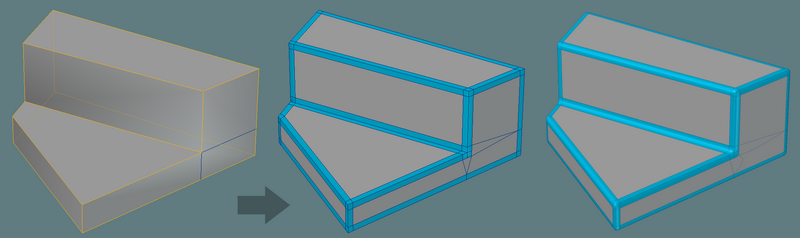
I select some edges and Bevel them with roundness set to 2 but the center edges doesn't stay where it was originally. If I use the Extrude (CTRL+D) on the same selection, the edges are correct, but the corners aren't tesselated like in Bevel
How do you guys do it?D-I can hide polygons but sometimes they keep "ghosting" and if I CTRL+A to select All the hidden ones get selected or if I go to Point component Mode some of the hidden polygons vertices are there. Strange.
Cheers
Last edited by probiner on 02 Jun 2013, 18:21, edited 1 time in total.
-
probiner
- Posts: 127
- Joined: 17 Apr 2013, 09:52
Re: Best modeling practices on SI for a LW user?
OK, I ended up figuring this one out. Boolean Union does the trick to copy polygons from one object to the otherprobiner wrote: B-Asked a co-worker how does he copy and paste polygons from one object to the other or in the same object and his answer was to Extract and Merge for both cases. I found this very inefficient and clicky, specially because it's gonna mess object properties... Symmetrize Polygons, clunky, but just duplicates the polygons I need right there in the same object. How do you guys do it from object to object?
Cheers