














Selecting through gizmo

General questions and troubleshooting SOFTIMAGE©
Jho
Posts: 49
Joined: 12 Feb 2013, 06:57

Selecting through gizmo

Post by Jho » 25 Apr 2013, 07:34

Hi.

Sorry for making a new thread for such a small thing, but I couldn't find an answer anywhere and it's bugging me a lot.

Is there a way to select objects through the gizmo?
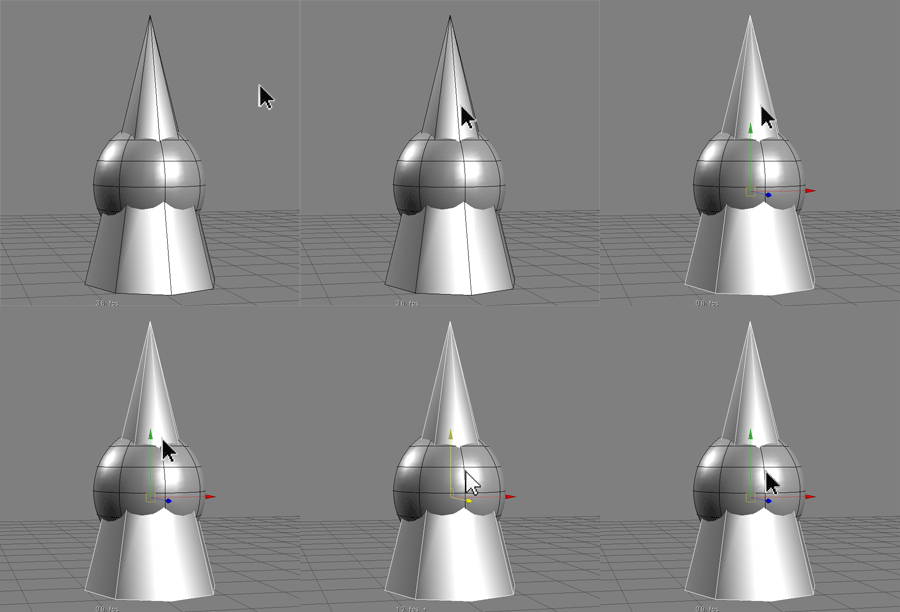
Image

Now it won't allow it for some reason. Especially in animation this can be annoying as for instance there are several control objects in the foot, and most of them have their pivot in the same place, so it can get tedious trying to select just the right one without touching the gizmo.
I do want the gizmo visible though. The default setting in Softimage, where I had to hit space bar all the time to deselect was not fun either.

grahamef
Posts: 281
Joined: 23 Jun 2009, 19:01

Re: Selecting through gizmo

Post by grahamef » 25 Apr 2013, 15:44

In your Tools/Transform preferences, you can set Click Outside Manipulator to "Select Tool". However, you still can't click between the axes because then Softimage thinks you want to move along the plane. If you want to be able to click between the axes and don't care about being able to move in the plane, then set Translate/Scale Interaction Style to "Axes Only".

Jho
Posts: 49
Joined: 12 Feb 2013, 06:57

Re: Selecting through gizmo

Post by Jho » 26 Apr 2013, 10:23

Awesome, thank you grahamef! That Axes only thing was just what I was looking for. Except that the problem still remains with the rotation tool.

The small yellow box in the middle of the gizmo is enough plane for me, it could be bigger though, but thats not such a big deal.