Issues concerning rigging & Face Robot...
-
minilogoguy18
- Posts: 110
- Joined: 24 Dec 2012, 18:34
Post
by minilogoguy18 » 26 Jan 2013, 23:33
Saw this in the documents
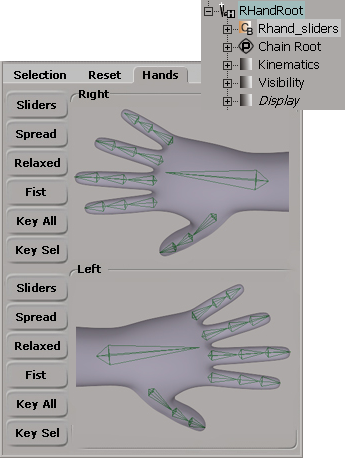
Wondering if anyone can point me in the right direction on how I could recreate this control setup for my custom rig?
Thanks for any info, in the meantime I'll try dissecting the preset biped.
-
EricTRocks
- Moderator
- Posts: 754
- Joined: 25 Nov 2009, 00:41
Post
by EricTRocks » 30 Jan 2013, 19:01
Hmm I replied yesterday but it seems not to have gone through...
The UI you are seeing is a Synoptic View. Essentially a web page shown in a special view inside the Softimage interface. It has an image as the background and then hot spots on it that are linked with scripts that do what you want when you click on the hot spot. Such as selecting parts of the rig / controllers. You can look in the documentation on how to create and edit them.
I will advise you to create the initial code in the Softimage Synoptic Editor then open the .html file in Dreamweaver if available. Dreamweaver has much better controls for creating the Synoptics and you can actually zoom in on the image when drawing the hot spots to be more precise.
Not sure if that was what you were asking or not as your question and images are a bit broad.
-
csaez
- Posts: 253
- Joined: 09 Jul 2012, 13:31
- Skype: csaezmargotta
- Location: Sydney, Australia
Post
by csaez » 31 Jan 2013, 10:07
EricTRocks wrote:I will advise you to create the initial code in the Softimage Synoptic Editor then open the .html file in Dreamweaver if available. Dreamweaver has much better controls for creating the Synoptics and you can actually zoom in on the image when drawing the hot spots to be more precise.
You can also draw polygons in the 3dview and parse that coordinates to a html file (way better than the standard synoptic editor), with some scripting skills is really easy build a decent synoptic generator.








































