Discussions about rendering in SOFTIMAGE©
-
Frank1000
- Posts: 349
- Joined: 16 Oct 2011, 12:13
- Skype: the2he
Post
by Frank1000 » 20 Jan 2013, 23:11
Hi,
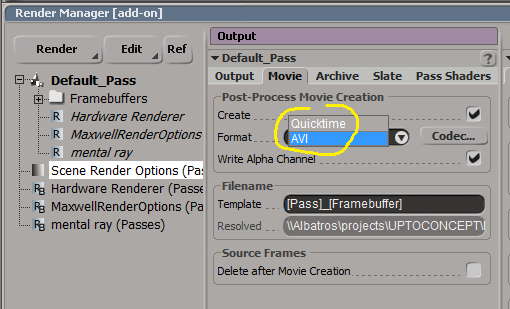
the render managers output / movie offers AVI and Quicktime with a few codec options. I was checking the manual and google to see if those settings are carved in stone or can be customized, since the system i'm working on has more codecs to offer that are more current, such as .f4v for example, which I tend to use when ever possible. I understand that .f4v is also just a container for H264 or whatever the correct name is, but the list of codecs offered in the Render output / movie makes a stone age impression to me.
Any hints around how to set this up better ?
Regards,
Frank
-
Rez007
- Posts: 609
- Joined: 12 Jan 2010, 14:51
- Location: Nevada
Post
by Rez007 » 21 Jan 2013, 01:07
Hi Frank,
I saw your post and I just wanted to give you a recommendation. If you are rendering out an animation, I would never render to a video format first. I personally would always render out to sequenced images (like .pngs/.pics/.exr/.tiff or something else) when you are rendering. Then, in the FXTree or another compositor, take the rendered image sequence and then export that to a movie format. The reason I mention this, is that if you are rendering straight to a movie format and something goes wrong, like a crash of something, then the file would most likely become corrupted and unreadable, leaving you to have to re-render everything again. Going the image route, you can just pick up where you left off and it also gives you greater flexability with post work.
(If you already know this, then sorry about the post, but I just wanted to share in case you didn't - it is a time saver)
-
luceric
- Posts: 1252
- Joined: 21 Jun 2009, 22:08
Post
by luceric » 21 Jan 2013, 02:43
Rez007 wrote:I saw your post and I just wanted to give you a recommendation. If you are rendering out an animation, I would never render to a video format first. I personally would always render out to sequenced images
that's what that render option does, it creates a movie after the image sequence has been created on disk.
-
luceric
- Posts: 1252
- Joined: 21 Jun 2009, 22:08
Post
by luceric » 21 Jan 2013, 02:48
Frank1000 wrote:I was checking the manual and google to see if those settings are carved in stone or can be customized, since the system i'm working on has more codecs to offer that are more current, such as .f4v for example, which I tend to use when ever possible. I understand that .f4v is also just a container for H264 or whatever the correct name is, but the list of codecs offered in the Render output / movie makes a stone age impression to me
well .f4v is not a codec, it's a totally different file format, Flash Video, and Softimage doesn't support creating Flash videos. Quicktime might have a h.264 codec on windows (I can't recall if it's the one that's Mac-only), otherwise you'll have to do the conversion in other application. Anyway, h264 is lossy and meant for streaming, it's not a good choice for going to editing or compositing
-
Frank1000
- Posts: 349
- Joined: 16 Oct 2011, 12:13
- Skype: the2he
Post
by Frank1000 » 21 Jan 2013, 03:13
Hi Guys,
thx for replies. Ya sure, the movie shortcut is only for hardware render stuff that I like to use for quick animation checks, which I partly use in pre-editing as a preview and place holder for when i finally know what i want to render out in high quality.
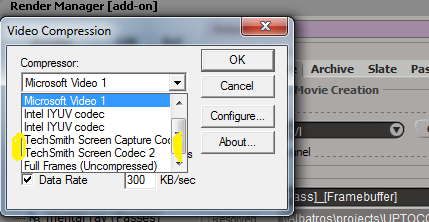
I was wondering how i possibly could add more codecs to the SI movie-out, because the existing codecs there are not really up to date. Since SI is so much extendable with everything, and I had recognized, that another codec had been recently added automatically when I installed a test of Camtasia.
-
Rork
- Posts: 1359
- Joined: 09 Jul 2009, 06:59
- Location: Close to The Hague, Netherlands
Post
by Rork » 21 Jan 2013, 09:22
it also depends on the Windows and Softimage version you're running.
If it's 64bit, you're very limited in codecs, due to the fact not many exist yet for x64.
And many will never be moved to x64 due to legacy.
Like everybody says, render in frames and convert to any codec later for video.
rob
-
Frank1000
- Posts: 349
- Joined: 16 Oct 2011, 12:13
- Skype: the2he
Post
by Frank1000 » 21 Jan 2013, 10:42
hmp, seems that's then the only doable way. For a movie making program its kinda wired that its so limited in directly having a built in function to combine pics to movies ... and instead needs one to take another sequence of steps that also costs time and concentration to achieve the goal. I also think, after creating a movie, there should be an auto-delete function (checkbox) for all pictures created, with a caching function to give you some time to redo, so you don't have to frequently do avoidable repeating cleanup tasks in cascade of output dirs. Just a thought.
-
Rork
- Posts: 1359
- Joined: 09 Jul 2009, 06:59
- Location: Close to The Hague, Netherlands
Post
by Rork » 21 Jan 2013, 11:16
well... it all depends on your workflow.
but most of us render in frames, and passes for compositing purposes.
so we can tweak the final result even more, as the rendered output most of the time isn't the end of things.
re-rendering of certain parts becomes very easy this way, instead of having going through the while timeline again.
mattes, changes of color, separated objects, you can't do this when rendring to final output.
and a checkbox is a BAD idea, what if the export somehow failed to produce a proper video, all your frames would be gone and you have to render again!!
If you want to render a video from your frames, use flipbook instead of directly from the renderer.
seriously... you'll thank us later ;-)
-
Frank1000
- Posts: 349
- Joined: 16 Oct 2011, 12:13
- Skype: the2he
Post
by Frank1000 » 21 Jan 2013, 20:13
Sure, that's correct. I had many different situations when it comes to rendering. Just in this project I started to make quick outlets for the video-editing and test look and feel etc. of the pre-hardware-rendering. It'd be a good thing to hit render and receive the movie ... sure there is many different other situations where I wouldn't need the quick pipeline.
-
luceric
- Posts: 1252
- Joined: 21 Jun 2009, 22:08
Post
by luceric » 21 Jan 2013, 22:04
you can write a script to render, convert and delete the pictures. the render option just calls a command to create the movie
-
Bullit
- Moderator
- Posts: 2621
- Joined: 24 May 2012, 07:44
Post
by Bullit » 22 Jan 2013, 02:49
The checkbox delete source frames after the movie creation in the screen shot in first post isn't for that?
-
Frank1000
- Posts: 349
- Joined: 16 Oct 2011, 12:13
- Skype: the2he
Post
by Frank1000 » 24 Jan 2013, 00:29
Script sounds cool, do you know if that can use other codecs on the system to create the movie in the right format ? Or can I only use the codecs that are offered from within SI ? Or are there codecs available to add to the system so that SI can use them ?
-
luceric
- Posts: 1252
- Joined: 21 Jun 2009, 22:08
Post
by luceric » 24 Jan 2013, 01:07
If you insist on using .avi, you can google for "vfw 64-bit codec" (VFW stands for Video for Windows) to find mode codecs.
If it's just for animation check, I think Quicktime already offers tons of codecs, and the more complicated codecs like h264 may just take more time to compress and end up being difficult to scrub in a video player because they are usually made for streaming and saving space for the web.








































