








































Shrink Wrap Along Curve
-
Falam
Shrink Wrap Along Curve
I want to create a shrink map along a curve effect, with each mesh a little offset from the next, so I have control which mesh, will nest within a mesh. Here is what I mean, there are two meshes, the mesh at the bottom of this example, I want to nest with the mesh at the top, while shrink wrapping to an object and following the the top part of the curve, as seen in the image. The shrink wrap compounds I found, are a little better then the vanilla shrink wrap found in Softimage, but missing some details.
-
rray

- Moderator
- Posts: 1810
- Joined: 26 Sep 2009, 13:51
- Location: Bonn, Germany
Re: Shrink Wrap Along Curve
I don't understand "nest". Is this still for the rope? I'd just complete the (straight) rope model by duplicate/merge, then applying a curve deform to the finished rope model. In case you want to prevent the individual pieces from deforming, look at the path constraint (duplicate model 10 times, constrain to path, enter something like L(0,100) into percentage box so the models get spread over the path)
softimage resources section updated Sep 26th 2026
-
Falam
Re: Shrink Wrap Along Curve
This doesn't have to do with the rope, the rope is a separate problemrray wrote:I don't understand "nest". Is this still for the rope? I'd just complete the (straight) rope model by duplicate/merge, then applying a curve deform to the finished rope model. In case you want to prevent the individual pieces from deforming, look at the path constraint (duplicate model 10 times, constrain to path, enter something like L(0,100) into percentage box so the models get spread over the path)
 This is what I mean by nest;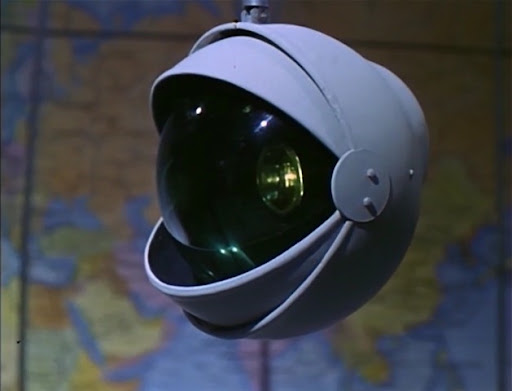
-
rray
- Moderator
- Posts: 1810
- Joined: 26 Sep 2009, 13:51
- Location: Bonn, Germany
Re: Shrink Wrap Along Curve
Oh ok I think what would help with understanding this was some kind of quick storyboard drawings of the final animation you're after.
softimage resources section updated Sep 26th 2026
-
Falam
Re: Shrink Wrap Along Curve
I sketched this up, I hope it helps explain ?rray wrote:Oh ok I think what would help with understanding this was some kind of quick storyboard drawings of the final animation you're after.

-
Jesse
- Posts: 30
- Joined: 18 Jun 2009, 19:51
Re: Shrink Wrap Along Curve
Not sure I understand why you are shrink wrapping? would a constraint along curve or a deform by curve be as good if not better? I may be having a hard time understanding this.
-
Falam
Re: Shrink Wrap Along Curve
The Eye image in a previous post has the eye lid follows the contours of the eye, that is why I want a shrink mapping effect to get a base shape. Then I want the eye lid sections, to animate along a curve with one part nesting within another part, take a look at the image in the earlier post, if the orb ball eye lids were to completely extract, they would nest within each other. Nested in other words, collapsed within.Jesse wrote:Not sure I understand why you are shrink wrapping? would a constraint along curve or a deform by curve be as good if not better? I may be having a hard time understanding this.
I could model the sections, but found that shrink wrap works better, except if you have a grid and you shrink map to a sphere the ray casting polygons on the grid will directly shrink wrap, around the corners of a sphere it won't. I know this last part may be a bit confusing to understand. I could show in a image, if need be.
-
Kerro Perro

- Posts: 306
- Joined: 20 Mar 2011, 00:01
- Location: Leiden, the Netherlands
Re: Shrink Wrap Along Curve
Why don't you just extract a poly section from the eye (sphere), you will only have to scale it up a little bit and you will have the base shape you need.
And as for rigging it with a shape like that you don't need any curves - it's not deforming is it? - you just need to set the pivot point on the side of the eye and it will "slide" over it.
Simplify man!
And as for rigging it with a shape like that you don't need any curves - it's not deforming is it? - you just need to set the pivot point on the side of the eye and it will "slide" over it.
Simplify man!
-
Falam
Re: Shrink Wrap Along Curve
The eye I constructed has alot of mechanical parts modeled in, extracting a polygon section, will just follow the contour of the eye, to the exact science, I don't want that. I want the contour of the eye to be followed, just not exactly, shrink wrapping would do exactly want want except it has a flaw, simple test, shrink wrap a grid to a sphere, you'll notice the left and right edge of the grid, doesn't shrink wrap. I don't understand when you say "set the pivot point on the side of and eye and it will slide over it", can you elaborate ?Kerro Perro wrote:Why don't you just extract a poly section from the eye (sphere), you will only have to scale it up a little bit and you will have the base shape you need.
And as for rigging it with a shape like that you don't need any curves - it's not deforming is it? - you just need to set the pivot point on the side of the eye and it will "slide" over it.
Simplify man!
-
Kerro Perro
- Posts: 306
- Joined: 20 Mar 2011, 00:01
- Location: Leiden, the Netherlands
Re: Shrink Wrap Along Curve
A: then get a sphere that matches the eye's size, extract a poly section from that. That way you decide how dense you want the base to be as well. Oh and flip it on it's side so the poles are left and right instead of up and down - that should give you good geo.
B: if you match the "lid" center to the center of the eyeball it will "slide" over it when you rotate it in y.
If you're still stuck lemme know and i can mock something up for you tomorrow, going to bed now ;)
B: if you match the "lid" center to the center of the eyeball it will "slide" over it when you rotate it in y.
If you're still stuck lemme know and i can mock something up for you tomorrow, going to bed now ;)
-
Falam
Re: Shrink Wrap Along Curve
I'm stuck with what you had suggested which I made boldKerro Perro wrote:A: then get a sphere that matches the eye's size, extract a poly section from that. That way you decide how dense you want the base to be as well. Oh and flip it on it's side so the poles are left and right instead of up and down - that should give you good geo.
B: if you match the "lid" center to the center of the eyeball it will "slide" over it when you rotate it in y.
If you're still stuck lemme know and i can mock something up for you tomorrow, going to bed now ;)
-
Kerro Perro
- Posts: 306
- Joined: 20 Mar 2011, 00:01
- Location: Leiden, the Netherlands
Re: Shrink Wrap Along Curve
This is rough but should be able to refine it.
You do not have the required permissions to view the files attached to this post.
-
Falam
Re: Shrink Wrap Along Curve
This is exactly what I had done, originallyKerro Perro wrote: This is rough but should be able to refine it.
I'll update and show what was frustrating me