








































Look really good (but hate zbrush retopology tool) :
http://www.cmivfx.com/tutorials/view/49 ... +Animation
New softimage ChrisT Tutorial from CMIVFX
-
j3st3r
- Posts: 121
- Joined: 11 Jun 2009, 07:13
Re: New softimage ChrisT Tutorial from CMIVFX
actually the new topology tools are really impressive in ZBrush 4r4, but I'd still finalize them in Topogun or XSI
-
Nizar

- Posts: 725
- Joined: 30 May 2010, 20:54
Re: New softimage ChrisT Tutorial from CMIVFX
My love for zbrush ended some mounths ago, when I finally recognized this software slow my process. Now I'm using it only for his unbeatable sculpts tools and brushes and only for organic modelling. For the rest I'm more fast and precise when modelling in poly by poly, and more learn and more I feel better in traditional poly modelling software like softimage and not with sculpt software like zbrush.
The strange thing is I'm a traditional sculptor, and my first software was zbrush (the marvel 2.0 release).
I think to day retopology is abused. It is a necessary process for translate fine detail in a mesh, but I see many people doing a sculpt for simple thing and then retopology it, when can be done directly poly by poly saving a step (the sculpt process) sometime very laborious. Obviously is all strictly IMHO
The strange thing is I'm a traditional sculptor, and my first software was zbrush (the marvel 2.0 release).
I think to day retopology is abused. It is a necessary process for translate fine detail in a mesh, but I see many people doing a sculpt for simple thing and then retopology it, when can be done directly poly by poly saving a step (the sculpt process) sometime very laborious. Obviously is all strictly IMHO
-
j3st3r
- Posts: 121
- Joined: 11 Jun 2009, 07:13
Re: New softimage ChrisT Tutorial from CMIVFX
Funny, I am just on the opposite...For mechanical stuff I use Softimage, but I'm a lot faster with ZBrush for anything else...so I spend more and more working in ZBrush and less in Softimage...and I'm a lot faster...Strictly IMHO...This way I separated the artistic stuff from the technical (polygonal modelling), and retopo takes very very small time...
-
Nizar
- Posts: 725
- Joined: 30 May 2010, 20:54
Re: New softimage ChrisT Tutorial from CMIVFX
Everyone has different perspective about the some problem, so this don't surprise me. the most important thing is doing your job better and faster, using everything you need or like.
I found so many weird things in zbrush... last one was about zbrush smoothing sharp edge, very frustrating (doing a mesh in softimage or what else, apply some edge support for your sharp edge, import in zbrush, apply one or two subdivision level (by default ctrl+d) then turn back at level one, and you sharp edge disappear because zbrush relax, arbitrary, your support edge... disable SMT don't work, disabling it your subdivision is very bad, the only thing is adding support edge loop directly in zbrush but the process is so weird... Sculptris, blender, modo and last I tried mudbox don't have this issue.
I found so many weird things in zbrush... last one was about zbrush smoothing sharp edge, very frustrating (doing a mesh in softimage or what else, apply some edge support for your sharp edge, import in zbrush, apply one or two subdivision level (by default ctrl+d) then turn back at level one, and you sharp edge disappear because zbrush relax, arbitrary, your support edge... disable SMT don't work, disabling it your subdivision is very bad, the only thing is adding support edge loop directly in zbrush but the process is so weird... Sculptris, blender, modo and last I tried mudbox don't have this issue.
-
j3st3r
- Posts: 121
- Joined: 11 Jun 2009, 07:13
Re: New softimage ChrisT Tutorial from CMIVFX
Actually neither of the mentioned programs does support hard edges...Hard edge is just an internal setting telling the subdivision engine if the edge is creased or not. Since we work in a mixed Softimage and Max environment we don't rely upon hard edges, since max has no hard edge, it has smoothing groups...
You mentioned blender, sculptris, and modo...neither of them handles hard edges, and neither of them can work with that insane amount of polygons...I use rather bevels, or duplicateing edges where I want sharp edges in ZBrush...
You mentioned blender, sculptris, and modo...neither of them handles hard edges, and neither of them can work with that insane amount of polygons...I use rather bevels, or duplicateing edges where I want sharp edges in ZBrush...
-
Nizar
- Posts: 725
- Joined: 30 May 2010, 20:54
Re: New softimage ChrisT Tutorial from CMIVFX
I don't mean crease edge, or apply a weight to it, I mean apply edge support for obtain sharp edge when you smoothing.
I post some image for example, a simple imported mesh from softimage:
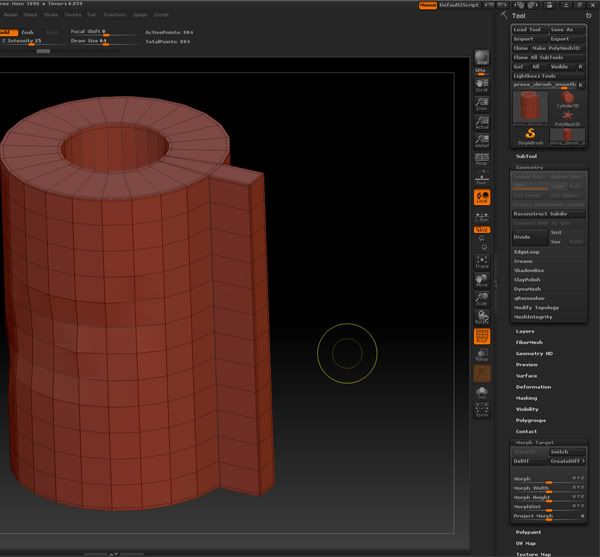
I don't if you can see the edges support
apply one or more subdivision level, and then turn back to level 1 :
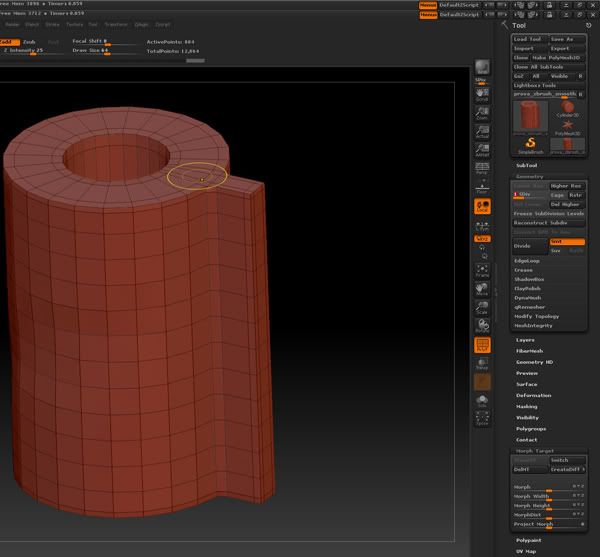
as you can see mesh is smoothed, if you doing the some in mudbox or modo, when turn back to level one the mesh is intact.
Sorry for my poor english, hope you understood what I mean.
I post some image for example, a simple imported mesh from softimage:
I don't if you can see the edges support
apply one or more subdivision level, and then turn back to level 1 :
as you can see mesh is smoothed, if you doing the some in mudbox or modo, when turn back to level one the mesh is intact.
Sorry for my poor english, hope you understood what I mean.
-
j3st3r
- Posts: 121
- Joined: 11 Jun 2009, 07:13
Re: New softimage ChrisT Tutorial from CMIVFX
Yep I see. That's why there is a button called Cage...I think. I understand your issue. But you might always overwrite your level 0 mesh...For this, it is suggested to store your unsmoothed mesh as a morph target, prior to any subdivision, etc.
-
origin

- Posts: 619
- Joined: 09 Jun 2009, 09:59
- Location: warsaw
Re: New softimage ChrisT Tutorial from CMIVFX
Yep store a morph target... zbrush is full of those click-this-before-you-do-that fucking workflow 'enhacements', probably thats why there are gazillion tutorials for it.
-
Nizar
- Posts: 725
- Joined: 30 May 2010, 20:54
Re: New softimage ChrisT Tutorial from CMIVFX
Where is the "Cage" button? Yes, the base mesh is not so important, but sometime you need to turn back to your application for add a loop and want using your level 0. Is not a so great issue (more odious some issue had when tried convert polypaint to texture...j3st3r wrote:Yep I see. That's why there is a button called Cage...I think. I understand your issue. But you might always overwrite your level 0 mesh...For this, it is suggested to store your unsmoothed mesh as a morph target, prior to any subdivision, etc.
Yep store a morph target... zbrush is full of those click-this-before-you-do-that fucking workflow 'enhacements', probably thats why there are gazillion tutorials for it.
yes, I think so. In any case sculpt in zbrush organic shape is great.