














RENAMED: NPR techniques in Softimage

Discussions about rendering in SOFTIMAGE©
User avatar
Kerro Perro
Posts: 306
Joined: 20 Mar 2011, 00:01
Location: Leiden, the Netherlands

RENAMED: NPR techniques in Softimage

Post by Kerro Perro » 25 Jun 2012, 14:27

Hi guys, i desperately want to copy this technique over to Softimage: http://blenderartists.org/forum/showthr ... olygons...

It's a great way of getting a "painted surface" on an object without it swimming or flickering like you get when you apply a Photoshop filter or one of the "painterly effects" in the FXTree. I really want to use it for this project : http://kerroperro.deviantart.com/art/An ... -309193910 - i got the comp looking just the way i want for stills but as soon as i animate it starts to swim #-o

I'm trying to understand what the blenderguys are talking about but i'm afraid i'm not quite getting it.... I'm currently seeing if i just comp together a buch of displaced renders i will get a similair effect but i would be great in one pass! They say "it can be done in almost any CG package, without any special render code or features specific to non-realistic rendering." and i'm sure it can be done in Softimage - if only i wasn't so dim... :-s

EDIT: ok i found the "origin" of technique and it is very nicely explained in this video:


2nd EDIT: i found other techniques that also seem really great - see below..

Last edited by Kerro Perro on 26 Jun 2012, 16:14, edited 2 times in total.

User avatar
rray
Moderator
Posts: 1810
Joined: 26 Sep 2009, 13:51
Location: Bonn, Germany

Re: Painting with polygons like the Blenderboys ;)

Post by rray » 25 Jun 2012, 14:46

I did something like it a while ago:

http://area.autodesk.com/forum/autodesk ... creating-/

(posting under the equally weird username rainyday)
softimage resources section updated Sep 26th 2026

User avatar
Kerro Perro
Posts: 306
Joined: 20 Mar 2011, 00:01
Location: Leiden, the Netherlands

Re: Painting with polygons like the Blenderboys ;)

Post by Kerro Perro » 25 Jun 2012, 14:53

rray wrote:I did something like it a while ago:

http://area.autodesk.com/forum/autodesk ... creating-/

(posting under the equally weird username rainyday)
I did my post-edit before i saw your response ;)

Cool thanks rray!! Looks like your compound already does the trick! You have no idea how happy that prospect makes me! :x

Gonna try it out to-night!

PS: rainyday and r-r-ay are a-ok! ;)

User avatar
Kerro Perro
Posts: 306
Joined: 20 Mar 2011, 00:01
Location: Leiden, the Netherlands

Re: Painting with polygons like the Blenderboys ;)

Post by Kerro Perro » 25 Jun 2012, 18:13

Hi rray i'm not quite getting it to work...
Painty_Main.0009.jpg
First off the grain: can't seem to get rid of it unless i push the AA sampling way up (>50)

But the thing i really want it to do is affect the shadows, that's the look i'm going for and your images on the AREA seem to have that as well, any idea what i'm doing wrong? Or maybe you have an example scene i can study?
You do not have the required permissions to view the files attached to this post.

User avatar
Kerro Perro
Posts: 306
Joined: 20 Mar 2011, 00:01
Location: Leiden, the Netherlands

Re: Painting with polygons like the Blenderboys ;)

Post by Kerro Perro » 25 Jun 2012, 19:00

Not to spam but just to show the look i want:

Image

I just want a very subtle watercolor feel that "crackles" the lighting - but also doesn't flicker in animation....

User avatar
rray
Moderator
Posts: 1810
Joined: 26 Sep 2009, 13:51
Location: Bonn, Germany

Re: Painting with polygons like the Blenderboys ;)

Post by rray » 26 Jun 2012, 15:31

That last picture looks great, not sure why in your render before the inside isn't displaced more. Make sure incidence is at 0, and you'll probably need quite contrasty lighting. I'll look into it some more when I have more time

Btw, for toon shading these are cool: Todd Akita series at youtube
softimage resources section updated Sep 26th 2026

User avatar
Kerro Perro
Posts: 306
Joined: 20 Mar 2011, 00:01
Location: Leiden, the Netherlands

Re: Painting with polygons like the Blenderboys ;)

Post by Kerro Perro » 26 Jun 2012, 15:55

Hi Ray, i hadn't tried it with incidende at 0 for some reasom - must try that...

But just to be really annoying i wonder if you (in your infinte wisdon ;) ) can advise me on this: the LitSphere method

http://andy.moonbase.net/archives/tag/art

http://www.cs.utah.edu/npr/papers/LitSphere_HTML/

I can get some interesting effects using the Gray Ball directly into the material port but i'm wondering how i can make it respond to lights - that should be possible right? Mudbox seems to use this method and you can change the lighting in that? I tried just plugging an incidence into the grayball's multiplier port but that didn't quite do it...

Can you help me out on this? :ympray:

EDIT: also there are these techniques in this slideshow: http://www.slideshare.net/pakital35
Light Warping and Radiance Scaling - they seem very interesting too... i might have to move or rename this thread to a more generalized quest for NPR..

Oh and yeah i've seen the Tod Akita, the line work in the image i posted is pretty much based of that, great stuff indeed!

EDIT 2: more cool NPR stuff: http://www.valvesoftware.com/publicatio ... tress2.pdf
i understand most of this except "warped diffuse" - looks cool...

User avatar
rray
Moderator
Posts: 1810
Joined: 26 Sep 2009, 13:51
Location: Bonn, Germany

Re: RENAMED: NPR techniques in Softimage

Post by rray » 26 Jun 2012, 18:38

Warped diffuse looks like a gradient, where an incident node ( set to lights&180 degree) is plugged into
softimage resources section updated Sep 26th 2026

User avatar
rray
Moderator
Posts: 1810
Joined: 26 Sep 2009, 13:51
Location: Bonn, Germany

Re: RENAMED: NPR techniques in Softimage

Post by rray » 26 Jun 2012, 18:46

About the Litsphere, I don't know.. In theory it should be light independent, but maybe in mudbox they're doing something like rotating the sampled sphere around...

You could try this, make 2 grayball shaders, one lit and the other that looks like it's completly in the shadow - then mix those using a lambert/or "half lambert"&gradient as the weight of the mix 2 color node.
softimage resources section updated Sep 26th 2026

User avatar
rray
Moderator
Posts: 1810
Joined: 26 Sep 2009, 13:51
Location: Bonn, Germany

Re: RENAMED: NPR techniques in Softimage

Post by rray » 26 Jun 2012, 19:03

It's an interesting subject for sure, did you find something like a gray ball library?
softimage resources section updated Sep 26th 2026

User avatar
Kerro Perro
Posts: 306
Joined: 20 Mar 2011, 00:01
Location: Leiden, the Netherlands

Re: RENAMED: NPR techniques in Softimage

Post by Kerro Perro » 26 Jun 2012, 19:14

Cool - i guess i was using the "warped diffuse" already, been doing some test with comping different lighting setups over each other:
Capture1.PNG
The 2 (or 3?) litSpheres method was in my mid as well except my idea was cruder - yours seems better, i was going to ask you about a half-lambert but i found this: http://www.derekjenson.com/

As for a lit sphere library there seems to be many online and in this AREA thread they offer 2 libraries : http://area.autodesk.com/forum/Autodesk ... e-library/ but i plan on making my own.
You do not have the required permissions to view the files attached to this post.

User avatar
Kerro Perro
Posts: 306
Joined: 20 Mar 2011, 00:01
Location: Leiden, the Netherlands

Re: RENAMED: NPR techniques in Softimage

Post by Kerro Perro » 26 Jun 2012, 19:23

More interesting stuff:


User avatar
rray
Moderator
Posts: 1810
Joined: 26 Sep 2009, 13:51
Location: Bonn, Germany

Re: RENAMED: NPR techniques in Softimage

Post by rray » 26 Jun 2012, 19:33

Thanks for the link. Half lambert can also be done with the incidident node set to Mode=Surface/Lights and Shading range=180-degree

was testing a bit too...
hallo.jpg
You do not have the required permissions to view the files attached to this post.
softimage resources section updated Sep 26th 2026

User avatar
Kerro Perro
Posts: 306
Joined: 20 Mar 2011, 00:01
Location: Leiden, the Netherlands

Re: RENAMED: NPR techniques in Softimage

Post by Kerro Perro » 26 Jun 2012, 22:56

Cool that you're also trying some of this stuff - if the Painting with ICE and your texture instancer are any indication you will soon come up with a kick-ass NPR shader! :P

That's one funky model there, seems fun to animate with - i like the "banding" on the shading on the neck - gradient?

I hit a bit of a snag with the Lit Sphere:


It is camera-bound so the texture crawls on the surface when it moves - great for some looks but not what i want - i want the texture to stay on the model and only have the shadow and maybe highlights a bit disturbed. In a temporal coherent way of course > hey ya gotta push it until it's right? (or until you've lost too much sleep and have to move on! ;-) )

I do have a method now: render map the lit sphere/grayball result and use those textures to get the desired result. Have tried that a little already and see some progress, plugging the rendermapped texture in the bump is somewhat interesting. But i could also just use it as a texture - although then it looks a little Clone Wars and i hate that show ;-)

Anyhoo there is a drawback and that is that i would have to rendermap every single object in the scene, if i have to i will but lemme check if there's another way: Is there a way to "freeze" the lit sphere? I realize it can't be done with grayball applied directly to the meshes but you said something about the enviroment sphere moving in sync > can i set up an sphere say around my character and then sample that back?

Also seeing the nodes in that Half-Lambert setup by Derek Jenson had me thinking: if you can sample surface vector and light direction isn't there a way to perturb that data? Like you can in ICE with "Turbulize around Value"? Maybe i'm trying to re-invent the wheel here (your Painting with ICE) but i dig the idea of only shadows getting funky. This is simple with something like phong specular but shadows are little more resistent to getting messed with apparently..

User avatar
Mathaeus
Posts: 1778
Joined: 08 Jun 2009, 19:11
Location: Zagreb, Croatia

Re: RENAMED: NPR techniques in Softimage

Post by Mathaeus » 27 Jun 2012, 09:20

Kerro Perro wrote:
Also seeing the nodes in that Half-Lambert setup by Derek Jenson had me thinking: if you can sample surface vector and light direction isn't there a way to perturb that data? Like you can in ICE with "Turbulize around Value"?
yes of course, usually this method is called "bump map", or "normal map" :) - exactly, only surface shading normal is modified, that should be enough.
Anyway just to add another one, 99% an reinventing the wheel, but anyway:
there is also a trick to smooth normals across many polygons, not just one. In ICE, take normals from neighbors and 'self' normal, take an array average of both, repeat the execution several times, convert result to vertex color ( should be 'float' type).
In render tree, convert vertex color to vector, plug this into 'normal' input of Bump Map Generator, set 'Base Normal' in Bump Map Generator to "relative to input normal". Result is a some kind of subsurface-like effect.

User avatar
Kerro Perro
Posts: 306
Joined: 20 Mar 2011, 00:01
Location: Leiden, the Netherlands

Re: RENAMED: NPR techniques in Softimage

Post by Kerro Perro » 27 Jun 2012, 10:11

Mathaeus wrote:
Kerro Perro wrote:
Also seeing the nodes in that Half-Lambert setup by Derek Jenson had me thinking: if you can sample surface vector and light direction isn't there a way to perturb that data? Like you can in ICE with "Turbulize around Value"?
yes of course, usually this method is called "bump map", or "normal map" :) - exactly, only surface shading normal is modified, that should be enough.

Anyway just to add another one, 99% an reinventing the wheel, but anyway:
there is also a trick to smooth normals across many polygons, not just one. In ICE, take normals from neighbors and 'self' normal, take an array average of both, repeat the execution several times, convert result to vertex color ( should be 'float' type).
In render tree, convert vertex color to vector, plug this into 'normal' input of Bump Map Generator, set 'Base Normal' in Bump Map Generator to "relative to input normal". Result is a some kind of subsurface-like effect.
Yeah sorry it was a little late and and i was a little burned out when i posted that last night - i've been working on this look for about 6 days straight...

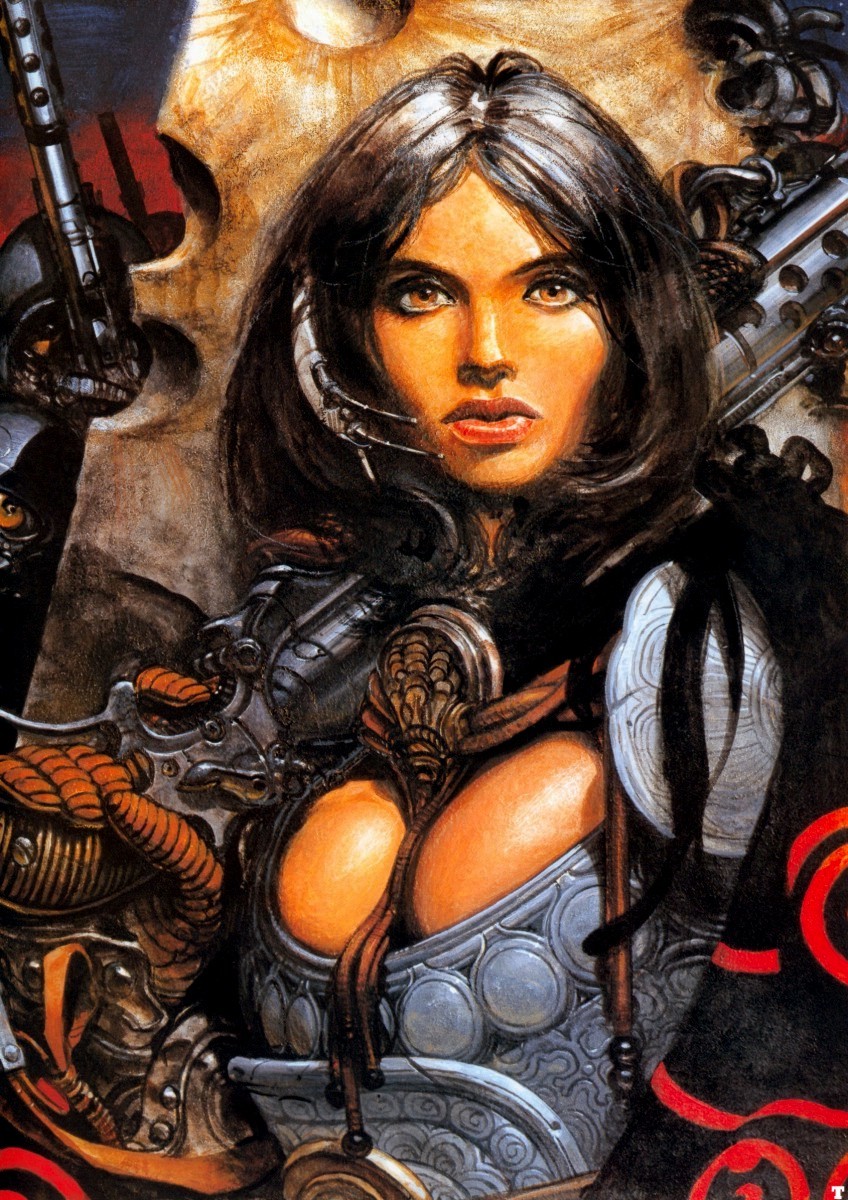
I just experimented with bump and displacement and you can get some nice "thick" oil/acryl painted look but not quite what i want, i'm looking to get this feel:

Image

(Jaun Gimenez - my favourite artist!)

I think the best way is to comp a shadow pass (or several) with a texture map pass - as i said i think i can get it right with a rendermapped lit sphere but am still intrigued by "freezing" the gray ball on multiple objects (i.e. as override material or group material) - not only for this project but as a way of texturing many objects in an unigue way, i really like the way it follows contours and stuff, ideal for easily getting meshes to look "painted" on, if you pause the youtube example you will see what i mean.