








































Hi there
Here is an alpha version of a paint tool that doesn't need weight maps to deform a mesh.
to install, copy the dll in your plugin directory then
run this jscript command in the script editor: paintDeform()
Some things you need to know:
You probably need to install the last Microsoft Visual C++ Redistributable Package
http://www.microsoft.com/en-us/download ... x?id=30679
-only 64bit for now
-shift to smooth
-RMB Menu to chose between the other brushes
-"e" drag to change the brush opacity
-"r" drag to change the brush radius
-it only work on freezed objects
next step:
-symmetry
-option for non additive painting
-flatten brush
Have fun
LivePaint plugin
Plugins linking to this thread: (hide)
LivePaint
Here is an alpha version of a paint tool that doesn't need weight maps to deform a
mesh. It's far from finished but is usable for painting push and smoothing. To install,
copy the dll in your plugin directory then run this jscript command in the script
editor: LivePaint()
Some things you need to know: only 32bit for now RMB to choose between push and smooth shift drag to change the brushopacity control drag to change the brush radius it only work on freezed objects undo will revert the object to its state before freeze there are many bugs, use it at your own risk — Have fun.
local backup: LivePaint.32.dll LivePaint.64.dll (copy to a Plugins directory)
Some things you need to know: only 32bit for now RMB to choose between push and smooth shift drag to change the brushopacity control drag to change the brush radius it only work on freezed objects undo will revert the object to its state before freeze there are many bugs, use it at your own risk — Have fun.
local backup: LivePaint.32.dll LivePaint.64.dll (copy to a Plugins directory)
-
Ahmidou
- Posts: 106
- Joined: 04 Jan 2010, 13:00
LivePaint plugin
You do not have the required permissions to view the files attached to this post.
Last edited by Ahmidou on 18 May 2013, 14:01, edited 5 times in total.
-
camer
- Posts: 5
- Joined: 09 Jun 2009, 00:03
Re: LivePaint plugin
not work ( softimage 2012 sp1 x32)
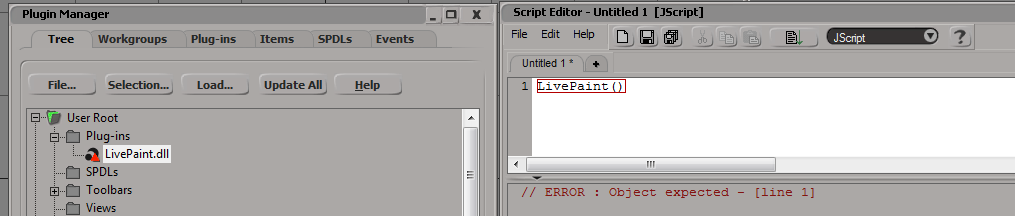
-
Rork

- Posts: 1359
- Joined: 09 Jul 2009, 06:59
- Location: Close to The Hague, Netherlands
Re: LivePaint plugin
Saw your post on the mailinglist, very nice tool!
I'll have to wait for a 64bit compile, but looking forward to play with it!!
I'll have to wait for a 64bit compile, but looking forward to play with it!!
SI UI tutorials: Toolbar http://goo.gl/iYOL0l | Custom Layout http://goo.gl/6iP5xQ | RenderManager View http://goo.gl/b4ZkjQ
So long, and thanks for all the Fish!!
So long, and thanks for all the Fish!!
-
origin

- Posts: 619
- Joined: 09 Jun 2009, 09:59
- Location: warsaw
-
Memag

- Posts: 339
- Joined: 08 Aug 2010, 23:37
- Location: Tits
Re: LivePaint plugin
Did anyone test it on 32bit?
Thanks.
Thanks.
-
Ahmidou
- Posts: 106
- Joined: 04 Jan 2010, 13:00
Re: LivePaint plugin
Hi it's working fine here, I also tryed it on my laptop, no problem. You're maby missing some lib dependanciescamer wrote:not work ( softimage 2012 sp1 x32)
-
Ahmidou
- Posts: 106
- Joined: 04 Jan 2010, 13:00
Re: LivePaint plugin
I updated the plugin with a 64 bit version, tell me if it's working
-
rray

- Moderator
- Posts: 1810
- Joined: 26 Sep 2009, 13:51
- Location: Bonn, Germany

-
j3st3r
- Posts: 121
- Joined: 11 Jun 2009, 07:13
Re: LivePaint plugin
Crashed on my 2012SP1 x64 
I had an object frozen. It'd be nice to have feedback of my opacity (Displayinfo?) also. The idea is nice, and I WANT IT NOW!!!!!!!!!
So, the crash happens always on undo. Few advices:
- the opacity range should be limited between 0-100
- it would be nice to make the behavior Zbrush or Mudbox like
- LMB stroke pushes outward
- ALT LMB stroke pushes inward
- SHIFT LMB stroke smooth the geometry
- undo should undo the last stroke...
Cheers
Jester
I had an object frozen. It'd be nice to have feedback of my opacity (Displayinfo?) also. The idea is nice, and I WANT IT NOW!!!!!!!!!
So, the crash happens always on undo. Few advices:
- the opacity range should be limited between 0-100
- it would be nice to make the behavior Zbrush or Mudbox like
- LMB stroke pushes outward
- ALT LMB stroke pushes inward
- SHIFT LMB stroke smooth the geometry
- undo should undo the last stroke...
Cheers
Jester
-
Ahmidou
- Posts: 106
- Joined: 04 Jan 2010, 13:00
Re: LivePaint plugin
Hi Jester
Thanks for the feedback, I know about this crash, it occurs undoing while the tool is still active.
Undo is not that easy to get as the putPositionArray function is quite limited (I think it's for performance reasons)
so I have to find a workarounds.
All tour requests are already on my list, be patient ;)
Cheers
Ahmidou
Thanks for the feedback, I know about this crash, it occurs undoing while the tool is still active.
Undo is not that easy to get as the putPositionArray function is quite limited (I think it's for performance reasons)
so I have to find a workarounds.
All tour requests are already on my list, be patient ;)
Cheers
Ahmidou
-
Ramon
- Posts: 111
- Joined: 19 Aug 2010, 20:47
Re: LivePaint plugin
gr8! wait for stability version and undo function
-
calmasacow
- Posts: 52
- Joined: 17 Jun 2009, 15:53
Re: LivePaint plugin
Ok I can see the circle representing radius. But cant Adjust it R doesnt work.
The colors of the verts highlight but I dont see any deformation.
Some explanation of how the tools works perhaps I'm doing something wrong.
Oh and in 2012 SP1 x64 on exit I get:
' ERROR : 2268 - This function is missing:
' <function: LivePaint_DoExitTool>
' <path: \\3DM-SPACEDOCK\XSI_workgroups\3Dmotif_2012\Application\Plugins\LivePaint.64.dll>
'
The colors of the verts highlight but I dont see any deformation.
Some explanation of how the tools works perhaps I'm doing something wrong.
Oh and in 2012 SP1 x64 on exit I get:
' ERROR : 2268 - This function is missing:
' <function: LivePaint_DoExitTool>
' <path: \\3DM-SPACEDOCK\XSI_workgroups\3Dmotif_2012\Application\Plugins\LivePaint.64.dll>
'
-
Memag
- Posts: 339
- Joined: 08 Aug 2010, 23:37
- Location: Tits
Re: LivePaint plugin
calmasacow wrote:Ok I can see the circle representing radius. But cant Adjust it R doesnt work.
The colors of the verts highlight but I dont see any deformation.
Some explanation of how the tools works perhaps I'm doing something wrong.
Oh and in 2012 SP1 x64 on exit I get:
' ERROR : 2268 - This function is missing:
' <function: LivePaint_DoExitTool>
' <path: \\3DM-SPACEDOCK\XSI_workgroups\3Dmotif_2012\Application\Plugins\LivePaint.64.dll>
'
Ahmidou said there are some things you need to know:
-RMB to chose between push and smooth
-shift drag to change the brushopacity
-control drag to change the brush radius
-it only work on freezed objects
-undo will revert the object to it's state befor freeze
-there are many bugs, use it at your own risk
-
Ahmidou
- Posts: 106
- Joined: 04 Jan 2010, 13:00
Re: LivePaint plugin
I forgot to say that the exit is not implemented yet, and the brush opacity/size update
is not working fine yet (but it's working).
I think I have found something for the undo and the crash.
A new version will come soon.
Regards
A.
is not working fine yet (but it's working).
I think I have found something for the undo and the crash.
A new version will come soon.
Regards
A.
-
anyheart
- Posts: 46
- Joined: 26 Jun 2011, 04:42
Re: LivePaint plugin
camer wrote:not work ( softimage 2012 sp1 x32)
win7 x64 si2012 sp1
the same problem . ..
