














Void World - free modeler revamped

New plugins, tools etc.
User avatar
Memag
Posts: 339
Joined: 08 Aug 2010, 23:37
Location: Tits

Void World - free modeler revamped

Post by Memag » 23 Jul 2011, 16:08

It took some time for me to realise that this UI revamped software, that looked familiar, is indeed the (DigitalFossils old ugly page) VoidWorld.
It was very ugly IMO. I still think the logo could be refined ,at least.

VoidWorld is (free) 3d modeler, much like a crossbreed of Silo, Modo, Max and who knows what else. Best of all worlds, it seems.
Plenty of great tools, advanced workflow and options and is highly open to customization and user suggestions.

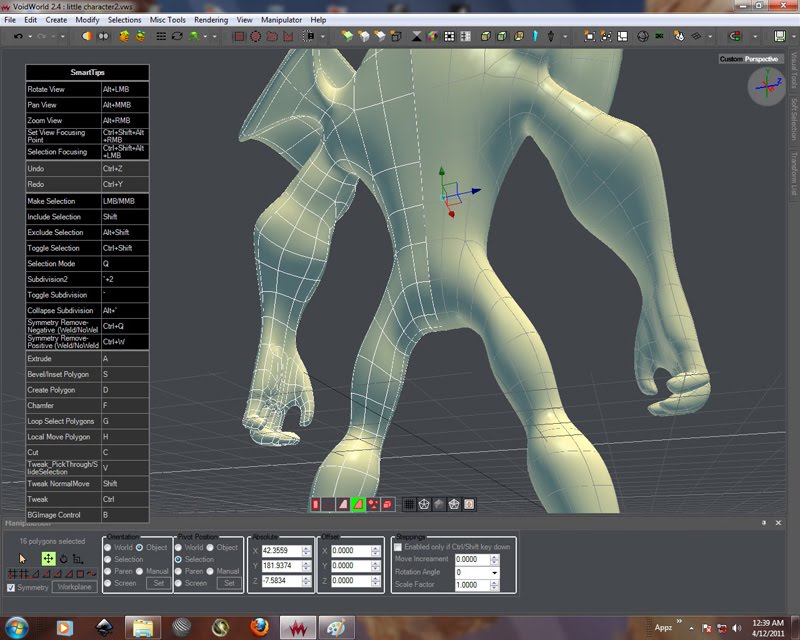
Image Image


Main thread can be read here, with all the updates, new tools, manuals,videos, users etc.
Some youtube channels- http://www.youtube.com/user/eltepedia, http://www.youtube.com/user/mrshikun

Latest update can be snitched here. But check the main thread for future updates as download link changes.

It was intended to be modeling,rigging and animation project, but the developers decided to start out small and polish modeling part first.
They are doing excellent. Looks VERY promising. Works even better.

Great to have additional choices.


PS. If you have issues with win7 64bit, try installing these files.
Last edited by Memag on 24 Jul 2011, 20:25, edited 3 times in total.

User avatar
Hirazi Blue
Administrator
Posts: 5113
Joined: 04 Jun 2009, 10:15

Re: Void World - free modeler revamped

Post by Hirazi Blue » 23 Jul 2011, 21:05

Interesting, will check it out tomorrow... ;)
Stay safe, sane & healthy!

User avatar
Memag
Posts: 339
Joined: 08 Aug 2010, 23:37
Location: Tits

Re: Void World - free modeler revamped

Post by Memag » 25 Jul 2011, 23:47

Thought to chime in after spending some time with it, this is a really nice application.
I'm sure Modo is fine these days, considering modeling tools, but this smokes Silo IMHO hands down.

Cut is simply amazing, turn quad flow*,tweak(of course works with all transform gizmos), easy stepped loop/ring select,
split loop and slide with regular control/middle split/ maintain curvature, chamfer hard/chop/refine flat/refine round*,
edge path select, subcomponents and loop/ring relax-optimize-tidy up*, topological symmetry calculation, bridges, double click loop/ring selection, bones, pre-selection , highlighting etc.
Really a BUNCH of nice standard and smart tools. It shines in various operations, mouse interactive, no too much fuss with PPG's which I like very much.
UI is better then when they started ,but I still think it's not quite there yet. So is performance, at least on win7 64bit.
I spent some time setting up shortcuts and streamline tools™ workflow ("multiple tools and commands can be packed into ONE StreamLine Tool.This brings great benefits into workflow.")
and now it flows along.

*
Image
Image
Image

Yes, UI looks like it has 3dsmax body parts, but guts are there and brain is of those alien ones.
Talentless creator listens to users and implements what people need.
Damn, I wish I was a programmer (instead of failed artist), I'd port it all to XSI, if SDK would allow me to. L-)


Seriously now, save some $$$ and try it. Won't hurt too much.

:-@ out
Last edited by Memag on 27 Jul 2011, 00:09, edited 1 time in total.

User avatar
Hirazi Blue
Administrator
Posts: 5113
Joined: 04 Jun 2009, 10:15

Re: Void World - free modeler revamped

Post by Hirazi Blue » 26 Jul 2011, 18:15

Haven't had time to play with it, but I like the fact that there is at least some written documentation included with the software. The lack of written documentation is one of the things I like least about many freeware/open source products.
;)
Stay safe, sane & healthy!

User avatar
Memag
Posts: 339
Joined: 08 Aug 2010, 23:37
Location: Tits

Re: Void World - free modeler revamped

Post by Memag » 26 Jul 2011, 18:25

Yes, not extensive but pretty much sufficient tool descriptions.
Some really nice ideas and tools in there.

User avatar
Nizar
Posts: 725
Joined: 30 May 2010, 20:54

Re: Void World - free modeler revamped

Post by Nizar » 02 Aug 2011, 11:06

Damn, I wish I was a programmer (instead of failed artist)
[-x hey, you are one of my favorite artist! :)

Void world look nice, but learn a new application... really tired, now I'm not so young :)

User avatar
Memag
Posts: 339
Joined: 08 Aug 2010, 23:37
Location: Tits

Re: Void World - free modeler revamped

Post by Memag » 02 Aug 2011, 11:32

Hey thanks Nizar.

VW is really not that complicated or demanding. I found Modo complicated, Silo was a breeze. This is leaning to Silo's ease of use. You'll pick it up in hours.
Tools are basically all and the same as in any application, except you have more control and methods of the same tool.
If you know extrude from XSI, extrude in VW will be fast delight since you have orienting of polygons, dragging with mouse, local or average normal extrusion.
You don't need to drag the sliders at all.This is just one example.
I have cursor extrude (with orienting), normal extrude, inset and bevel available in just one shortcut (Z). Every operation is executed by different mouse button click.
You can bind a operation to wheel up and wheel down, so I also have "turn quad flow" for wheel up, and "relax" for wheel down movement. So pretty much 6 tools in one shortcut! Nice!
You can define tools like this and customize it however you want. Pretty powerful.
Selecting every n-th polygon in loop is as easy as dragging your mouse from starting poly to second (in the loop).
Maybe a hint for future RC tools. Softimage doesn't have such selection method if I remember correctly.
Selection and modeling tools are on par with the big boys, if not more refined in some cases.

Really great application.

User avatar
Nizar
Posts: 725
Joined: 30 May 2010, 20:54

Re: Void World - free modeler revamped

Post by Nizar » 02 Aug 2011, 11:48

I found Modo complicated, Silo was a breeze.
Agree, modo seems complicated at first, but I like it (in any case, prefer modelling in XSI or, really better, in Silo). Best Modo selling point, IMO, is the fast and really simply (and efficacy) Rendering engine (after the first, traumatic impact, Shader Tree is not so bad)
You don't need to drag the sliders at all.This is just one example.
This is something I like in Silo (and hate to do in Modo... tooo much mouse click and enter/exit tool). Hate slider/tab, I think this break modelling workflow.

If void world has the some "rollover" selection like silo for apply tool I give a try.

Interface seems to me like a Silo/old blender GUI. is it opensource?

User avatar
Memag
Posts: 339
Joined: 08 Aug 2010, 23:37
Location: Tits

Re: Void World - free modeler revamped

Post by Memag » 02 Aug 2011, 12:35

Nizar wrote: This is something I like in Silo (and hate to do in Modo... tooo much mouse click and enter/exit tool). Hate slider/tab, I think this break modelling workflow.
If void world has the some "rollover" selection like silo for apply tool I give a try.

Interface seems to me like a Silo/old blender GUI. is it opensource?
Well there is still parameter control if you want to do it like that ,but it's mainly viewport interactive modeling.
Yes, VW has pre-selection and highlighting, multi-component mode etc...you can hover over the poly and do your operation , don't need to select it if you're in hurry.


I just suggested additional symmetry option and surface tool (for retopo).
Well he already wrote the "orient tool", and also implemented it in extrude with cursor control, which is fabulous.
He also wrote "consider neighbor/surface" for soft selection/proportional in XSI, day after I have put a suggestion.
Reminds me of 3dcoat,as far as use interaction and development. Oh, it has 3dcoat direct link button as well.

It is like Silo, only with updates.
It is public development, for a long time now. You can use it for you r work,of course.
But as soon as Istonia polishes it I think there will be a price tag. I doubt it will be hefty.

User avatar
Nizar
Posts: 725
Joined: 30 May 2010, 20:54

Re: Void World - free modeler revamped

Post by Nizar » 03 Aug 2011, 10:28

Arrrgh! Downloaded yesterday and play a bit with it. It is not Silo, it is a evolution! I like very much many idea behind it, tweak tool is better (love it). Don't understood cut tool, it make many undesired edge.
Definitely, I like it, my only problem hate cage application and jump to modelling in one, then export, rendering in other

User avatar
Memag
Posts: 339
Joined: 08 Aug 2010, 23:37
Location: Tits

Re: Void World - free modeler revamped

Post by Memag » 03 Aug 2011, 12:15

Cut tool always looks for the best way to make a quad polygon.
If you left click it will do the cut as you probably did, if you middle click it will not make any additional edges and will do a simple cut.
If you left click in screen space and drag across the object it will do the cut across the object, like a knife tool in softimage.
If you right click in screen space and drag across the object it will do the knife and it will disconnect the cut edges,so you have two separate sides in the object, much like a real life knife would do.

If you select some edges (orange) and do a cut (black in the middle), you'll see it will automatically try to avoid triangle and will add edges (red) where needed.
If you press "cut" two more times , additional splits will be made (blue, not too accurate cause I added them in photoshop) , VW will keep the edges you first selected so you can split them as much as you want.

Image

You can do that in XSI with subdivide edge, of course , but you need to specify the number of cuts in the PPG , and it doesn't solve triangles/quads on the fly.

Try turn quad flow and edge path select, extrude with half orient (cursor control), gap selections etc. Pretty nice and packed tool.
Cheers!