








































Hi,
How can I render render cycle channel I saw in the render region (AO Channel for example) ?
Didn't found how to create a cycle render pass.
All the best
Phil
Cycles for Softimage
Plugins linking to this thread: (hide)
 Sycles 2.4.1
 V 2.4.1 released August 2026 —
This is a full integration of the Blender Cycles renderer into XSI. Version 2.4 is compiled with Cycles 5.3 (state of July 2026). The second generation of the addon (since 2.0) is a complete rewrite and works with Softimage 2015 SP2.
New since version 2.1.3 (from the github release notes): 2.4.1: fixed incorrect transforms of instances when the master model has rotation or scale, repacked with missing DLLs 2.4: Cycles 5.3. New Alpha parameter for the ImageTexture node, Sky Texture with Single and Multiple Scattering models, Thin Film for Metallic and Glass BSDF, new Raycast and Scene Time nodes, OSL custom camera, Linear 3D curve shape (also as per-object override), Geometry Approximation mode for NURBS surfaces, Render Time pass (CPU), texture optimisation (resolution, limit, tx texture cache) and a detailed scene export timing log 2.4: renders MaterialX shader trees from the MaterialXSI addon (converted to OSL). Note: OSL shading works on CPU render devices only 2.3.x: Cycles 4.5, OSL support is back, new Metallic BSDF and Set Normal nodes, phase function for Scatter Volume, Diffuse Roughness for Principled BSDF, more Noise Texture types, subdivision with motion deform, per-frame texture images, rendering of NURBS surfaces and curves (via custom properties), tile rendering, fixed shadow catcher, vector input ports for OSL shaders 2.2.x: nodes of Blender 4.3 (Ray Portal BSDF, Sheen BSDF, Gabor Texture, redesigned Principled BSDF), current Blender OCIO color profiles, custom velocity grids for VDB primitives, Particle Info node fed by ICE attributes, denoising of the final passes with OIDN or OptiX
Supported Softimage features (quoted from the download page):
Polygon meshes and hair geometry Texture coordinates Vertex colors Shaderball preview. For materials, shader nodes and texture nodes Basic limited support of the following built-in Softimage shader nodes: Phong, Lambert, Hair Shading, Image, converters between vector, color and scalar Ambience global environment light Limited support of built-in Softimage light sources Model instances ICE strands geometry ICE pointcloud instances ICE geometry attributes (vector, color and scalar) with context per-point and per-object Volume rendering. In particular supports emFluid, Explosia FX and openVDB for Softimage volumes Special VDB Primitive for rendering vdbs without ICE Output multilayered exr file with all rendered passes Rendermaps
The following features from Cycles itself are supported: CPU and GPU rendering. In particular multidevices are supported. This allows you to use cpu and gpu simultaneously. The libraries for GPU rendering are included in the package. All Cycles shader nodes OSL shaders OpenColorIO profiles (Blender profile included) All Cycles output passes (Combined, Depth, Normal and so on) Color and value shader AOVs Lightgroups Cycles camera properties, in particular all panorama modes Cycles light sources Denoising by using Open Image Denoise and OptiX denoiser
For more information, full documentation and a list of the available Cycles nodes see the download page linked below. There is no local backup because the addon is still frequently updated - the plugin can be downloaded on Shekn's github releases. The source code is available on github there as well.
This is a full integration of the Blender Cycles renderer into XSI. Version 2.4 is compiled with Cycles 5.3 (state of July 2026). The second generation of the addon (since 2.0) is a complete rewrite and works with Softimage 2015 SP2.
New since version 2.1.3 (from the github release notes): 2.4.1: fixed incorrect transforms of instances when the master model has rotation or scale, repacked with missing DLLs 2.4: Cycles 5.3. New Alpha parameter for the ImageTexture node, Sky Texture with Single and Multiple Scattering models, Thin Film for Metallic and Glass BSDF, new Raycast and Scene Time nodes, OSL custom camera, Linear 3D curve shape (also as per-object override), Geometry Approximation mode for NURBS surfaces, Render Time pass (CPU), texture optimisation (resolution, limit, tx texture cache) and a detailed scene export timing log 2.4: renders MaterialX shader trees from the MaterialXSI addon (converted to OSL). Note: OSL shading works on CPU render devices only 2.3.x: Cycles 4.5, OSL support is back, new Metallic BSDF and Set Normal nodes, phase function for Scatter Volume, Diffuse Roughness for Principled BSDF, more Noise Texture types, subdivision with motion deform, per-frame texture images, rendering of NURBS surfaces and curves (via custom properties), tile rendering, fixed shadow catcher, vector input ports for OSL shaders 2.2.x: nodes of Blender 4.3 (Ray Portal BSDF, Sheen BSDF, Gabor Texture, redesigned Principled BSDF), current Blender OCIO color profiles, custom velocity grids for VDB primitives, Particle Info node fed by ICE attributes, denoising of the final passes with OIDN or OptiX
Supported Softimage features (quoted from the download page):
Polygon meshes and hair geometry Texture coordinates Vertex colors Shaderball preview. For materials, shader nodes and texture nodes Basic limited support of the following built-in Softimage shader nodes: Phong, Lambert, Hair Shading, Image, converters between vector, color and scalar Ambience global environment light Limited support of built-in Softimage light sources Model instances ICE strands geometry ICE pointcloud instances ICE geometry attributes (vector, color and scalar) with context per-point and per-object Volume rendering. In particular supports emFluid, Explosia FX and openVDB for Softimage volumes Special VDB Primitive for rendering vdbs without ICE Output multilayered exr file with all rendered passes Rendermaps
The following features from Cycles itself are supported: CPU and GPU rendering. In particular multidevices are supported. This allows you to use cpu and gpu simultaneously. The libraries for GPU rendering are included in the package. All Cycles shader nodes OSL shaders OpenColorIO profiles (Blender profile included) All Cycles output passes (Combined, Depth, Normal and so on) Color and value shader AOVs Lightgroups Cycles camera properties, in particular all panorama modes Cycles light sources Denoising by using Open Image Denoise and OptiX denoiser
For more information, full documentation and a list of the available Cycles nodes see the download page linked below. There is no local backup because the addon is still frequently updated - the plugin can be downloaded on Shekn's github releases. The source code is available on github there as well.
download page: https://ssoftadd.github.io/syclesSecondGenPage.html / wiki with tutorials / all of Shekn's plugins / author on vimeo / si-community thread
-
wireframex

- Posts: 425
- Joined: 08 Jun 2009, 21:02
- Location: France
Re: Cycles for Softimage
"without mastery, power is nothing" - Softimage Addict User
CPU 3990x 128 Threads / 2 x 3090 RTX - 24 Go / 96 Go memory
CPU 3990x 128 Threads / 2 x 3090 RTX - 24 Go / 96 Go memory
-
Shekn
- Posts: 254
- Joined: 30 Dec 2016, 19:18
Re: Cycles for Softimage
As usual. Add the channel Cycles AO to the Render Channels Output list in the Render Manager window.
There is a difference between render channels and render passes. Channels can be rendered at once in one render session. Passes rendered in different render sessions. Usually each pass is a copy of the same scene but with overrided shaders, or may be with hided or unhided objects and so on. So, it's better to use render channels, when it's possible. If the renderer can not generate channel with required data, then may be it's possible to create it by using AOV Color and AOV Value shader nodes. Render passes should be used only when other two approaches are not working.
There is a difference between render channels and render passes. Channels can be rendered at once in one render session. Passes rendered in different render sessions. Usually each pass is a copy of the same scene but with overrided shaders, or may be with hided or unhided objects and so on. So, it's better to use render channels, when it's possible. If the renderer can not generate channel with required data, then may be it's possible to create it by using AOV Color and AOV Value shader nodes. Render passes should be used only when other two approaches are not working.
-
wireframex
- Posts: 425
- Joined: 08 Jun 2009, 21:02
- Location: France
Re: Cycles for Softimage
Thanks Shekn 
"without mastery, power is nothing" - Softimage Addict User
CPU 3990x 128 Threads / 2 x 3090 RTX - 24 Go / 96 Go memory
CPU 3990x 128 Threads / 2 x 3090 RTX - 24 Go / 96 Go memory
-
nospitters
- Posts: 52
- Joined: 06 Jul 2012, 16:08
- Location: bremen, germany
Re: Cycles for Softimage
hi shekn,
firstly, happy new year!!!
couldnt find any email on your github sycles page, so i am writing here...
i know, this is a SI forum, but are there maybe any plans to port sycles to maya (mycles?)?
another question is, if it is possible to use custom ocio configs with sycles? since it uses the SI render view, i couldnt find out how...or maybe by implement a custom sycles render view?
firstly, happy new year!!!
couldnt find any email on your github sycles page, so i am writing here...
i know, this is a SI forum, but are there maybe any plans to port sycles to maya (mycles?)?
another question is, if it is possible to use custom ocio configs with sycles? since it uses the SI render view, i couldnt find out how...or maybe by implement a custom sycles render view?
-
xsisoft
- Posts: 152
- Joined: 01 Nov 2018, 10:13
-
Shekn
- Posts: 254
- Joined: 30 Dec 2016, 19:18
Re: Cycles for Softimage
About ocio configs. There are two different color management systems. The first one is default Softamage system. It placed in File - Preferences - Display - Color Management. Parameters in this section affects only to previews, but not to saved render images. It will be better to disable checkbox "Apply to Render regions and viewports". As I understand, default Softimge system does not supports ocio config files. The second color management system is internal Sycles system. It based on OpenColorIO library and so, supports ocio configs. To enable it change parameter Mode in render settings - Color Management tab to the value OpenColorIO Config. After that the renderer will be use the file config.ocio, placed in Addon Directory/Data/ColorManagement. I don't fully understand the structure of this file, but it contains all parameters for devices, views and looks, which can be used in Sycles Color Management settings. Use can change this config.ocio file, and in principle it should works.
-
nospitters
- Posts: 52
- Joined: 06 Jul 2012, 16:08
- Location: bremen, germany
Re: Cycles for Softimage
thanx.
i found it...
seems to work like in blender, by placing the custom ocio config and luts into the colormanagement-folder...(where the addon is installed)
btw, when using the gpu, i see 2 devices (normal gpu and the same one with _optix prefix)...
do i have to also change from embree to bvh2/optix to render with gpu?
using _optix prefix will crash xsi, the only that seems to work for me is bvh2 and only selecting gpu without _optix preview...
also combining cpu and gpu will crash xsi.
denoising only works with nlm or intel denoiser...
are this optix options only for rtx cards?
i found it...
seems to work like in blender, by placing the custom ocio config and luts into the colormanagement-folder...(where the addon is installed)
btw, when using the gpu, i see 2 devices (normal gpu and the same one with _optix prefix)...
do i have to also change from embree to bvh2/optix to render with gpu?
using _optix prefix will crash xsi, the only that seems to work for me is bvh2 and only selecting gpu without _optix preview...
also combining cpu and gpu will crash xsi.
denoising only works with nlm or intel denoiser...
are this optix options only for rtx cards?
-
Shekn
- Posts: 254
- Joined: 30 Dec 2016, 19:18
Re: Cycles for Softimage
Combined mode cpu+gpu should works without any crashes. In this combined mode gpu should be used without _optix prefix. Optix version of the gpu can be used separately. In other cases (gpu+gpu_optix or cpu+gpu_optix) I also have crashes, so, these combination of devices are blocked in the renderer. Any bvh layout should works in any combinations. In any case, the reasons of crashes are on Blender side. Optix mode is experimental. May be with next releases they will improve it, and this mode will be works more stable.
I don't know what the difference between two gpu devices (with _optix prefix and without it). May be there are differences between these devices on gpus with rtx cores, but on old gpus the gpu_optix is some virtual device, which emulated by ordinary gpu.
I don't know what the difference between two gpu devices (with _optix prefix and without it). May be there are differences between these devices on gpus with rtx cores, but on old gpus the gpu_optix is some virtual device, which emulated by ordinary gpu.
-
avalon_70

- Posts: 45
- Joined: 09 Jan 2021, 13:59
Re: Cycles for Softimage
Hi everyone.
First I would like to congratulate you on this fantastic plugin, it works very well!
I discovered it by chance, just last week ..
After the well-deserved compliments I would like to make a suggestion and make a small request ..
The suggestion is simply to highlight both in this forum (I would say on the first page) and on the github site of the problem with the DLL tbb.dll, because I went crazy to install Sycles..
The request. if possible, use the softimage image node to load the textures, in order to display the texture in viewport with relative repetition and perhaps color corrections.
At the moment I have created a compound (which I attach if it were useful to someone) that allows me to view the texture. If this is not possible, someone has an idea if it is possible to connect the two paths of the images loaded from the image node of softimage to that of cycles (at the moment I have to do it manually).
Thanks..
First I would like to congratulate you on this fantastic plugin, it works very well!
I discovered it by chance, just last week ..
After the well-deserved compliments I would like to make a suggestion and make a small request ..
The suggestion is simply to highlight both in this forum (I would say on the first page) and on the github site of the problem with the DLL tbb.dll, because I went crazy to install Sycles..
The request. if possible, use the softimage image node to load the textures, in order to display the texture in viewport with relative repetition and perhaps color corrections.
At the moment I have created a compound (which I attach if it were useful to someone) that allows me to view the texture. If this is not possible, someone has an idea if it is possible to connect the two paths of the images loaded from the image node of softimage to that of cycles (at the moment I have to do it manually).
Thanks..
You do not have the required permissions to view the files attached to this post.
-
Shekn
- Posts: 254
- Joined: 30 Dec 2016, 19:18
Re: Cycles for Softimage
Ok, I will try to implement the recognition of the default image node in the next update.Wherenever it will be.
-
opoppopopp
- Posts: 213
- Joined: 16 Jun 2009, 04:23
Re: Cycles for Softimage
If " recognition of the default image node" implemented, It will be a HUGE feature.Shekn wrote: 19 Jan 2021, 11:46 Ok, I will try to implement the recognition of the default image node in the next update.Wherenever it will be.

so that we can drag drop pictures, preview, relative path, etc.
And most importantly, we can "Copy external file to the current Project" when "save as", I rely on this old feature so much...
You do not have the required permissions to view the files attached to this post.
-
I3D

- Posts: 122
- Joined: 12 Aug 2009, 16:15
- Skype: ironic3d
Re: Cycles for Softimage
Hi Shken
I ran into a problem with the sky and sun following the guide. Apologies if this was posted before.
1- When trying to follow the guide, I cannot connect the cycTextureCoordinate to the cycSkyTexture. It simply refuse to plugin or show any node to plugin to.
2- The cycBackground seems to be missing the transparency factor, so I cannot render the sky
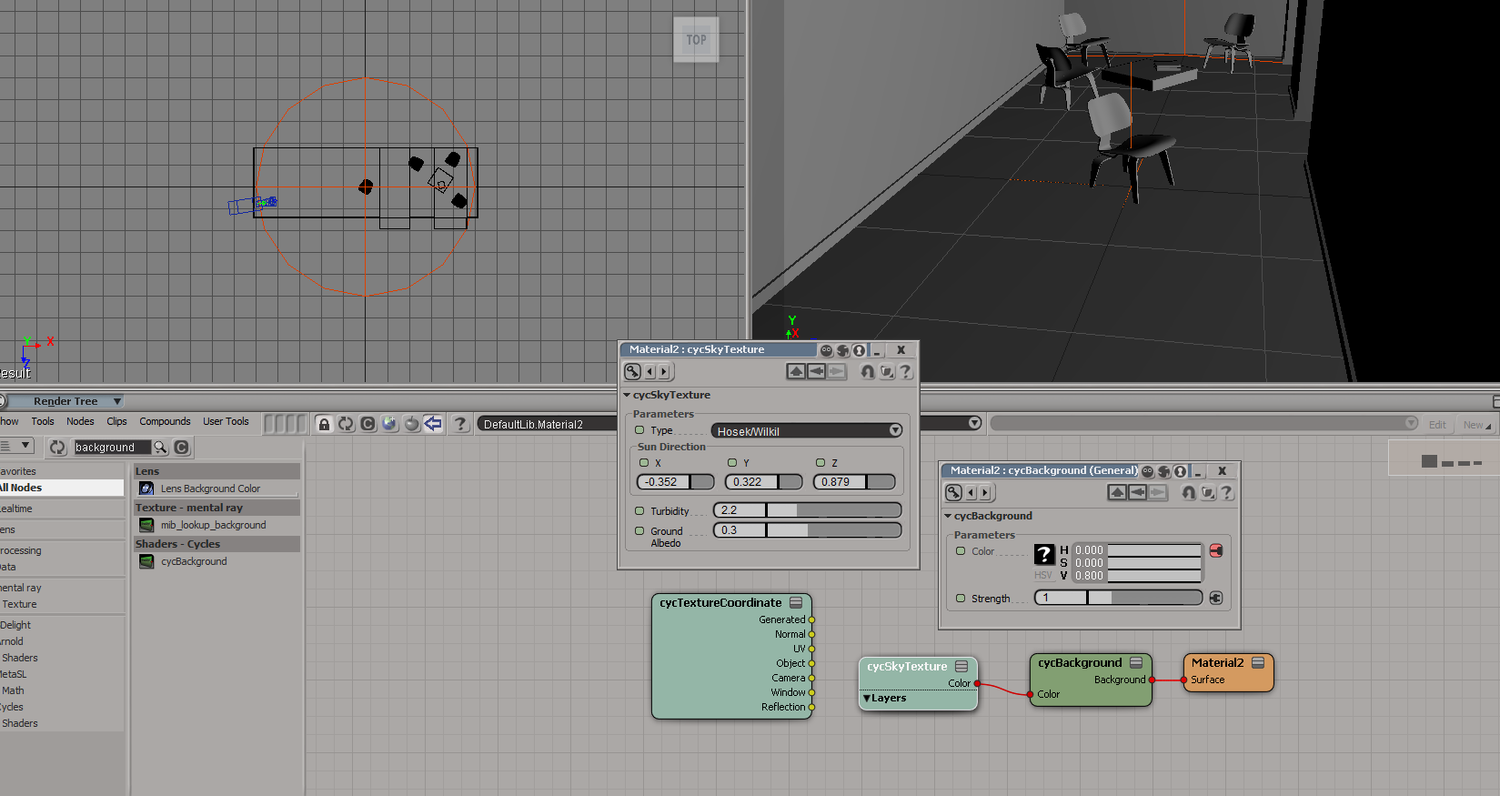
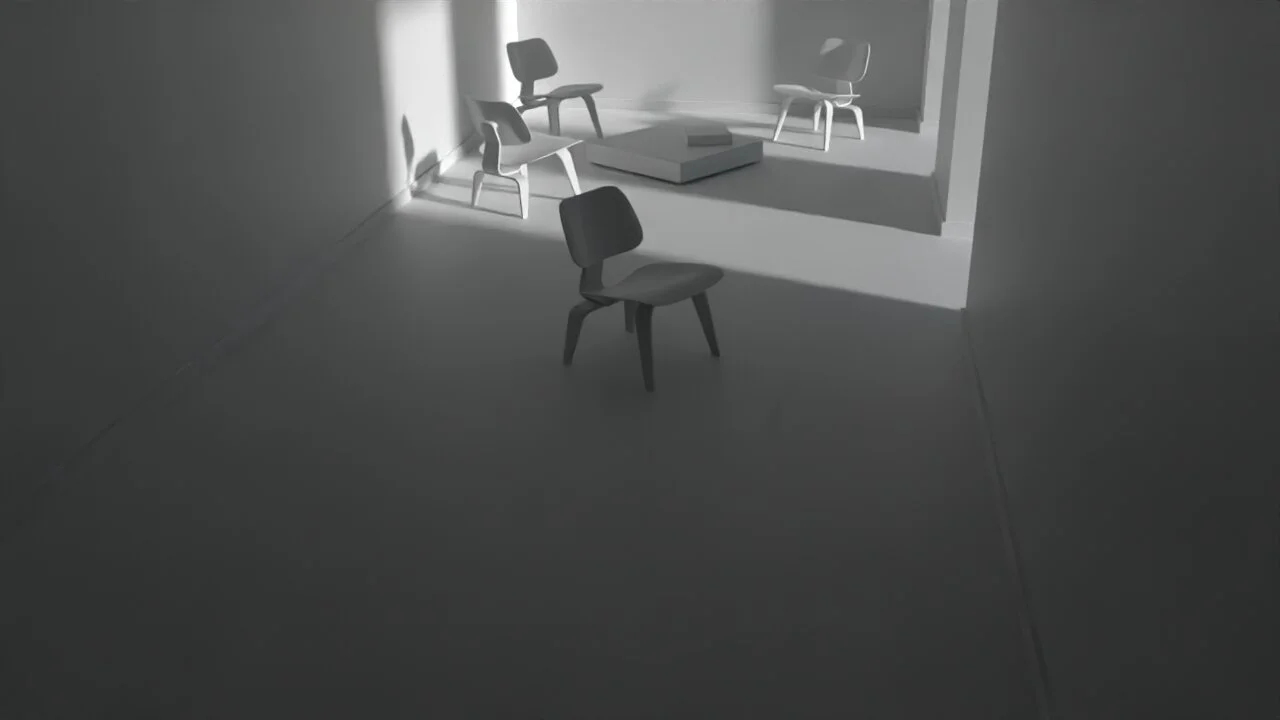
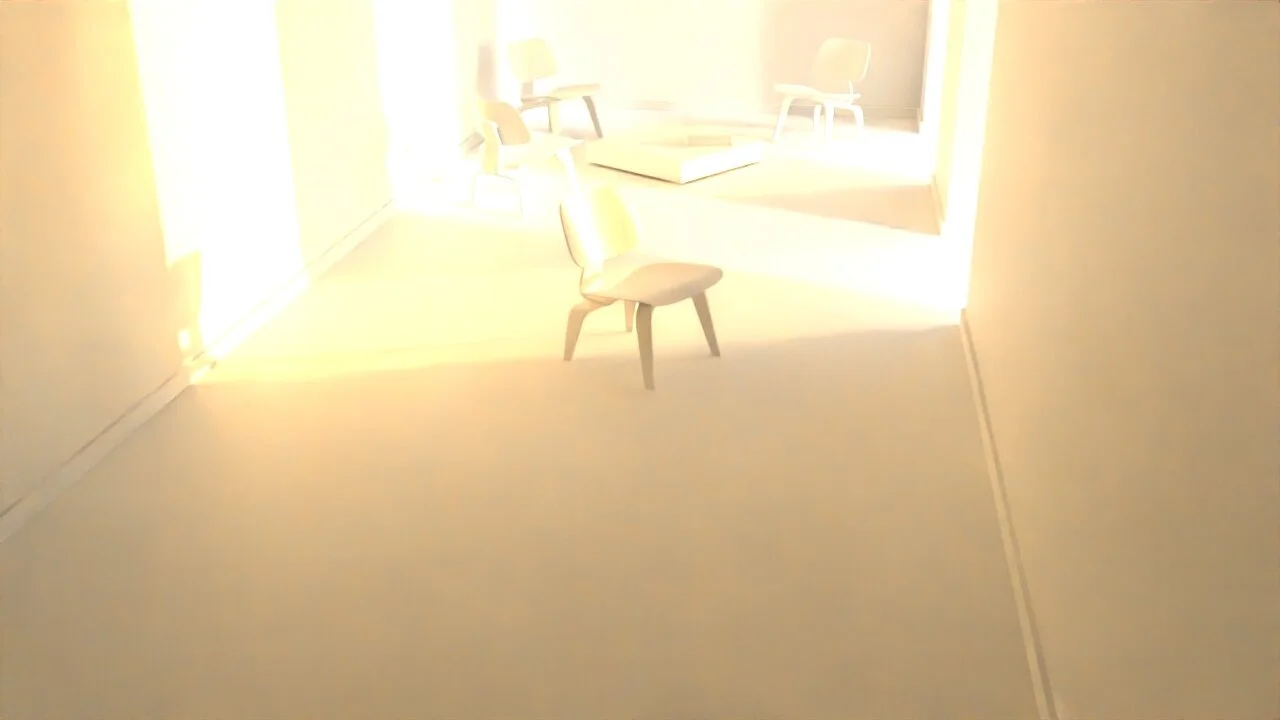
3- Something strange also happens when switching from Nishita to Hosek. Trying to match the sun direction in Nishia is difficuilt, so following the guide I've changed to Hosek and added the sun direction. Now when switching to Nishita, it seems both the Hosek and Nishita sun(s) are overlapping.
Any help is apprecaited.
Thank you
I ran into a problem with the sky and sun following the guide. Apologies if this was posted before.
1- When trying to follow the guide, I cannot connect the cycTextureCoordinate to the cycSkyTexture. It simply refuse to plugin or show any node to plugin to.
2- The cycBackground seems to be missing the transparency factor, so I cannot render the sky
3- Something strange also happens when switching from Nishita to Hosek. Trying to match the sun direction in Nishia is difficuilt, so following the guide I've changed to Hosek and added the sun direction. Now when switching to Nishita, it seems both the Hosek and Nishita sun(s) are overlapping.
Any help is apprecaited.
Thank you
-
Shekn
- Posts: 254
- Joined: 30 Dec 2016, 19:18
Re: Cycles for Softimage
1. This is my bug, that cycSkyTexture does not contains Vector input. In most cases it should not be used, because the renderer automatically connect it with generated uv-coordinates of the background.
2. Parameter to change transparency placed in the render settings in the Background tab.
3. To change sun direction in the Nishita model - add sun light as subobject to the Background light. Then transforms of the sun light will be used to compute sun direction. Nishita model create it's own sun in the texture, so, it's helpful to set directional light strength equal to 0. In another way, you can turn off the Sun Disc parameter, and then the sky will not generate the sun.
4. The light strength of the Nishita model is to bright for default sRgb color mode. You can either set a low strength of the cycBackground node, or change color space to Filmic.
2. Parameter to change transparency placed in the render settings in the Background tab.
3. To change sun direction in the Nishita model - add sun light as subobject to the Background light. Then transforms of the sun light will be used to compute sun direction. Nishita model create it's own sun in the texture, so, it's helpful to set directional light strength equal to 0. In another way, you can turn off the Sun Disc parameter, and then the sky will not generate the sun.
4. The light strength of the Nishita model is to bright for default sRgb color mode. You can either set a low strength of the cycBackground node, or change color space to Filmic.
-
Shekn
- Posts: 254
- Joined: 30 Dec 2016, 19:18
Re: Cycles for Softimage
Small update. Version 1.10.2. Download here: https://ssoftadd.github.io/syclesPage.html
What's new:
1. Add adaptive subdivision mode. It controls the density of polygons with respect to camera view. If polygons in some area becomes too small, then it stops subdivide process inside this area and continue in areas, where it needs. Example in the first attached picture. Adaptive mode is faster, but it produce not very accurate result. Example in the second attached picture. Artefacts appears on hard edges. In adaptive mode all normals of polygon corners incident to the same vertex are the same. This produce smooth shading even on hard edges. So, in most cases adaptive mode is works fine, but in some special cases it should be disabled.
2. Add support of the default image shader node. Example in the third attached picture. The renderer recognize only selected settings of this node: the name of uv-coordinates, tiling and different alternate modes. All other settings are ignored.
3. In previous versions, if the shader needs different uv-coordinates of the mesh, then it can access it by using names uv0, uv1 and so on in the node cycUVMap. Now these names are the same as in Softimage (by default Texture_Projection, Texture_Projection1 and so on).
4. Primitive for reading vdb-files (VDBPrimitive) now can read files with respect to current frame. The method is the same as in OpenVDB for Softimage addon. In particular in allows to render animated vdb-s. Details on the tutorial 24 in the manual (https://github.com/ssoftadd/SSoftAdd.gi ... 3_2021.pdf).
5. If the parameter Performance - Logging - Log Statistics in the render settings is ON, then some additional information about rendering process outuput to the console. Use this option carefully, because getting this statistically data in some cases may crash the Softimage (and I don't konw why it happens).
6. I hope that optiX render device should works more stable. In my tests all works fine, but my GPU does not actual rtx-card. At first render with selected optiX device it may start compile some binaries. After that the render works as usual.
7. Now the renderer needs vc redistributable 2019. This is an additional package, which can be downloaded from Microsoft site. This package should be installed to the system. But in most cases it already installed.
Remind, that if someone will use the addon and find any error (bag, crash, wrong result or something similar) - please, write me to PM. Of course, I test the functionality, but errors can occur in any unexpected place.
What's new:
1. Add adaptive subdivision mode. It controls the density of polygons with respect to camera view. If polygons in some area becomes too small, then it stops subdivide process inside this area and continue in areas, where it needs. Example in the first attached picture. Adaptive mode is faster, but it produce not very accurate result. Example in the second attached picture. Artefacts appears on hard edges. In adaptive mode all normals of polygon corners incident to the same vertex are the same. This produce smooth shading even on hard edges. So, in most cases adaptive mode is works fine, but in some special cases it should be disabled.
2. Add support of the default image shader node. Example in the third attached picture. The renderer recognize only selected settings of this node: the name of uv-coordinates, tiling and different alternate modes. All other settings are ignored.
3. In previous versions, if the shader needs different uv-coordinates of the mesh, then it can access it by using names uv0, uv1 and so on in the node cycUVMap. Now these names are the same as in Softimage (by default Texture_Projection, Texture_Projection1 and so on).
4. Primitive for reading vdb-files (VDBPrimitive) now can read files with respect to current frame. The method is the same as in OpenVDB for Softimage addon. In particular in allows to render animated vdb-s. Details on the tutorial 24 in the manual (https://github.com/ssoftadd/SSoftAdd.gi ... 3_2021.pdf).
5. If the parameter Performance - Logging - Log Statistics in the render settings is ON, then some additional information about rendering process outuput to the console. Use this option carefully, because getting this statistically data in some cases may crash the Softimage (and I don't konw why it happens).
6. I hope that optiX render device should works more stable. In my tests all works fine, but my GPU does not actual rtx-card. At first render with selected optiX device it may start compile some binaries. After that the render works as usual.
7. Now the renderer needs vc redistributable 2019. This is an additional package, which can be downloaded from Microsoft site. This package should be installed to the system. But in most cases it already installed.
Remind, that if someone will use the addon and find any error (bag, crash, wrong result or something similar) - please, write me to PM. Of course, I test the functionality, but errors can occur in any unexpected place.
You do not have the required permissions to view the files attached to this post.
-
opoppopopp
- Posts: 213
- Joined: 16 Jun 2009, 04:23
Re: Cycles for Softimage
"Add support of the default image shader node"
Yeah~!
Yeah~!
-
I3D
- Posts: 122
- Joined: 12 Aug 2009, 16:15
- Skype: ironic3d
Re: Cycles for Softimage
Awesome, thanks Shekn