








































Is the 2.x.x Sycles only supporting Nvidia GPUs? Anyone using AMD? Can't see my AMD 5700XT or AMD 6900XT as options whereas I could use them with Sycles 1.12. I have had to roll back because the CPU rendering is pretty slow in comparison, but I'm missing some of the updates to shaders etc so really keen to upgrade.
I'm installing the pre-compiled add-on only. I have seen dll files on Github but it seems that they are already in the installation when I look to add them manually. So I'm guessing installing 2.2.1 using normal route in SI 2015 SP2 File -> Addon is all I need to do?
Cycles for Softimage
Plugins linking to this thread: (hide)
 Sycles 2.4.1
 V 2.4.1 released August 2026 —
This is a full integration of the Blender Cycles renderer into XSI. Version 2.4 is compiled with Cycles 5.3 (state of July 2026). The second generation of the addon (since 2.0) is a complete rewrite and works with Softimage 2015 SP2.
New since version 2.1.3 (from the github release notes): 2.4.1: fixed incorrect transforms of instances when the master model has rotation or scale, repacked with missing DLLs 2.4: Cycles 5.3. New Alpha parameter for the ImageTexture node, Sky Texture with Single and Multiple Scattering models, Thin Film for Metallic and Glass BSDF, new Raycast and Scene Time nodes, OSL custom camera, Linear 3D curve shape (also as per-object override), Geometry Approximation mode for NURBS surfaces, Render Time pass (CPU), texture optimisation (resolution, limit, tx texture cache) and a detailed scene export timing log 2.4: renders MaterialX shader trees from the MaterialXSI addon (converted to OSL). Note: OSL shading works on CPU render devices only 2.3.x: Cycles 4.5, OSL support is back, new Metallic BSDF and Set Normal nodes, phase function for Scatter Volume, Diffuse Roughness for Principled BSDF, more Noise Texture types, subdivision with motion deform, per-frame texture images, rendering of NURBS surfaces and curves (via custom properties), tile rendering, fixed shadow catcher, vector input ports for OSL shaders 2.2.x: nodes of Blender 4.3 (Ray Portal BSDF, Sheen BSDF, Gabor Texture, redesigned Principled BSDF), current Blender OCIO color profiles, custom velocity grids for VDB primitives, Particle Info node fed by ICE attributes, denoising of the final passes with OIDN or OptiX
Supported Softimage features (quoted from the download page):
Polygon meshes and hair geometry Texture coordinates Vertex colors Shaderball preview. For materials, shader nodes and texture nodes Basic limited support of the following built-in Softimage shader nodes: Phong, Lambert, Hair Shading, Image, converters between vector, color and scalar Ambience global environment light Limited support of built-in Softimage light sources Model instances ICE strands geometry ICE pointcloud instances ICE geometry attributes (vector, color and scalar) with context per-point and per-object Volume rendering. In particular supports emFluid, Explosia FX and openVDB for Softimage volumes Special VDB Primitive for rendering vdbs without ICE Output multilayered exr file with all rendered passes Rendermaps
The following features from Cycles itself are supported: CPU and GPU rendering. In particular multidevices are supported. This allows you to use cpu and gpu simultaneously. The libraries for GPU rendering are included in the package. All Cycles shader nodes OSL shaders OpenColorIO profiles (Blender profile included) All Cycles output passes (Combined, Depth, Normal and so on) Color and value shader AOVs Lightgroups Cycles camera properties, in particular all panorama modes Cycles light sources Denoising by using Open Image Denoise and OptiX denoiser
For more information, full documentation and a list of the available Cycles nodes see the download page linked below. There is no local backup because the addon is still frequently updated - the plugin can be downloaded on Shekn's github releases. The source code is available on github there as well.
This is a full integration of the Blender Cycles renderer into XSI. Version 2.4 is compiled with Cycles 5.3 (state of July 2026). The second generation of the addon (since 2.0) is a complete rewrite and works with Softimage 2015 SP2.
New since version 2.1.3 (from the github release notes): 2.4.1: fixed incorrect transforms of instances when the master model has rotation or scale, repacked with missing DLLs 2.4: Cycles 5.3. New Alpha parameter for the ImageTexture node, Sky Texture with Single and Multiple Scattering models, Thin Film for Metallic and Glass BSDF, new Raycast and Scene Time nodes, OSL custom camera, Linear 3D curve shape (also as per-object override), Geometry Approximation mode for NURBS surfaces, Render Time pass (CPU), texture optimisation (resolution, limit, tx texture cache) and a detailed scene export timing log 2.4: renders MaterialX shader trees from the MaterialXSI addon (converted to OSL). Note: OSL shading works on CPU render devices only 2.3.x: Cycles 4.5, OSL support is back, new Metallic BSDF and Set Normal nodes, phase function for Scatter Volume, Diffuse Roughness for Principled BSDF, more Noise Texture types, subdivision with motion deform, per-frame texture images, rendering of NURBS surfaces and curves (via custom properties), tile rendering, fixed shadow catcher, vector input ports for OSL shaders 2.2.x: nodes of Blender 4.3 (Ray Portal BSDF, Sheen BSDF, Gabor Texture, redesigned Principled BSDF), current Blender OCIO color profiles, custom velocity grids for VDB primitives, Particle Info node fed by ICE attributes, denoising of the final passes with OIDN or OptiX
Supported Softimage features (quoted from the download page):
Polygon meshes and hair geometry Texture coordinates Vertex colors Shaderball preview. For materials, shader nodes and texture nodes Basic limited support of the following built-in Softimage shader nodes: Phong, Lambert, Hair Shading, Image, converters between vector, color and scalar Ambience global environment light Limited support of built-in Softimage light sources Model instances ICE strands geometry ICE pointcloud instances ICE geometry attributes (vector, color and scalar) with context per-point and per-object Volume rendering. In particular supports emFluid, Explosia FX and openVDB for Softimage volumes Special VDB Primitive for rendering vdbs without ICE Output multilayered exr file with all rendered passes Rendermaps
The following features from Cycles itself are supported: CPU and GPU rendering. In particular multidevices are supported. This allows you to use cpu and gpu simultaneously. The libraries for GPU rendering are included in the package. All Cycles shader nodes OSL shaders OpenColorIO profiles (Blender profile included) All Cycles output passes (Combined, Depth, Normal and so on) Color and value shader AOVs Lightgroups Cycles camera properties, in particular all panorama modes Cycles light sources Denoising by using Open Image Denoise and OptiX denoiser
For more information, full documentation and a list of the available Cycles nodes see the download page linked below. There is no local backup because the addon is still frequently updated - the plugin can be downloaded on Shekn's github releases. The source code is available on github there as well.
download page: https://ssoftadd.github.io/syclesSecondGenPage.html / wiki with tutorials / all of Shekn's plugins / author on vimeo / si-community thread
-
Shekn
- Posts: 253
- Joined: 30 Dec 2016, 19:18
Re: Cycles for Softimage
May be you should try the 2.1.3 version. As far as I know, no additional tweaks are required other than a simple addon installation. However, I do not have a PC with an AMD GPU, so I cannot test it.
-
SPJ

- Posts: 75
- Joined: 14 Jun 2014, 13:38
Re: Cycles for Softimage
Thanks Shekn. Very oddly, when I install 2.1.3, the Cycles renderer is not an option in my pass renderer options. It's just Mental Ray, Hardware Renderer etc. This is also the case wth 2.1.2 & 2.1.1.
I have a laptop with GeForce GFX 1050 Ti. I installed 2.1.3 on there and it is working, also with GPU support. I installed 2.2.1 on there, no GPU support. 2.2.0 also no GPU support. That seems to be a problem with other forum folks as well.
But mainly I would like to get the more powerful AMD GPUs working. I don't know why 2.1.3 won't show Cycles option on my main machine Render Manager?
EDIT: Just noticed an error in log "ERROR : 2356 - This plug-in is not installed: Cycles Renderer Options"
I have a laptop with GeForce GFX 1050 Ti. I installed 2.1.3 on there and it is working, also with GPU support. I installed 2.2.1 on there, no GPU support. 2.2.0 also no GPU support. That seems to be a problem with other forum folks as well.
But mainly I would like to get the more powerful AMD GPUs working. I don't know why 2.1.3 won't show Cycles option on my main machine Render Manager?
EDIT: Just noticed an error in log "ERROR : 2356 - This plug-in is not installed: Cycles Renderer Options"
-
Shekn
- Posts: 253
- Joined: 30 Dec 2016, 19:18
Re: Cycles for Softimage
May be you need to download nvcuda.dll and manually copy it to the addon directory. Like described on Github page (https://github.com/Tugcga/Sycles#how-to-install).
-
SPJ
- Posts: 75
- Joined: 14 Jun 2014, 13:38
Re: Cycles for Softimage
Yep, that sorted the issue Cycles not showing as renderer option on 2.1.1, 2.1.2 and 2.1.3. Thanks for the guidance.
Unfortunately, the AMD GPUs were not enabled on any of those versions
So unless someone else has got AMD GPU working and can say otherwise, it looks like it's not been possible with Sycles v2?
Unfortunately, the AMD GPUs were not enabled on any of those versions
So unless someone else has got AMD GPU working and can say otherwise, it looks like it's not been possible with Sycles v2?
-
Shekn
- Posts: 253
- Joined: 30 Dec 2016, 19:18
Re: Cycles for Softimage
Sycles 2.1.3 use Blender sources from January 2023. You can try to download a Blender build from this date and check if your GPU is visible in Blender. If it is not visible, then it cannot be used in Sycles.
-
SPJ
- Posts: 75
- Joined: 14 Jun 2014, 13:38
Re: Cycles for Softimage
Good idea. I downloaded Blender 3.4 which is Dec 2022 release. Blender 3.5 is March 2023 release so figure the source you used would have been 3.4. Both AMD cards are showing in the HiP options for Cycles rendering.
So I suppose there is some hope, but I don't know how to go about enabling it in XSI.
So I suppose there is some hope, but I don't know how to go about enabling it in XSI.
-
Shekn
- Posts: 253
- Joined: 30 Dec 2016, 19:18
-
opoppopopp
- Posts: 213
- Joined: 16 Jun 2009, 04:23
Re: Cycles for Softimage
Let's make it clear, for 2.2+ :
Are there any other people's GPU that can also work?
besides, 2.2+ GPU is working on Shekn's development machine, right?
Are there any other people's GPU that can also work?
besides, 2.2+ GPU is working on Shekn's development machine, right?
-
wireframex

- Posts: 425
- Joined: 08 Jun 2009, 21:02
- Location: France
Re: Cycles for Softimage
Only 2.13 is usable for me.
2.2+ doesn't work on my RTX4090 laptop nor my 2x RTX3090 computer.
2.2+ doesn't work on my RTX4090 laptop nor my 2x RTX3090 computer.
"without mastery, power is nothing" - Softimage Addict User
CPU 3990x 128 Threads / 2 x 3090 RTX - 24 Go / 96 Go memory
CPU 3990x 128 Threads / 2 x 3090 RTX - 24 Go / 96 Go memory
-
Shekn
- Posts: 253
- Joined: 30 Dec 2016, 19:18
Re: Cycles for Softimage
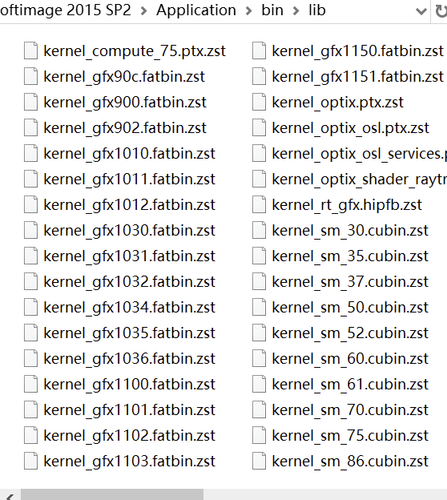
It's too late an idea. The render may detect the GPU if you copy the lib folder (with cuda binaries) from the add-on directory into the Softimage system folder (C:\Program Files\Autodesk\Softimage 2015\Application\bin).
-
wireframex
- Posts: 425
- Joined: 08 Jun 2009, 21:02
- Location: France
Re: Cycles for Softimage
YOU'RE A MASTER IT WORKS !!!Shekn wrote: 18 May 2025, 16:08 It's too late an idea. The render may detect the GPU if you copy the lib folder (with cuda binaries) from the add-on directory into the Softimage system folder (C:\Program Files\Autodesk\Softimage 2015\Application\bin).
All my GPUs are detected now with 2.2.1
only GPU OPTIX doesn't render anything --> I have a black screen
Denoising : OPENIMAGE & OPTIX work very well
Phil
"without mastery, power is nothing" - Softimage Addict User
CPU 3990x 128 Threads / 2 x 3090 RTX - 24 Go / 96 Go memory
CPU 3990x 128 Threads / 2 x 3090 RTX - 24 Go / 96 Go memory
-
opoppopopp
- Posts: 213
- Joined: 16 Jun 2009, 04:23
Re: Cycles for Softimage
Shekn wrote: 18 May 2025, 16:08 It's too late an idea. The render may detect the GPU if you copy the lib folder (with cuda binaries) from the add-on directory into the Softimage system folder (C:\Program Files\Autodesk\Softimage 2015\Application\bin).
Yes, GPUs are detected!
 (even with Radeon iGPU, De-noise with OptiX also working) but render region is black with only GPU selected.
I must miss some step? I ONLY copy lib folder to 'Application\bin\'
-
opoppopopp
- Posts: 213
- Joined: 16 Jun 2009, 04:23
Re: Cycles for Softimage
@Shekn say COPY, not CUT
so GPUs work
but why...(leave "2.2 lib" at system folder, not even conflict with 2.1.3 addon when I test, but 2.2 addon really need "2.2 lib" at both system and addon folder)
so GPUs work
but why...(leave "2.2 lib" at system folder, not even conflict with 2.1.3 addon when I test, but 2.2 addon really need "2.2 lib" at both system and addon folder)
Last edited by opoppopopp on 18 May 2025, 19:57, edited 1 time in total.
-
opoppopopp
- Posts: 213
- Joined: 16 Jun 2009, 04:23
Re: Cycles for Softimage
Is 2.2.1 include the new Volume Scatter Shader?
-
SPJ
- Posts: 75
- Joined: 14 Jun 2014, 13:38
Re: Cycles for Softimage
Take a massive bow @Shekn! This has enabled both my AMD GPUs with 2.2.1. It was the missing link and I can't believe I can finally move from Cycles v1. Huge thanks!!