Cycles for Softimage

Plugins linking to this thread: (hide)

Sycles 2.4.1Author: Shekn @si-community
V 2.4.1 released August 2026 —

This is a full integration of the Blender Cycles renderer into XSI. Version 2.4 is compiled with Cycles 5.3 (state of July 2026). The second generation of the addon (since 2.0) is a complete rewrite and works with Softimage 2015 SP2.

New since version 2.1.3 (from the github release notes): 2.4.1: fixed incorrect transforms of instances when the master model has rotation or scale, repacked with missing DLLs 2.4: Cycles 5.3. New Alpha parameter for the ImageTexture node, Sky Texture with Single and Multiple Scattering models, Thin Film for Metallic and Glass BSDF, new Raycast and Scene Time nodes, OSL custom camera, Linear 3D curve shape (also as per-object override), Geometry Approximation mode for NURBS surfaces, Render Time pass (CPU), texture optimisation (resolution, limit, tx texture cache) and a detailed scene export timing log 2.4: renders MaterialX shader trees from the MaterialXSI addon (converted to OSL). Note: OSL shading works on CPU render devices only 2.3.x: Cycles 4.5, OSL support is back, new Metallic BSDF and Set Normal nodes, phase function for Scatter Volume, Diffuse Roughness for Principled BSDF, more Noise Texture types, subdivision with motion deform, per-frame texture images, rendering of NURBS surfaces and curves (via custom properties), tile rendering, fixed shadow catcher, vector input ports for OSL shaders 2.2.x: nodes of Blender 4.3 (Ray Portal BSDF, Sheen BSDF, Gabor Texture, redesigned Principled BSDF), current Blender OCIO color profiles, custom velocity grids for VDB primitives, Particle Info node fed by ICE attributes, denoising of the final passes with OIDN or OptiX

Supported Softimage features (quoted from the download page):

Polygon meshes and hair geometry Texture coordinates Vertex colors Shaderball preview. For materials, shader nodes and texture nodes Basic limited support of the following built-in Softimage shader nodes: Phong, Lambert, Hair Shading, Image, converters between vector, color and scalar Ambience global environment light Limited support of built-in Softimage light sources Model instances ICE strands geometry ICE pointcloud instances ICE geometry attributes (vector, color and scalar) with context per-point and per-object Volume rendering. In particular supports emFluid, Explosia FX and openVDB for Softimage volumes Special VDB Primitive for rendering vdbs without ICE Output multilayered exr file with all rendered passes Rendermaps

The following features from Cycles itself are supported: CPU and GPU rendering. In particular multidevices are supported. This allows you to use cpu and gpu simultaneously. The libraries for GPU rendering are included in the package. All Cycles shader nodes OSL shaders OpenColorIO profiles (Blender profile included) All Cycles output passes (Combined, Depth, Normal and so on) Color and value shader AOVs Lightgroups Cycles camera properties, in particular all panorama modes Cycles light sources Denoising by using Open Image Denoise and OptiX denoiser

For more information, full documentation and a list of the available Cycles nodes see the download page linked below. There is no local backup because the addon is still frequently updated - the plugin can be downloaded on Shekn's github releases. The source code is available on github there as well.

News concerning 3D DCC business
opoppopopp
Posts: 213
Joined: 16 Jun 2009, 04:23

Re: Cycles for Softimage

Post by opoppopopp » 15 Sep 2024, 20:53

Shekn wrote: 23 Jul 2024, 04:15 For detect gpus the renderer use precompiled binaries, which placed inside the folder Sycles\Application\Plugins\lib\ This folder contains many different *.zst files for different gpu models. You can try to download Blender 4.3 and copy these files from the distributive to the folder of the addon. May be it will help.
I test several blender builds(4.0-4.3) and try to copy/use its "Lib" folder, but no luck. (all those blender building's Cycles GPU is working)
Since GPU working on your development machine, so Is it possible that we just simply missing some other dlls? (maybe they looks unrelated, like blender include its own msvcxxx.dll)

Is Cycles SDK and blender have same release cycle? (because I saw a 4.2.0 SDK at https://projects.blender.org/blender/cy ... tag/v4.2.0). Just imagine problem will be magically solved when compile against coming 4.3.x release :D

BTW. How many of us can confirm GPU is working your machine ? (not only shown but also working)

User avatar
wireframex
Posts: 425
Joined: 08 Jun 2009, 21:02
Location: France

Re: Cycles for Softimage

Post by wireframex » 16 Sep 2024, 04:49

I tried many things with dll without success. I returned back to old version.
"without mastery, power is nothing" - Softimage Addict User
CPU 3990x 128 Threads / 2 x 3090 RTX - 24 Go / 96 Go memory

Shekn
Posts: 254
Joined: 30 Dec 2016, 19:18

Re: Cycles for Softimage

Post by Shekn » 16 Sep 2024, 12:43

GPU still not working, and I think that it is not related to dll-s inside the distributive. The reason is something else. There are some ideas, but no clear understanding.

User avatar
I3D
Posts: 122
Joined: 12 Aug 2009, 16:15
Skype: ironic3d

Re: Cycles for Softimage

Post by I3D » 18 Sep 2024, 11:38

Shekn wrote: 16 Sep 2024, 12:43 GPU still not working, and I think that it is not related to dll-s inside the distributive. The reason is something else. There are some ideas, but no clear understanding.
Shekn, not sure if this will help. but Gaffer team recently where able to include the GPU part of cycles into Gaffer in their 1.4.12 release. Perhaps their implementation could hold the answer?

User avatar
FXDude
Posts: 1145
Joined: 19 Jun 2012, 19:59

Re: Cycles for Softimage

Post by FXDude » 22 Sep 2024, 23:25

Hi,
just to say, unlike others here, I was able to install Sycles v2.2 no problem,

But it reminded me of trouble I had installing the FXTree denoiser,
and updating my GPU driver solved it.

So perhaps would that solve your issues?
Just in case, my driver version is 546.01

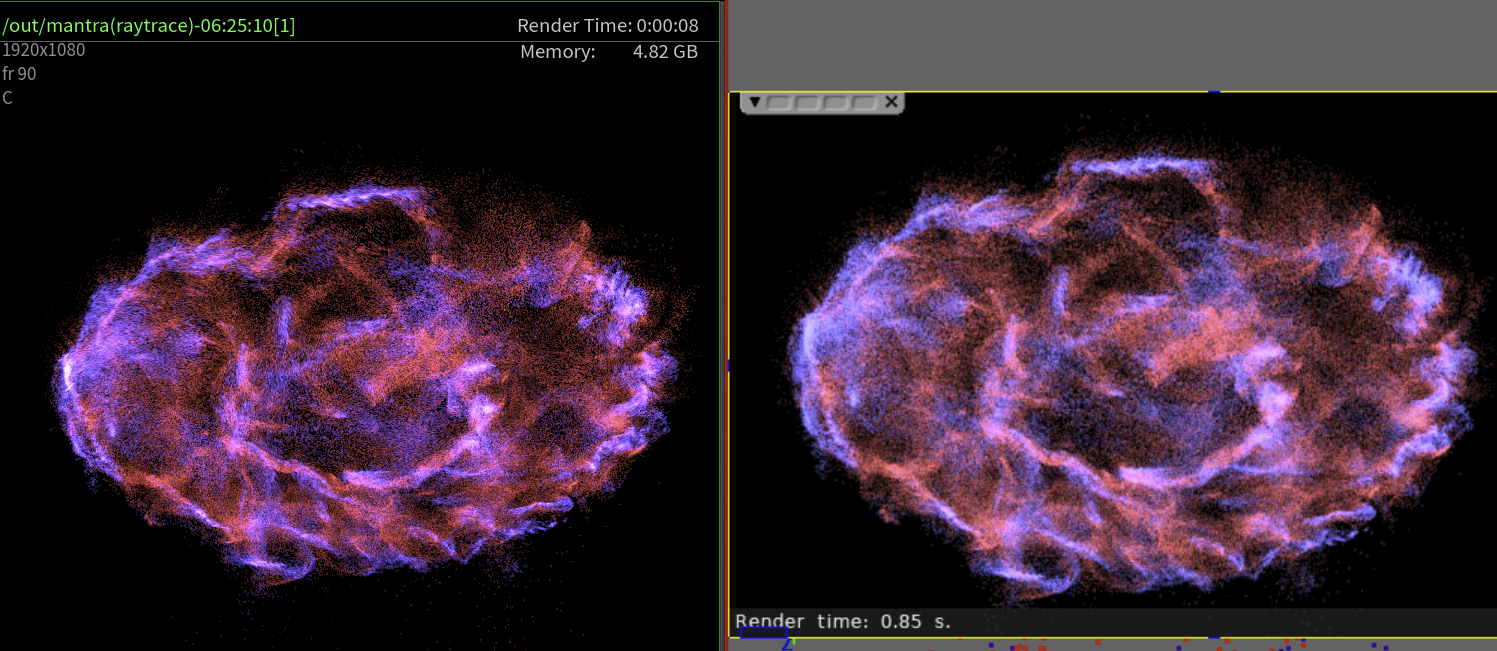
Otherwise particle motion blur works!

Image

but motion blurred particles does slow down rendering considerably,
this medium region was a 3 minute render, relative to less than 10 seconds without MB with the same 8 samples.

So for motion blur, the "pseudo motion-blur" trick I used of duplicating particles along velocity vectors, is MUCH more efficient,
as particle count barely affects render-time.

The following was a mere 16sec with TONS of particles
8 million particles including duplicated along velocity vectors.

( edit: region renders were 16 seconds, this one was 23 seconds @ 1080p )

Image

But if I'm reverting to the previous version, it's mostly about the denoiser indeed not working in 2.2, which is a biggie for me.

Otherwise everything seems great!


HDR render region is also great ! :)
Last edited by FXDude on 23 Sep 2024, 01:39, edited 1 time in total.

User avatar
FXDude
Posts: 1145
Joined: 19 Jun 2012, 19:59

Re: Cycles for Softimage

Post by FXDude » 22 Sep 2024, 23:30

FXDude wrote: 22 Sep 2024, 23:25
But if I'm reverting to the previous version, it's mostly about the denoiser indeed not working in 2.2, which is a biggie for me.
Just went to the release page,
https://github.com/Tugcga/Sycles/releases
and there's a 2.2.1 release from last week WITH DENOISING !

( will test shortly )

Thank you Shekn ! :ymhug:

User avatar
I3D
Posts: 122
Joined: 12 Aug 2009, 16:15
Skype: ironic3d

Re: Cycles for Softimage

Post by I3D » 23 Sep 2024, 01:00

Thank you Shekn 🙌

User avatar
wireframex
Posts: 425
Joined: 08 Jun 2009, 21:02
Location: France

Re: Cycles for Softimage

Post by wireframex » 23 Sep 2024, 15:06

No GPU in this last version (2.2.1)
Get back to 2.1.3
"without mastery, power is nothing" - Softimage Addict User
CPU 3990x 128 Threads / 2 x 3090 RTX - 24 Go / 96 Go memory

User avatar
I3D
Posts: 122
Joined: 12 Aug 2009, 16:15
Skype: ironic3d

Re: Cycles for Softimage

Post by I3D » 24 Sep 2024, 05:07

I agree with wireframex, no GPU rendering.

opoppopopp
Posts: 213
Joined: 16 Jun 2009, 04:23

Re: Cycles for Softimage

Post by opoppopopp » 06 Oct 2024, 22:34

Sycles is faster for real :x
and I will trade GPU for motion blur on points for this sequence.
Image

tarkovsky
Posts: 61
Joined: 05 Oct 2012, 18:02

Re: Cycles for Softimage

Post by tarkovsky » 23 Oct 2024, 09:38

Dipping my feet in Soft again after a long break. So nice... :) Thanks for this amazing plugin - one issue:

Is it me, or doesn't the mesh properties work? If I apply a mesh property and untick visibilities, nothing really happens?

thanks!

Shekn
Posts: 254
Joined: 30 Dec 2016, 19:18

Re: Cycles for Softimage

Post by Shekn » 23 Oct 2024, 13:06

Yes, your are right. This is an issue. I will track it.

User avatar
wireframex
Posts: 425
Joined: 08 Jun 2009, 21:02
Location: France

Re: Cycles for Softimage

Post by wireframex » 25 Oct 2024, 06:19

Shekn wrote: 23 Oct 2024, 13:06 Yes, your are right. This is an issue. I will track it.
Hi Shekn,
Any news about 2.2.1 GPU support ?
Thanks
Phil
"without mastery, power is nothing" - Softimage Addict User
CPU 3990x 128 Threads / 2 x 3090 RTX - 24 Go / 96 Go memory

Shekn
Posts: 254
Joined: 30 Dec 2016, 19:18

Re: Cycles for Softimage

Post by Shekn » 25 Oct 2024, 14:55

No

opoppopopp
Posts: 213
Joined: 16 Jun 2009, 04:23

Re: Cycles for Softimage

Post by opoppopopp » 30 Oct 2024, 21:00

Global settings for AO is gone, right?(I remember there is AO settings in render settings tab) So how to change ao setting for that "Cycles AO" channel?
Right now I just do a separate AO pass...

Shekn
Posts: 254
Joined: 30 Dec 2016, 19:18

Re: Cycles for Softimage

Post by Shekn » 31 Oct 2024, 13:33

There are two methods to render AO pass. First - render Cycles AO channel into separate image. If activate Fast GI Approximation in Light Paths parameter, then AO Distance allows to tweak the AO effect.
Image

Another way. Create a separate pass and override the material of all geometry objects. Assign emissive shader with cycAmbientOcclusion node. Render this pass into image.
Image