








































mesh paint
Plugins linking to this thread: (hide)
 Mesh Paint v0.95
 Updated September 2012 with straight/curved line drawing. Mesh Paint lets you paint
meshes or mesh instances interactively on the surface of another mesh. Not only for
placing rows of bolts but with every conceivable placement option like follow stroke,
stack clones, adjustable spacing, delete overlapping, alignment, randomization, size
falloff and mouse position interpolation (for evenly-spaced placement even when painting
quickly).
To-be-placed objects are organized in a list with the option of randomizing through the list, or cycling through the list while painting. There's also a »drop« mode for placing individual objects more precisely (like a simpler version of Piotrek's QuickPrimitive tool).
 For more information, visit the si-community thread linked below. Videos available:
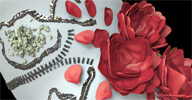
Introduction, and added features in v0.91 & v0.93. The roses in the thumbnail have been created with a combination of follow stroke/stack
clones/ramp scale, moving the mouse around in little circles. For regularly spaced
placement like the zipper in the thumbnail, turn off the »delete overlapping«
option. Source code available here (Check the thread for a newer version of this, too).
For more information, visit the si-community thread linked below. Videos available:
Introduction, and added features in v0.91 & v0.93. The roses in the thumbnail have been created with a combination of follow stroke/stack
clones/ramp scale, moving the mouse around in little circles. For regularly spaced
placement like the zipper in the thumbnail, turn off the »delete overlapping«
option. Source code available here (Check the thread for a newer version of this, too).
local backup: meshpaint_095.xsiaddon
To-be-placed objects are organized in a list with the option of randomizing through the list, or cycling through the list while painting. There's also a »drop« mode for placing individual objects more precisely (like a simpler version of Piotrek's QuickPrimitive tool).
For more information, visit the si-community thread linked below. Videos available:
Introduction, and added features in v0.91 & v0.93. The roses in the thumbnail have been created with a combination of follow stroke/stack
clones/ramp scale, moving the mouse around in little circles. For regularly spaced
placement like the zipper in the thumbnail, turn off the »delete overlapping«
option. Source code available here (Check the thread for a newer version of this, too).
local backup: meshpaint_095.xsiaddon
-
uhans
- Posts: 3
- Joined: 10 Oct 2011, 13:32
Re: mesh paint
sorry but can you halp me to finde the tool meshpaint ? sorry for this primetive question !!!
-
Rork

- Posts: 1359
- Joined: 09 Jul 2009, 06:59
- Location: Close to The Hague, Netherlands
Re: mesh paint
the download links are on the first page. Don't they work for you??
rob
rob
SI UI tutorials: Toolbar http://goo.gl/iYOL0l | Custom Layout http://goo.gl/6iP5xQ | RenderManager View http://goo.gl/b4ZkjQ
So long, and thanks for all the Fish!!
So long, and thanks for all the Fish!!
-
uhans
- Posts: 3
- Joined: 10 Oct 2011, 13:32
Re: mesh paint
non problem with downloading !!! it's in XSI - I can't find the plugin/toolbars after insalation, where I can find this toolbars in XSI
-
Rork
- Posts: 1359
- Joined: 09 Jul 2009, 06:59
- Location: Close to The Hague, Netherlands
Re: mesh paint
It's under the "Edit" dropdown. Rightside menu bar, above the "Freeze" etc. button.
Hope that helps.
rob
Hope that helps.
rob
SI UI tutorials: Toolbar http://goo.gl/iYOL0l | Custom Layout http://goo.gl/6iP5xQ | RenderManager View http://goo.gl/b4ZkjQ
So long, and thanks for all the Fish!!
So long, and thanks for all the Fish!!
-
uhans
- Posts: 3
- Joined: 10 Oct 2011, 13:32
Re: mesh paint
Thank You!!!!!!Rork wrote:It's under the "Edit" dropdown. Rightside menu bar, above the "Freeze" etc. button.
Hope that helps.
rob
-
Falam
Re: mesh paint

I'm having a bit of an issue with Mesh Paint. I want to paint the cylinder along the inner or outer edge of my object as seen in the image. In the example video where rivets were painted on the plane things worked fluidly, maybe because it's a broad surface (broad as in big area). Things are not working so fluid on my object, I froze the scale on the cylinder and painted, that didn't work, I painted the cylinder at regular size and using meshPaint controls to change the size, that isn't working as I expected either. My theory is, maybe the edge of the object I want to paint onto is too narrow, not as broad (hence the broad example used earlier) ? I hope all is understood

-
origin

- Posts: 619
- Joined: 09 Jun 2009, 09:59
- Location: warsaw
-
origin
- Posts: 619
- Joined: 09 Jun 2009, 09:59
- Location: warsaw
Re: mesh paint
It's working okay here, just remember to reduce Spacing if the object is very small (default is 1 object per 1 SI unit).
As for flipped painted objects, it's because your source object has got flipped axis (Y doesnt go up but to goes to the side), so you either rotate pivot on your source object or change Align Axis in meshpaint PPG to X.
As for flipped painted objects, it's because your source object has got flipped axis (Y doesnt go up but to goes to the side), so you either rotate pivot on your source object or change Align Axis in meshpaint PPG to X.
-
Falam
Re: mesh paint
Origin, I must be doing something wrong, it's not working for me. I rotated the object rotation; then toggled on before rotating the axis and after "align axis" setting in the Mesh Paint PPG. Painting on the mesh does not paint the object where I want it, in a sequence or arch ?origin wrote:It's working okay here, just remember to reduce Spacing if the object is very small (default is 1 object per 1 SI unit).
As for flipped painted objects, it's because your source object has got flipped axis (Y doesnt go up but to goes to the side), so you either rotate pivot on your source object or change Align Axis in meshpaint PPG to X.


-
Artistxsi
- Posts: 1
- Joined: 16 Sep 2009, 08:26
Re: mesh paint
Hi guys!
i installed this amazing tool on Softimage 2013. But it dosent work.
I mean.. I cant find tool !
Anyone can help me?
Bye Andrea
i installed this amazing tool on Softimage 2013. But it dosent work.
I mean.. I cant find tool !
Anyone can help me?
Bye Andrea
-
Acrobat
- Posts: 31
- Joined: 24 Apr 2013, 21:50
Re: mesh paint
You can assign an hot key (you can find it under custom script commands in keymapping window)
But don't work on 2014 release. Independently by setting (I tried different options), it don't paint upon surface bat randomly around the viewport
However tanks for sharing it
But don't work on 2014 release. Independently by setting (I tried different options), it don't paint upon surface bat randomly around the viewport
However tanks for sharing it
-
origin
- Posts: 619
- Joined: 09 Jun 2009, 09:59
- Location: warsaw
Re: mesh paint
It's working in 2014 okay...By default you paint WITH selected objects on grid+objects over mouse. If object popup in weird position your source objects' pivot might be not in the centre of object.
-
Filmguy
- Posts: 38
- Joined: 07 Jul 2012, 11:06
Re: mesh paint
Hi. Ive installed it. Cant seem to access the menu. Can anyone tell me:)
Thank You
Thank You
-
Filmguy
- Posts: 38
- Joined: 07 Jul 2012, 11:06
Re: mesh paint
Hi. Tool looks awesome. Ive installed but Im a bit lost on where to find the PPG.
Help:)
Help:)
-
AceMastermind

- Posts: 161
- Joined: 14 Jun 2009, 22:57
Re: mesh paint
https://www.si-community.com/forum/v ... 585#p25585Filmguy wrote:Ive installed it. Cant seem to access the menu. Can anyone tell me