








































mesh paint
Plugins linking to this thread: (hide)
 Mesh Paint v0.95
 Updated September 2012 with straight/curved line drawing. Mesh Paint lets you paint
meshes or mesh instances interactively on the surface of another mesh. Not only for
placing rows of bolts but with every conceivable placement option like follow stroke,
stack clones, adjustable spacing, delete overlapping, alignment, randomization, size
falloff and mouse position interpolation (for evenly-spaced placement even when painting
quickly).
To-be-placed objects are organized in a list with the option of randomizing through the list, or cycling through the list while painting. There's also a »drop« mode for placing individual objects more precisely (like a simpler version of Piotrek's QuickPrimitive tool).
 For more information, visit the si-community thread linked below. Videos available:
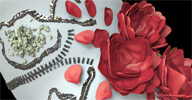
Introduction, and added features in v0.91 & v0.93. The roses in the thumbnail have been created with a combination of follow stroke/stack
clones/ramp scale, moving the mouse around in little circles. For regularly spaced
placement like the zipper in the thumbnail, turn off the »delete overlapping«
option. Source code available here (Check the thread for a newer version of this, too).
For more information, visit the si-community thread linked below. Videos available:
Introduction, and added features in v0.91 & v0.93. The roses in the thumbnail have been created with a combination of follow stroke/stack
clones/ramp scale, moving the mouse around in little circles. For regularly spaced
placement like the zipper in the thumbnail, turn off the »delete overlapping«
option. Source code available here (Check the thread for a newer version of this, too).
local backup: meshpaint_095.xsiaddon
To-be-placed objects are organized in a list with the option of randomizing through the list, or cycling through the list while painting. There's also a »drop« mode for placing individual objects more precisely (like a simpler version of Piotrek's QuickPrimitive tool).
For more information, visit the si-community thread linked below. Videos available:
Introduction, and added features in v0.91 & v0.93. The roses in the thumbnail have been created with a combination of follow stroke/stack
clones/ramp scale, moving the mouse around in little circles. For regularly spaced
placement like the zipper in the thumbnail, turn off the »delete overlapping«
option. Source code available here (Check the thread for a newer version of this, too).
local backup: meshpaint_095.xsiaddon
-
rray

- Moderator
- Posts: 1810
- Joined: 26 Sep 2009, 13:51
- Location: Bonn, Germany
Re: mesh paint
Thanks! Good additions. Line drawing is really useful. Nice to see you're releasing sources also, this will be my evening lecture for this week
softimage resources section updated Sep 26th 2026

-
origin

- Posts: 619
- Joined: 09 Jun 2009, 09:59
- Location: warsaw
Re: mesh paint
code is mess, really. ive attached it in case someone willing to compile it on linuxrray wrote:Thanks! Good additions. Line drawing is really useful. Nice to see you're releasing sources also, this will be my evening lecture for this week


-
Boris

- Posts: 67
- Joined: 25 May 2012, 14:35
- Location: R&M
Re: mesh paint
Piotr, i love you too !  you're Cool MAn ! Thank you very much !
you're Cool MAn ! Thank you very much ! Oops ,something went wrong
-
yashugan
- Posts: 115
- Joined: 30 May 2012, 18:58
Paint without randomize
the plug in is simply amazing!!! IS really helpfull!
But i would like to ask one thuing:
I would like to paint a line of objects without randomize them. How i have to do? they came always random, even i putt al 0 in the randomize panel!
Thakyou!!!!!!!!!!!!!
PS: Simply incredible the plug in demo to move uv from the mesh!!! when will be out???
thankyou!!!!!!!+
But i would like to ask one thuing:
I would like to paint a line of objects without randomize them. How i have to do? they came always random, even i putt al 0 in the randomize panel!
Thakyou!!!!!!!!!!!!!
PS: Simply incredible the plug in demo to move uv from the mesh!!! when will be out???
thankyou!!!!!!!+
-
origin
- Posts: 619
- Joined: 09 Jun 2009, 09:59
- Location: warsaw
Re: mesh paint
yashugan, you need to be more specific, image of what you want to achieve would be helpful.
-
yashugan
- Posts: 115
- Joined: 30 May 2012, 18:58
Re: mesh paint
Excuse me for my incompelte question.
I explain better:)
I trying to paint rows of objects, but the rows still randomize the position of the objects. I saw in a vimeo video that you painted bullets on a airplane, and the bullets where regular and not randomized. How i can do it? I putted all ZERO value in the randomize window. where i'mdoing a mistake? Thank you!!!!!!!!!
I explain better:)
I trying to paint rows of objects, but the rows still randomize the position of the objects. I saw in a vimeo video that you painted bullets on a airplane, and the bullets where regular and not randomized. How i can do it? I putted all ZERO value in the randomize window. where i'mdoing a mistake? Thank you!!!!!!!!!
-
origin
- Posts: 619
- Joined: 09 Jun 2009, 09:59
- Location: warsaw
-
yashugan
- Posts: 115
- Joined: 30 May 2012, 18:58
Re: mesh paint
yeah!!!!!!!!! thank you!!!!!!!!!! simply amazing tool!!!
Just a question, that i'm here: do you have intention to release also the plug in to move textures UV from the mesh? Ishould be a revolution....
thank you!
Just a question, that i'm here: do you have intention to release also the plug in to move textures UV from the mesh? Ishould be a revolution....
thank you!
-
ActionArt

- Posts: 853
- Joined: 25 Nov 2010, 17:23
- Location: Canada
Re: mesh paint
For some reason this isn't working for me. I can't seem to scale the brush.origin wrote:Just scale the brush radius to 0 (r+lmb and drag)
Anyone else run into this? Perhaps it's a preference setting or something?
-
Kerro Perro

- Posts: 306
- Joined: 20 Mar 2011, 00:01
- Location: Leiden, the Netherlands
Re: mesh paint
You're not pressing left and right mouse button at the same time are you?
Maybe a silly question but the line you quoted kinda reads that way...
Maybe a silly question but the line you quoted kinda reads that way...
-
origin
- Posts: 619
- Joined: 09 Jun 2009, 09:59
- Location: warsaw
Re: mesh paint
key R+ left mouse button, like the si tweak tool, should work...-
ActionArt
- Posts: 853
- Joined: 25 Nov 2010, 17:23
- Location: Canada
Re: mesh paint
Ah, not a silly question, silly me. That's what I was doing 
Works fine, thanks!
Works fine, thanks!
-
ActionArt
- Posts: 853
- Joined: 25 Nov 2010, 17:23
- Location: Canada
Re: mesh paint
I'd just like to say, that is one sweet tool! Your best so far IMO. I've been trying it all evening and works perfectly so far.
Like I said, I have just the project waiting for it. Will start on it tomorrow!
Thanks a million!
Like I said, I have just the project waiting for it. Will start on it tomorrow!
Thanks a million!
-
yashugan
- Posts: 115
- Joined: 30 May 2012, 18:58
Re: mesh paint
I'm using you tool in these days and it saved to me a lot of time placing trees in the scene! is amazing, thank you again!
Super cool tool.
Super cool tool.