








































Cycles for Softimage
Plugins linking to this thread: (hide)
 Sycles 2.4.1
 V 2.4.1 released August 2026 —
This is a full integration of the Blender Cycles renderer into XSI. Version 2.4 is compiled with Cycles 5.3 (state of July 2026). The second generation of the addon (since 2.0) is a complete rewrite and works with Softimage 2015 SP2.
New since version 2.1.3 (from the github release notes): 2.4.1: fixed incorrect transforms of instances when the master model has rotation or scale, repacked with missing DLLs 2.4: Cycles 5.3. New Alpha parameter for the ImageTexture node, Sky Texture with Single and Multiple Scattering models, Thin Film for Metallic and Glass BSDF, new Raycast and Scene Time nodes, OSL custom camera, Linear 3D curve shape (also as per-object override), Geometry Approximation mode for NURBS surfaces, Render Time pass (CPU), texture optimisation (resolution, limit, tx texture cache) and a detailed scene export timing log 2.4: renders MaterialX shader trees from the MaterialXSI addon (converted to OSL). Note: OSL shading works on CPU render devices only 2.3.x: Cycles 4.5, OSL support is back, new Metallic BSDF and Set Normal nodes, phase function for Scatter Volume, Diffuse Roughness for Principled BSDF, more Noise Texture types, subdivision with motion deform, per-frame texture images, rendering of NURBS surfaces and curves (via custom properties), tile rendering, fixed shadow catcher, vector input ports for OSL shaders 2.2.x: nodes of Blender 4.3 (Ray Portal BSDF, Sheen BSDF, Gabor Texture, redesigned Principled BSDF), current Blender OCIO color profiles, custom velocity grids for VDB primitives, Particle Info node fed by ICE attributes, denoising of the final passes with OIDN or OptiX
Supported Softimage features (quoted from the download page):
Polygon meshes and hair geometry Texture coordinates Vertex colors Shaderball preview. For materials, shader nodes and texture nodes Basic limited support of the following built-in Softimage shader nodes: Phong, Lambert, Hair Shading, Image, converters between vector, color and scalar Ambience global environment light Limited support of built-in Softimage light sources Model instances ICE strands geometry ICE pointcloud instances ICE geometry attributes (vector, color and scalar) with context per-point and per-object Volume rendering. In particular supports emFluid, Explosia FX and openVDB for Softimage volumes Special VDB Primitive for rendering vdbs without ICE Output multilayered exr file with all rendered passes Rendermaps
The following features from Cycles itself are supported: CPU and GPU rendering. In particular multidevices are supported. This allows you to use cpu and gpu simultaneously. The libraries for GPU rendering are included in the package. All Cycles shader nodes OSL shaders OpenColorIO profiles (Blender profile included) All Cycles output passes (Combined, Depth, Normal and so on) Color and value shader AOVs Lightgroups Cycles camera properties, in particular all panorama modes Cycles light sources Denoising by using Open Image Denoise and OptiX denoiser
For more information, full documentation and a list of the available Cycles nodes see the download page linked below. There is no local backup because the addon is still frequently updated - the plugin can be downloaded on Shekn's github releases. The source code is available on github there as well.
This is a full integration of the Blender Cycles renderer into XSI. Version 2.4 is compiled with Cycles 5.3 (state of July 2026). The second generation of the addon (since 2.0) is a complete rewrite and works with Softimage 2015 SP2.
New since version 2.1.3 (from the github release notes): 2.4.1: fixed incorrect transforms of instances when the master model has rotation or scale, repacked with missing DLLs 2.4: Cycles 5.3. New Alpha parameter for the ImageTexture node, Sky Texture with Single and Multiple Scattering models, Thin Film for Metallic and Glass BSDF, new Raycast and Scene Time nodes, OSL custom camera, Linear 3D curve shape (also as per-object override), Geometry Approximation mode for NURBS surfaces, Render Time pass (CPU), texture optimisation (resolution, limit, tx texture cache) and a detailed scene export timing log 2.4: renders MaterialX shader trees from the MaterialXSI addon (converted to OSL). Note: OSL shading works on CPU render devices only 2.3.x: Cycles 4.5, OSL support is back, new Metallic BSDF and Set Normal nodes, phase function for Scatter Volume, Diffuse Roughness for Principled BSDF, more Noise Texture types, subdivision with motion deform, per-frame texture images, rendering of NURBS surfaces and curves (via custom properties), tile rendering, fixed shadow catcher, vector input ports for OSL shaders 2.2.x: nodes of Blender 4.3 (Ray Portal BSDF, Sheen BSDF, Gabor Texture, redesigned Principled BSDF), current Blender OCIO color profiles, custom velocity grids for VDB primitives, Particle Info node fed by ICE attributes, denoising of the final passes with OIDN or OptiX
Supported Softimage features (quoted from the download page):
Polygon meshes and hair geometry Texture coordinates Vertex colors Shaderball preview. For materials, shader nodes and texture nodes Basic limited support of the following built-in Softimage shader nodes: Phong, Lambert, Hair Shading, Image, converters between vector, color and scalar Ambience global environment light Limited support of built-in Softimage light sources Model instances ICE strands geometry ICE pointcloud instances ICE geometry attributes (vector, color and scalar) with context per-point and per-object Volume rendering. In particular supports emFluid, Explosia FX and openVDB for Softimage volumes Special VDB Primitive for rendering vdbs without ICE Output multilayered exr file with all rendered passes Rendermaps
The following features from Cycles itself are supported: CPU and GPU rendering. In particular multidevices are supported. This allows you to use cpu and gpu simultaneously. The libraries for GPU rendering are included in the package. All Cycles shader nodes OSL shaders OpenColorIO profiles (Blender profile included) All Cycles output passes (Combined, Depth, Normal and so on) Color and value shader AOVs Lightgroups Cycles camera properties, in particular all panorama modes Cycles light sources Denoising by using Open Image Denoise and OptiX denoiser
For more information, full documentation and a list of the available Cycles nodes see the download page linked below. There is no local backup because the addon is still frequently updated - the plugin can be downloaded on Shekn's github releases. The source code is available on github there as well.
download page: https://ssoftadd.github.io/syclesSecondGenPage.html / wiki with tutorials / all of Shekn's plugins / author on vimeo / si-community thread
-
Shekn
- Posts: 254
- Joined: 30 Dec 2016, 19:18
Re: Cycles for Softimage
Use VDB Primitive. Some descriptions are on tutorial 24. It also show how to render animated vdb-s.
-
sirdavid32

- Posts: 309
- Joined: 10 Feb 2010, 03:36
- Location: Ecuador
Re: Cycles for Softimage
Marvelous! This totally makes sense. Thank you for benchmarking!opoppopopp wrote: 20 Sep 2021, 20:45Try increase "tile size"?Maximus wrote: 20 Sep 2021, 07:33 im having issues on rendering high pixel dimension images, anyone have noticed some problems going above 5000 pixels format?
My cpu usage stays at 10% the whole rendering time, i have to cancel the rendering task because it takes forever.
to like 512,
I remember, in a previous quick project, solo CPU, 7000px, 128*128 only at ~10% but 512*512 give me 100% (at lease for that particular scene)
I know in theory, CPU should use relative "small" tiles size, and opposite for GPU
BTW, I also think, 100% utilisation, not necessary mean the quickest/optimised frame time, am I wrong?
image-asset.png
Portfolio: https://www.behance.net/3dcinetv
Vimeo: http://vimeo.com/3dcinetv
Web: http://www.3dcinetv.com
Vimeo: http://vimeo.com/3dcinetv
Web: http://www.3dcinetv.com
-
opoppopopp
- Posts: 213
- Joined: 16 Jun 2009, 04:23
Re: Cycles for Softimage
Although later in the thread, Shekn report that he found the real bottle neck in the code.sirdavid32 wrote: 13 Nov 2021, 17:24Marvelous! This totally makes sense. Thank you for benchmarking!opoppopopp wrote: 20 Sep 2021, 20:45Try increase "tile size"?Maximus wrote: 20 Sep 2021, 07:33 im having issues on rendering high pixel dimension images, anyone have noticed some problems going above 5000 pixels format?
My cpu usage stays at 10% the whole rendering time, i have to cancel the rendering task because it takes forever.
to like 512,
I remember, in a previous quick project, solo CPU, 7000px, 128*128 only at ~10% but 512*512 give me 100% (at lease for that particular scene)
I know in theory, CPU should use relative "small" tiles size, and opposite for GPU
BTW, I also think, 100% utilisation, not necessary mean the quickest/optimised frame time, am I wrong?
image-asset.png
It is when Cycle write back to SI frame buffer, and he add an option to temporary disable render preview during render time. (you won't hit this bottle neck when you batch render etc.)
But I still believe increase the tile size goes for the same theory: decrease the the number of writing back to SI render frame.
so that it is also solve the problem for me, because it is suggested we have to optimise the tile size anyway.
-
I3D

- Posts: 122
- Joined: 12 Aug 2009, 16:15
- Skype: ironic3d
Re: Cycles for Softimage
Hey Guys, I am getting consistent ugly banding in my renders with Sycles whenever I am using the denoising options, regardless of the type. The below images have been rendered in SI with 1024 and Optix and OIDN:
NOTE, the banding is made worse by the compression, but with SI not by much. It is already bad.
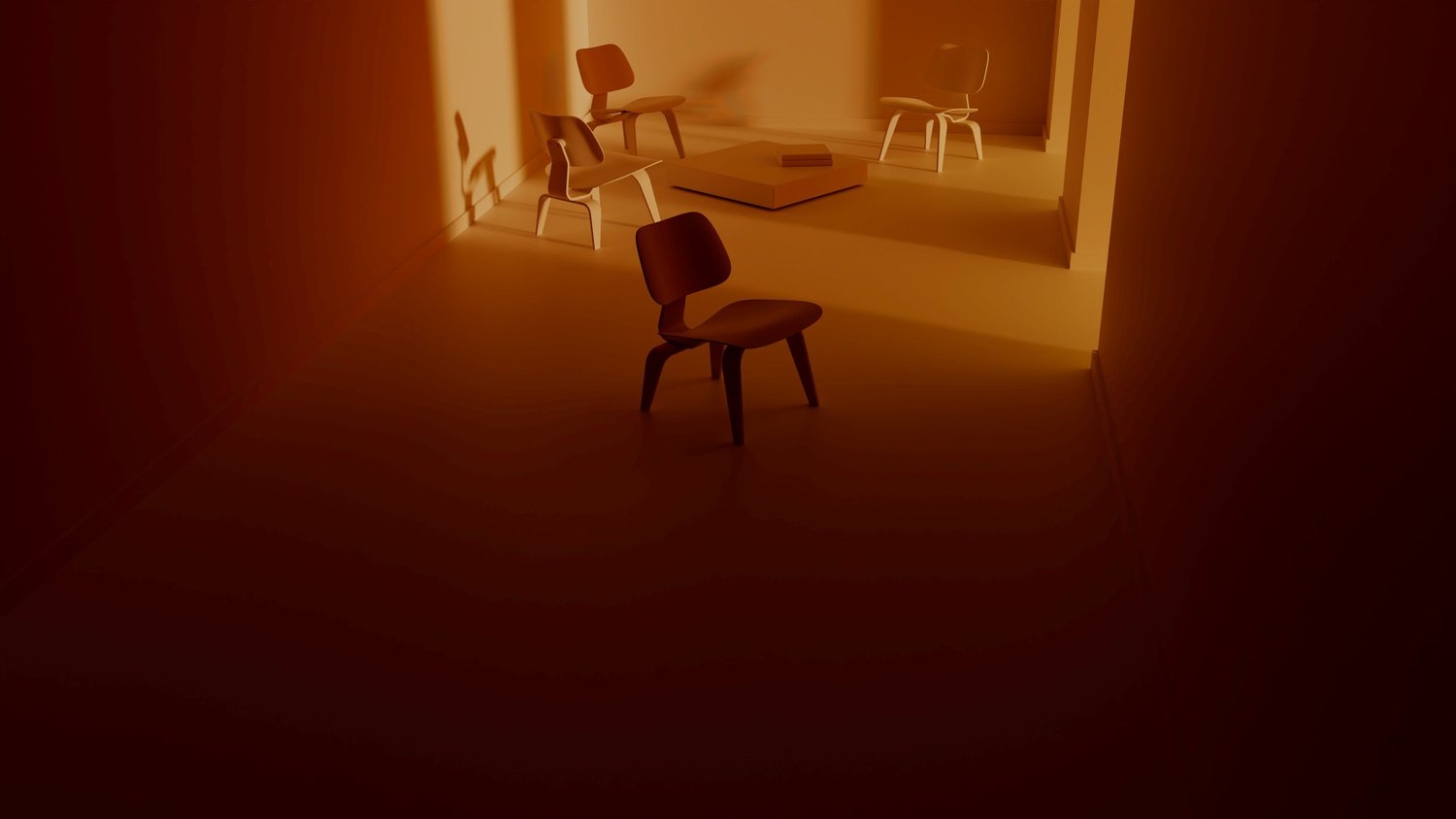
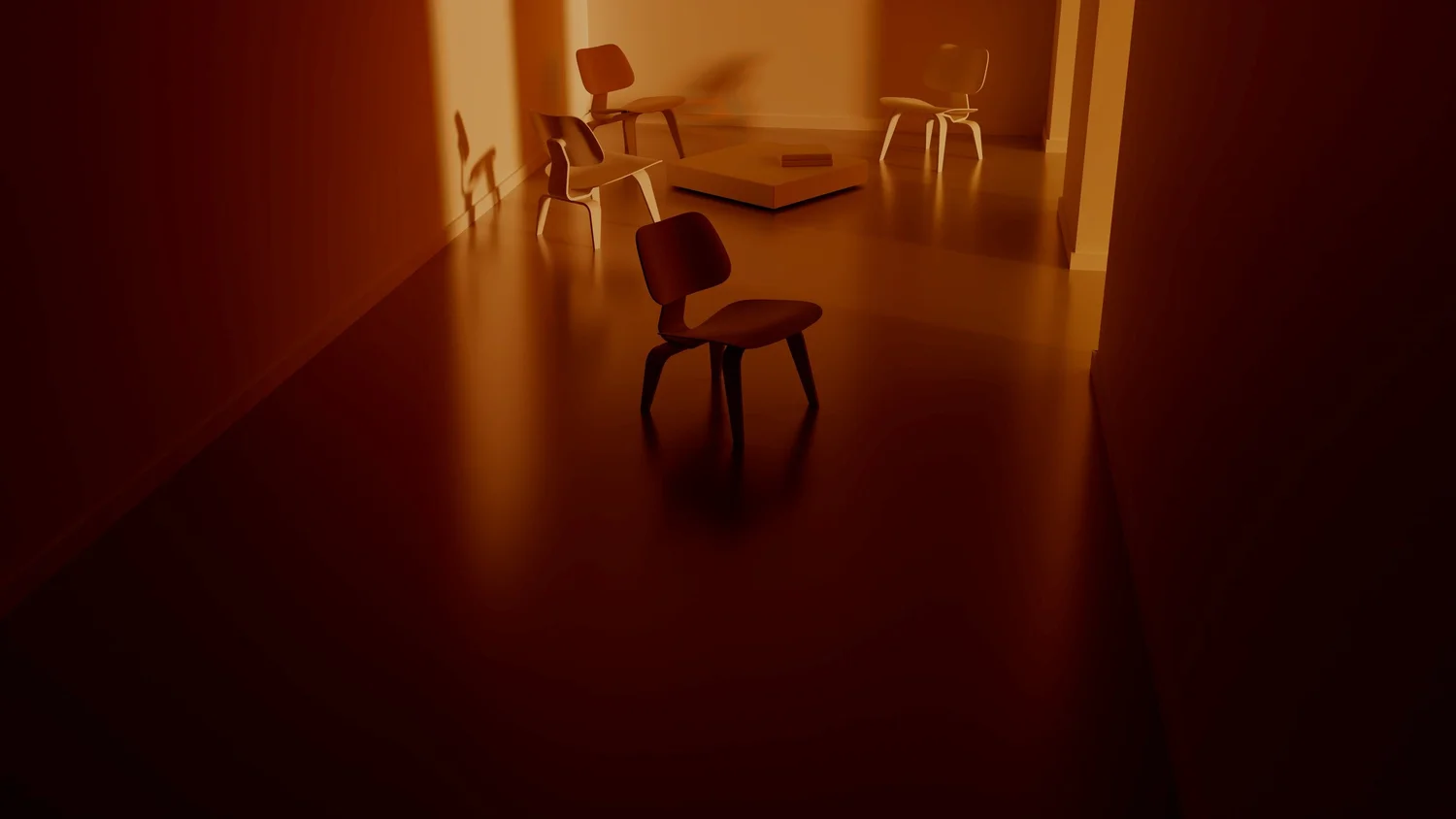
Now the following is from Blender 2.93.5 at 512 samples with OIDN denoiser
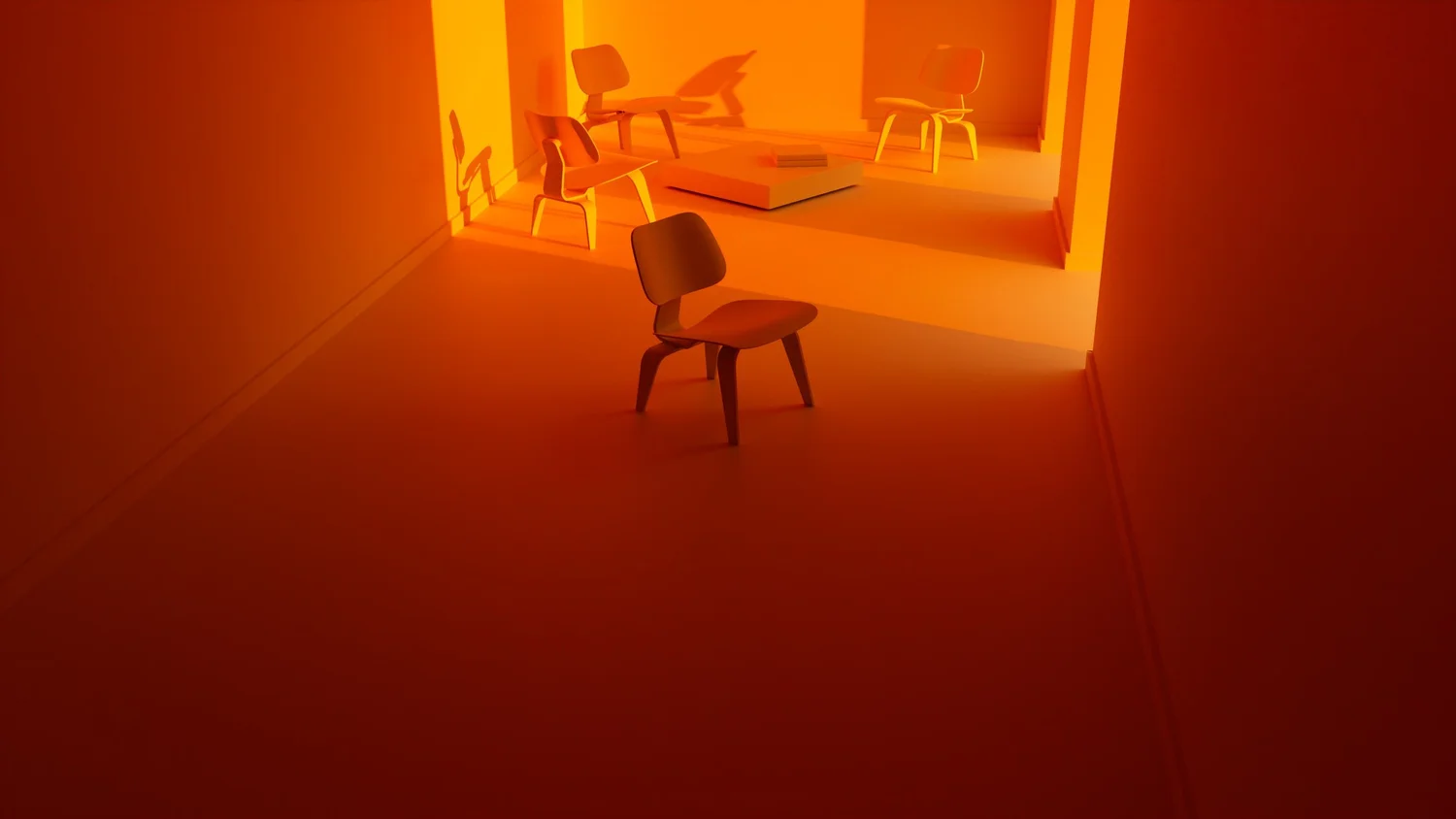
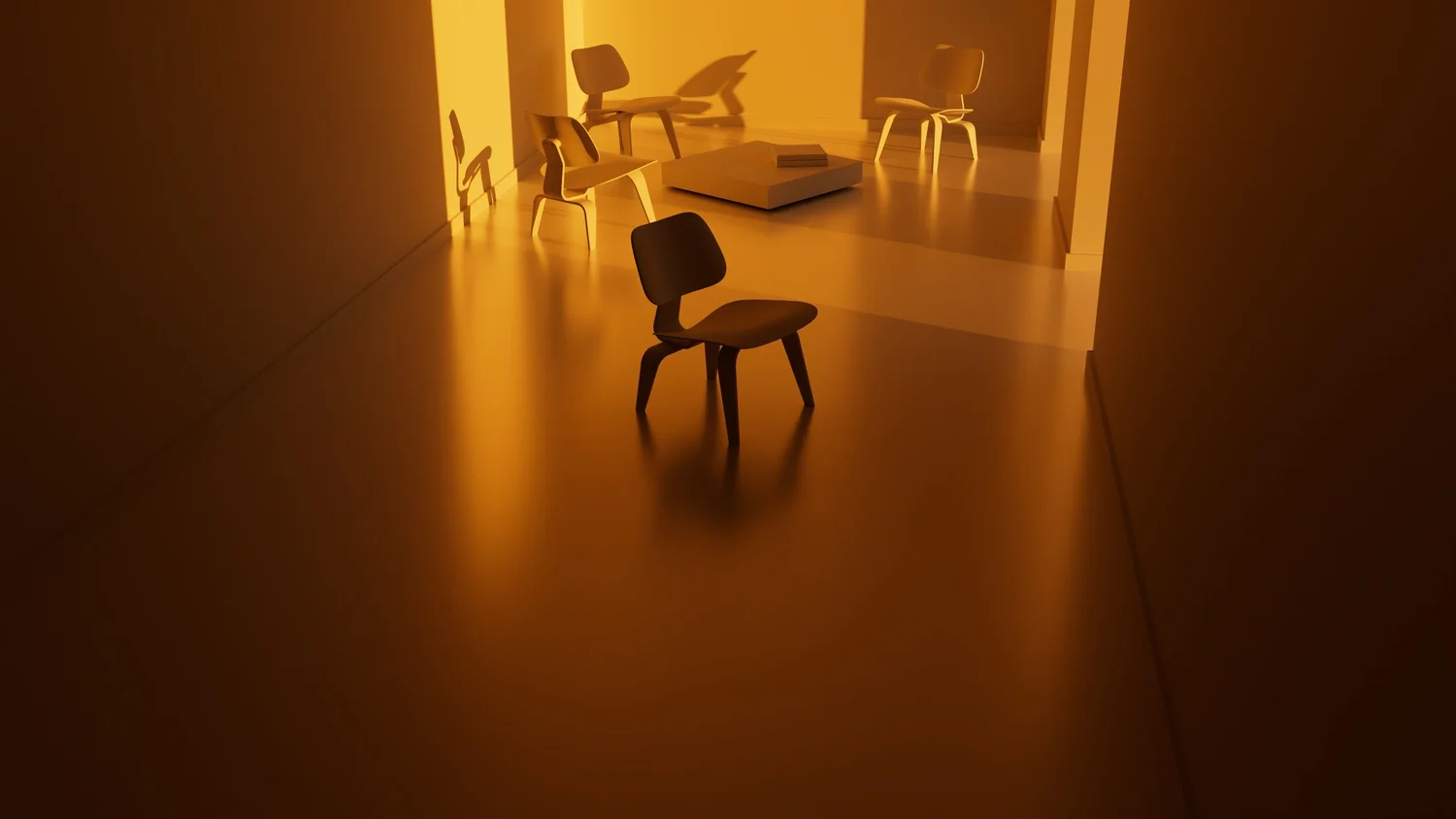
I tried to match the look (color) as much as possible for this quick test. Don't ask about the shadow as I don't know why the shadows are much sharper with Blender. One guess it would be because I am using a sun light parented to the sky texture in SI but in blender I am using the sky texture sun directly. But still the halo effect around the chair shadows in SI is disgusting. In any case this post is about banding in the gradient after denoise.
Here are the scene files:
Any one can confirm it? any solution?
NOTE, the banding is made worse by the compression, but with SI not by much. It is already bad.
Now the following is from Blender 2.93.5 at 512 samples with OIDN denoiser
I tried to match the look (color) as much as possible for this quick test. Don't ask about the shadow as I don't know why the shadows are much sharper with Blender. One guess it would be because I am using a sun light parented to the sky texture in SI but in blender I am using the sky texture sun directly. But still the halo effect around the chair shadows in SI is disgusting. In any case this post is about banding in the gradient after denoise.
Here are the scene files:
Any one can confirm it? any solution?
-
Shekn
- Posts: 254
- Joined: 30 Dec 2016, 19:18
Re: Cycles for Softimage
1. Remove directional light source from the child of the environment light and deactivate it (hide, for example)
2. Set for SkyTexture parameters the same as in Blender. If Background light source has sun light in the child, then it set sun rotation and elevation from this light source direction and ignore node's parameters. Even if this child is hided. So, you need to remove sun light from the hierarchy
3. Disable all color correction in Color Management tab
Then colors in Blender and Softimage rendered images will be the same. Next you can tweak parameters of color corrections and enable denoising. For me the result is still the same.
Gradients in the dark areas are standard artefacts of the ldr image formats. If you will save render in exr format, then these artefacts should disappear.
2. Set for SkyTexture parameters the same as in Blender. If Background light source has sun light in the child, then it set sun rotation and elevation from this light source direction and ignore node's parameters. Even if this child is hided. So, you need to remove sun light from the hierarchy
3. Disable all color correction in Color Management tab
Then colors in Blender and Softimage rendered images will be the same. Next you can tweak parameters of color corrections and enable denoising. For me the result is still the same.
Gradients in the dark areas are standard artefacts of the ldr image formats. If you will save render in exr format, then these artefacts should disappear.
-
SPJ

- Posts: 75
- Joined: 14 Jun 2014, 13:38
Re: Cycles for Softimage
Merry Christmas everyone!
I'm getting back to working with Sycles during the festive break after a really busy few months of film and motion graphics work. I'm in the process of reworking the shaders and textures of a 3D model I spent a lot of time on some years ago and getting beautiful renders compared to Mentalray!
I'm hitting a bump in the road though. I modelled most of this as a single mesh (bit of a challenge to myself), and it's all nicely set up with hard edges etc. The attached render is with subD level 0 (1,439,792 triangles). When I was rendering with Mentalray, I set the subD level to 2 to smooth it out (3,455,550 triangles). But in Sycles, I'm running out of system memory (which is 128GB) when SI is caching the model over to Sycles. I've tried increasing the subD level in SI before rendering. I've tried leaving the subD level at 0 and using the Cycles Mesh property on the mesh set to 2, they both result in RAM usage exploding until I run out of memory, then SI crashes.
I'm wondering if the cache can be written to disk (for example, in the project folder) to get round this problem?
I'm getting back to working with Sycles during the festive break after a really busy few months of film and motion graphics work. I'm in the process of reworking the shaders and textures of a 3D model I spent a lot of time on some years ago and getting beautiful renders compared to Mentalray!
I'm hitting a bump in the road though. I modelled most of this as a single mesh (bit of a challenge to myself), and it's all nicely set up with hard edges etc. The attached render is with subD level 0 (1,439,792 triangles). When I was rendering with Mentalray, I set the subD level to 2 to smooth it out (3,455,550 triangles). But in Sycles, I'm running out of system memory (which is 128GB) when SI is caching the model over to Sycles. I've tried increasing the subD level in SI before rendering. I've tried leaving the subD level at 0 and using the Cycles Mesh property on the mesh set to 2, they both result in RAM usage exploding until I run out of memory, then SI crashes.
I'm wondering if the cache can be written to disk (for example, in the project folder) to get round this problem?
You do not have the required permissions to view the files attached to this post.
-
Shekn
- Posts: 254
- Joined: 30 Dec 2016, 19:18
Re: Cycles for Softimage
Sycles use two different algorithms for subdivision. The first one is default - adaptive subdivision. This algorithm implemented inside the Cycles render engine and also use in Blender. The second one - based on OpenSubdiv. Adaptive subdivision is also based on OpenSubdiv but use more advanced technique. To use more simple subdivision algorithm - turn off the parameter "Adaptive subdivision" in CyclesMesh property. But in any case, subdivide 1m triangles is not a problem for any system. In a simple cube test (cube object has 1.2m triangles), both methods produce correct result, and the cache is 3.5 gb for adaptive mode (it produce 11m triangles) and 1.5 gb for simple mode (it produce 5.6 m triangles at 1-st subdiv level).
To understand the reason of the problem - send me archive with the model. I will try to understand what is wrong and why it happens.
To understand the reason of the problem - send me archive with the model. I will try to understand what is wrong and why it happens.
-
SPJ
- Posts: 75
- Joined: 14 Jun 2014, 13:38
Re: Cycles for Softimage
Thanks Shekn.
I was trying to narrow down the problem the other day and stripped out textures and UVs, that kind of thing. I found that just with the mesh alone the problem was occurring. I managed to get a render completed by splitting the model mesh into two parts and caching them individually.
I finished stripping back the mesh today and found it is the hard edges causing the RAM usage to spike. I removed all the hard edges and the render was nearly instant with level 2 subD.
I'm sending you the mesh I'm testing on so you can have a better look yourself. On my system, if I draw a render region over the mesh, the RAM usage spikes then SI crashes. If I first remove all the hard edges, then draw a render region, the render completes with around only 2-3GB RAM usage.
It certainly seems the hard edges are causing the problem, no idea why though!
I was trying to narrow down the problem the other day and stripped out textures and UVs, that kind of thing. I found that just with the mesh alone the problem was occurring. I managed to get a render completed by splitting the model mesh into two parts and caching them individually.
I finished stripping back the mesh today and found it is the hard edges causing the RAM usage to spike. I removed all the hard edges and the render was nearly instant with level 2 subD.
I'm sending you the mesh I'm testing on so you can have a better look yourself. On my system, if I draw a render region over the mesh, the RAM usage spikes then SI crashes. If I first remove all the hard edges, then draw a render region, the render completes with around only 2-3GB RAM usage.
It certainly seems the hard edges are causing the problem, no idea why though!
-
SPJ
- Posts: 75
- Joined: 14 Jun 2014, 13:38
Re: Cycles for Softimage
Hey Shekn, just wondering if you had a chance to look at the hard edge memory issues I was having? I'm sort of just treading water with this project not really sure whether to strip out all the hard edges or not. It would be a shame if I had to remove them to avoid crashes 
-
Shekn
- Posts: 254
- Joined: 30 Dec 2016, 19:18
Re: Cycles for Softimage
I am already answered you into PM, but shortly repeat here. The problem on Cycles render engine side, I can not fix it. It use a lot of memory when the mesh contains thin polygons with hard edges. I don't know why. But if you switch to custom subdivision process (by turning off Adaptive subdivision), then all should be ok.
-
SPJ
- Posts: 75
- Joined: 14 Jun 2014, 13:38
Re: Cycles for Softimage
Super, thanks Shekn. Sorry, I totally missed the PM, my browser logs me out every time I restart. I was just popping into this thread now and then as a guest to check for any news.
Disabling adaptive subdivision sounds like the best way forward. I'll give that a go later on
I'll post to let folks know how I get on.
Disabling adaptive subdivision sounds like the best way forward. I'll give that a go later on
I'll post to let folks know how I get on.
-
Shekn
- Posts: 254
- Joined: 30 Dec 2016, 19:18
Re: Cycles for Softimage
Next update: version 1.12. Download on the addon page: https://ssoftadd.github.io/syclesPage.html
What's new:
1. Compiled with the Cycles version from 13.03.2022. This version of Cycles render has many changes with respect to the previous one. The most important are:
1.1. Remove Branched Path Tracing mode. Now there is only one more simple mode with one quality parameter - samples count
1.2. Remove progressive rendering. In fact the render mode now is always progressive. But there is possibility to split rendered image into different tiles. By default the engine render the whole image as one tile. This mode is optimized for CPU and GPU
1.3. Remove NLM denoising mode. Now there are only two different denoising modes: OptiX and OpenImageDenoise
1.4. The render speed is increased
1.5. Improved shadow catcher. Now the engine allows to output the special pass, which can be used in composition. This pass contains not only the shadow information, but also secondary light and reflections
1.6. The interface of the Sycles is changed: some parameters are removed, some are moved into another location, some are new (look to the attached image, where old ui at the top and new ui at the bottom)
2. New output passes:
2.1. Add Position output pass
2.2. Add Shadow Catcher output pass
2.3. If the parameter "Combine Render Passes To Single EXR" is activated and denoising is ON, then there is possibility to save as additional layer noisy images for Combined Pass and Shadow Catcher and also passes (albedo, normal and position), which can be used for denoising
3. Now the Cycles render engine supports primitive point clouds. It renders the points as procedural spheres instead of instances of polygonal spheres. This is much more optimal with respect to sphere instances
4. Shader node updates:
4.1. PointInfo node for shading procedural point clouds
4.2. New "Random Walk (Fixed Radius)" mode for subsurface scattering
4.3. New nodes FloatCurve and VectorMapRange
4.4. Add Alpha output port for ObjectInfo and Attribute nodes
4.5. Add Length output for HairInfo node
5. Add vertex creases for subdivided polygonal meshes
6. Add "Invisible Tiles" parameter in Performance tab of the render settings. When it activated, then the render does not update image on the screen during the render process. It output to the screen only the final image. May be now this parameter is not actual, because by default the tile size is big, and image is not updated frequently during the render process.
7. New mode of the panoramic camera: Fisheye Lens Polynomial
8. Denoising now can be activated for the light baking
9. Some bug bixes and improvements
Also add two short tutorials into "how to" manual (https://github.com/ssoftadd/SSoftAdd.gi ... 3_2022.pdf). Tutorial 32 about rendering UDIMS and tutorial 33 about rendering new pointcloud primitives.
What's new:
1. Compiled with the Cycles version from 13.03.2022. This version of Cycles render has many changes with respect to the previous one. The most important are:
1.1. Remove Branched Path Tracing mode. Now there is only one more simple mode with one quality parameter - samples count
1.2. Remove progressive rendering. In fact the render mode now is always progressive. But there is possibility to split rendered image into different tiles. By default the engine render the whole image as one tile. This mode is optimized for CPU and GPU
1.3. Remove NLM denoising mode. Now there are only two different denoising modes: OptiX and OpenImageDenoise
1.4. The render speed is increased
1.5. Improved shadow catcher. Now the engine allows to output the special pass, which can be used in composition. This pass contains not only the shadow information, but also secondary light and reflections
1.6. The interface of the Sycles is changed: some parameters are removed, some are moved into another location, some are new (look to the attached image, where old ui at the top and new ui at the bottom)
2. New output passes:
2.1. Add Position output pass
2.2. Add Shadow Catcher output pass
2.3. If the parameter "Combine Render Passes To Single EXR" is activated and denoising is ON, then there is possibility to save as additional layer noisy images for Combined Pass and Shadow Catcher and also passes (albedo, normal and position), which can be used for denoising
3. Now the Cycles render engine supports primitive point clouds. It renders the points as procedural spheres instead of instances of polygonal spheres. This is much more optimal with respect to sphere instances
4. Shader node updates:
4.1. PointInfo node for shading procedural point clouds
4.2. New "Random Walk (Fixed Radius)" mode for subsurface scattering
4.3. New nodes FloatCurve and VectorMapRange
4.4. Add Alpha output port for ObjectInfo and Attribute nodes
4.5. Add Length output for HairInfo node
5. Add vertex creases for subdivided polygonal meshes
6. Add "Invisible Tiles" parameter in Performance tab of the render settings. When it activated, then the render does not update image on the screen during the render process. It output to the screen only the final image. May be now this parameter is not actual, because by default the tile size is big, and image is not updated frequently during the render process.
7. New mode of the panoramic camera: Fisheye Lens Polynomial
8. Denoising now can be activated for the light baking
9. Some bug bixes and improvements
Also add two short tutorials into "how to" manual (https://github.com/ssoftadd/SSoftAdd.gi ... 3_2022.pdf). Tutorial 32 about rendering UDIMS and tutorial 33 about rendering new pointcloud primitives.
You do not have the required permissions to view the files attached to this post.
-
wireframex

- Posts: 425
- Joined: 08 Jun 2009, 21:02
- Location: France
Re: Cycles for Softimage
Wow
Thanks a lot man
Thanks a lot man
"without mastery, power is nothing" - Softimage Addict User
CPU 3990x 128 Threads / 2 x 3090 RTX - 24 Go / 96 Go memory
CPU 3990x 128 Threads / 2 x 3090 RTX - 24 Go / 96 Go memory
-
I3D
- Posts: 122
- Joined: 12 Aug 2009, 16:15
- Skype: ironic3d
Re: Cycles for Softimage
Amazing Shekn!! I was about to post a message yesterday morning asking if the new CyclesX was going to be supported but decided not to and here you are phenomenal work, thank you so much
phenomenal work, thank you so much-
I3D
- Posts: 122
- Joined: 12 Aug 2009, 16:15
- Skype: ironic3d
Re: Cycles for Softimage
Hey Shekn
I found a bug, I noticed it first when I opened a scene and it rendered completely wrong, so made a simpler one and the issue seems to be stemming from the colour management, here is a video showcasing the problem:
I found a bug, I noticed it first when I opened a scene and it rendered completely wrong, so made a simpler one and the issue seems to be stemming from the colour management, here is a video showcasing the problem: