








































I'm using portal light and physical light only. I've spent hours yesterday tryin to figure out this.
In that render i posted is quite clear. Mila material is wrong in terms of intensity/shading color of the texture, to get the same texture color (correct one) of an architectural material i have to multiply the mila weight intensity by 3.14.
So either i got this totally wrong, either there is something wrong in softimage
New Mental Ray shaders development
-
Kzin
- Posts: 432
- Joined: 09 Jun 2009, 09:36
Re: New Mental Ray shaders development
its a different shading convention so it cant be the same. its like the ibl intensity, you have to divide the mia diffuse weight by pi, otherwise the rendering would be way to bright. its exactly the same here with mia and mila. mila follows the same convention like the ibl. so dont compare mila and mia without to change mia (if you are using booth in the same rendering). its also the same with mia and bsdf. bsdf is correct while you have to divide by pi for mia when mixing mia and bsdf in the same rendering.Maximus wrote:I'm using portal light and physical light only. I've spent hours yesterday tryin to figure out this.
In that render i posted is quite clear. Mila material is wrong in terms of intensity/shading color of the texture, to get the same texture color (correct one) of an architectural material i have to multiply the mila weight intensity by 3.14.
So either i got this totally wrong, either there is something wrong in softimage
its not mila that is false, its the mia shader which is wrong in the mila/ibl/bsdf universe. ;)
-
Maximus

- Posts: 1121
- Joined: 09 Jun 2009, 13:45
Re: New Mental Ray shaders development
And I might have understood this but now for a moment lets take out mia.Kzin wrote:its a different shading convention so it cant be the same. its like the ibl intensity, you have to divide the mia diffuse weight by pi, otherwise the rendering would be way to bright. its exactly the same here with mia and mila. mila follows the same convention like the ibl. so dont compare mila and mia without to change mia (if you are using booth in the same rendering). its also the same with mia and bsdf. bsdf is correct while you have to divide by pi for mia when mixing mia and bsdf in the same rendering.Maximus wrote:I'm using portal light and physical light only. I've spent hours yesterday tryin to figure out this.
In that render i posted is quite clear. Mila material is wrong in terms of intensity/shading color of the texture, to get the same texture color (correct one) of an architectural material i have to multiply the mila weight intensity by 3.14.
So either i got this totally wrong, either there is something wrong in softimage
its not mila that is false, its the mia shader which is wrong in the mila/ibl/bsdf universe. ;)
Create a scene and use mila only. Sphere on a plane, texture it. Render, the texture renders way darker than the correct color/intensity of the texture itself opened in photoshop.
So how you render correct texturing with mila? I was using mia + mila to compare the texture shading. of course if i apply a /pi on mia it renders darker as mila, but that is wrong in terms of shading. I cannot reproduce the same amount of color intensity of a texture opened in photoshop with Mila, if not by mulitplying the diffuse weight by 3.14.
-
Kzin
- Posts: 432
- Joined: 09 Jun 2009, 09:36
Re: New Mental Ray shaders development
Maximus wrote:And I might have understood this but now for a moment lets take out mia.Kzin wrote:its a different shading convention so it cant be the same. its like the ibl intensity, you have to divide the mia diffuse weight by pi, otherwise the rendering would be way to bright. its exactly the same here with mia and mila. mila follows the same convention like the ibl. so dont compare mila and mia without to change mia (if you are using booth in the same rendering). its also the same with mia and bsdf. bsdf is correct while you have to divide by pi for mia when mixing mia and bsdf in the same rendering.Maximus wrote:I'm using portal light and physical light only. I've spent hours yesterday tryin to figure out this.
In that render i posted is quite clear. Mila material is wrong in terms of intensity/shading color of the texture, to get the same texture color (correct one) of an architectural material i have to multiply the mila weight intensity by 3.14.
So either i got this totally wrong, either there is something wrong in softimage
its not mila that is false, its the mia shader which is wrong in the mila/ibl/bsdf universe. ;)
Create a scene and use mila only. Sphere on a plane, texture it. Render, the texture renders way darker than the correct color/intensity of the texture itself opened in photoshop.
So how you render correct texturing with mila? I was using mia + mila to compare the texture shading. of course if i apply a /pi on mia it renders darker as mila, but that is wrong in terms of shading. I cannot reproduce the same amount of color intensity of a texture opened in photoshop with Mila, if not by mulitplying the diffuse weight by 3.14.
have you increased the lighting intensity?
so you say you cant render a texture with mila that looks like the texture in ps? (completely take away mia and its rendering)
i did a fast test and it looks good to me, texture looks like expected and not to dark.
but i know what you mean from my test. mia renders slightly brighter. ok, so conlcusion would be not to use mia and mila in one render. a diffuse weight of 0.26 gives a rendering that is nearly the same, visually of course.
-
Maximus
- Posts: 1121
- Joined: 09 Jun 2009, 13:45
Re: New Mental Ray shaders development
Here is what i mean. The scene is lit with 1 hdri (alex apartment from sIBL collection) userIBL env on environment node, userIBL env on a spotlight, userIBL rect on another spotlight.
Gamma correction on.
I'm using mila shaders only in this scene.

And here is what i meant, i had to multiply the weight by PI to get the correct texture result.

Am I going nuts or what?
Gamma correction on.
I'm using mila shaders only in this scene.
And here is what i meant, i had to multiply the weight by PI to get the correct texture result.
Am I going nuts or what?
-
Kzin
- Posts: 432
- Joined: 09 Jun 2009, 09:36
Re: New Mental Ray shaders development
my best advice, dont compare against mia. use mila and light/shade your scene like you want.Maximus wrote:Here is what i mean. The scene is lit with 1 hdri (alex apartment from sIBL collection) userIBL env on environment node, userIBL env on a spotlight, userIBL rect on another spotlight.
Gamma correction on.
I'm using mila shaders only in this scene.
And here is what i meant, i had to multiply the weight by PI to get the correct texture result.
Am I going nuts or what?
its a bit like ambient environments and fg, you would not render these two in one scene in one pass.
-
Maximus
- Posts: 1121
- Joined: 09 Jun 2009, 13:45
Re: New Mental Ray shaders development
I'm not comparing with mia, i'm comparing to real texture color in photoshop.
Basically if i dont multiply the weight by PI there is no way i can match the texture. Even increasing the light intensity it blowns out the whole render and the shading is still weird and darker.
Its incredibily off to shade a scene with those shaders if you dont multiply the weight cause everything is dark. I mean they dont match the real textures..
Basically if i dont multiply the weight by PI there is no way i can match the texture. Even increasing the light intensity it blowns out the whole render and the shading is still weird and darker.
Its incredibily off to shade a scene with those shaders if you dont multiply the weight cause everything is dark. I mean they dont match the real textures..
-
Kzin
- Posts: 432
- Joined: 09 Jun 2009, 09:36
Re: New Mental Ray shaders development
i have not that problem. i increase my light until the texture looks like it should. like i also did with mia or phong or lambert.Maximus wrote:I'm not comparing with mia, i'm comparing to real texture color in photoshop.
Basically if i dont multiply the weight by PI there is no way i can match the texture. Even increasing the light intensity it blowns out the whole render and the shading is still weird and darker.
Its incredibily off to shade a scene with those shaders if you dont multiply the weight cause everything is dark. I mean they dont match the real textures..
-
Kzin
- Posts: 432
- Joined: 09 Jun 2009, 09:36
Re: New Mental Ray shaders development
ok, did another test with 2 different textures and 3 colors (100%white; 50% white and 10% white) with a white physical area light and it renders like expected.
can you run a test like this max?
edit: the image
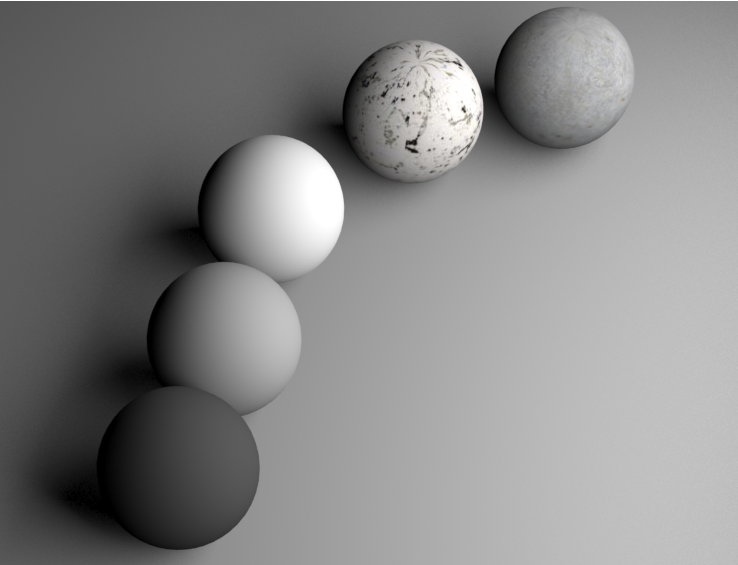
can you run a test like this max?
edit: the image
-
Maximus
- Posts: 1121
- Joined: 09 Jun 2009, 13:45
Re: New Mental Ray shaders development
i'll do in a bit, i'm running a 1600px interior rendering with those mila, gonna let it finish and post it 
also what intensity you used on physical light?
also what intensity you used on physical light?
-
Kzin
- Posts: 432
- Joined: 09 Jun 2009, 09:36
Re: New Mental Ray shaders development
think i should set this on hold actually. i try to carry some more informations.
max is right with this problem.
finish it in your way with the scale and show some renders and also shadersettings. meanwhile, i will do some more tests.
max is right with this problem.
finish it in your way with the scale and show some renders and also shadersettings. meanwhile, i will do some more tests.
-
Maximus
- Posts: 1121
- Joined: 09 Jun 2009, 13:45
Re: New Mental Ray shaders development
Well this was a render I left running overnight with all the diffuse weight multiplied by 3.14. What i was tryin to do now is reshade this without the multiply as you said but i got frustrated on how much changes in light intensity and everything in the scene i have to do to achieve a correct texture result so i stopped it. (beside wtf final gather is a pain in the ass to get rid of splotches in interiors!)
Here textures match the real ps texture, i'm using this multiply thing using a scalar basic (set to 1, 3.14, and multiply as operation) plugged into the weight ports of the shaders.

There are some issues in sampling and scene is not finished, also there are some splotches from final gathering in the outside geometry wall.
Scene is rendered using portal lights with custom color on ceiling things, 2 portal lights outside with environment node and HDRI, and a spot light with userIBL env with the same hdri.
Here textures match the real ps texture, i'm using this multiply thing using a scalar basic (set to 1, 3.14, and multiply as operation) plugged into the weight ports of the shaders.
There are some issues in sampling and scene is not finished, also there are some splotches from final gathering in the outside geometry wall.
Scene is rendered using portal lights with custom color on ceiling things, 2 portal lights outside with environment node and HDRI, and a spot light with userIBL env with the same hdri.
Last edited by Maximus on 03 Feb 2013, 12:20, edited 1 time in total.
-
Maximus
- Posts: 1121
- Joined: 09 Jun 2009, 13:45
Re: New Mental Ray shaders development
Here you can find a screen of the column wood texture and the setup i used
http://img805.imageshack.us/img805/7927/grabi.jpg
edit: I've tried your setup with those spheres and texture/black white, i always have the same issue, it doesnt match the texture color values, i have to multiply the weight by PI.
http://img805.imageshack.us/img805/7927/grabi.jpg

edit: I've tried your setup with those spheres and texture/black white, i always have the same issue, it doesnt match the texture color values, i have to multiply the weight by PI.
-
Kzin
- Posts: 432
- Joined: 09 Jun 2009, 09:36
Re: New Mental Ray shaders development
problem with that weighting by pi is that you cant layer correctly anymore. every diffuse layer would kill all other layers above him because the weight is way over one. thats the thing i look at the moment.Maximus wrote:Here you can find a screen of the column wood texture and the setup i used
http://img805.imageshack.us/img805/7927/grabi.jpg
edit: I've tried your setup with those spheres and texture/black white, i always have the same issue, it doesnt match the texture color values, i have to multiply the weight by PI.
-
Maximus
- Posts: 1121
- Joined: 09 Jun 2009, 13:45
Re: New Mental Ray shaders development
I've posted on mental forum and apparently the solution i've found is quite right in terms of texturing diffuse, the problem with the layering .... well you are right, but for the moment i'm multiplying only the diffuse/texture part of the shader, not the reflective/refractive, and its working, at least it seems to.
Sure its a total mess since we cant just use a damn string option cause Softimage doesnt work like maya. Yay autodesk again
thats what i got from mental forum "Your current solution might be the only workaround I know of unless a developer has an idea."
Sure its a total mess since we cant just use a damn string option cause Softimage doesnt work like maya. Yay autodesk again
thats what i got from mental forum "Your current solution might be the only workaround I know of unless a developer has an idea."
-
Daniel Brassard

- Posts: 878
- Joined: 18 Mar 2010, 22:38
- Location: St. Thomas, Ontario
Re: New Mental Ray shaders development
Max and KZin,
Silly question, are you working linearly or with gamma correction on?
Dan
Silly question, are you working linearly or with gamma correction on?
Dan
$ifndef "Softimage"
set "Softimage" "true"
$endif
set "Softimage" "true"
$endif