








































Thanks for the Follow-ups!
Ramon, what error message do you see? Couldn't reproduce it here. Double checked for conflicts with other XPOPs. Do you have a newer version of Junki's OrenoXPOPs than the one that's available here? That one uses an old version of XPOP (non python) which shouldn't be affected (theorertically....)
RCTools updates
Plugins linking to this thread: (hide)
 RcTools 5.3
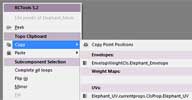
 Updated April 2013 — 5.3's main new feature TopoClipboard lets you copy map data from a point/edge/polygon/sample selection and paste it somewhere
else on the same or a different mesh into a selection that has the same »shape«
as the first selection. Also works for complete selections, which makes sense when
pasting across two meshes that have the same topology, but differing point orders.
TopoClipboard transfers: Vertex Colors UVs Envelope weights (with a remapping option) weight maps tangents point positions (local »shape« of the selected area). Works across different
maps of the same type and across scenes inside one instance of Softimage. Other new
features are a topology based mirror/flip selection and a couple of new settings for
the custom filters like point position compare components, edge on UV border, edge
orientation.
The RCTools plug-in is a collection of workflow helpers and filters for Softimage. The supplied popup menu (Script command »rcToolsPopup«) gives you quick access to all the tools. [..] List of features: Peek (Align camera along selected edge/facing selection @90°;) TopoClipboard Flip Selection Mirror Selection Fill Selection Walk Patterned Loop selections Apply Pattern Customizable Filters (by polygon area, aspect ratio, orientation, edge length, point distance and 30 others) subcomponent clipboard subcomponent clipboard booleans (e.g. Select intersection of current and clipboard selection) Cap holes Repeat
local backup: rcTools.5.3.xsiaddon
The RCTools plug-in is a collection of workflow helpers and filters for Softimage. The supplied popup menu (Script command »rcToolsPopup«) gives you quick access to all the tools. [..] List of features: Peek (Align camera along selected edge/facing selection @90°;) TopoClipboard Flip Selection Mirror Selection Fill Selection Walk Patterned Loop selections Apply Pattern Customizable Filters (by polygon area, aspect ratio, orientation, edge length, point distance and 30 others) subcomponent clipboard subcomponent clipboard booleans (e.g. Select intersection of current and clipboard selection) Cap holes Repeat
local backup: rcTools.5.3.xsiaddon
-
rray

- Moderator
- Posts: 1810
- Joined: 26 Sep 2009, 13:51
- Location: Bonn, Germany
Re: RCTools updates
softimage resources section updated Sep 26th 2026
-
Ramon
- Posts: 111
- Joined: 19 Aug 2010, 20:47
Re: RCTools updates
Hi! Install OrenoXpop10.xsiaddon, I think it is last version
error in OrenoXPop.js in line
var iCmd = DisplayPop(LabelAll,Name,Color);
// ERROR : 2006-CUST-OrenoXPopA - Unexpected failure.
OrenoXPopA();
The same error with other plugin PF_Popup_v1.1
e=DisplayPop (cl_barra& cl_barra& cltxt_Full& c_barra& c_barra& ctxt_Full& d_barra& d_barra& dtxt& expr_barra& expr_barra& exprtxt_Full& Sc_barra& Sc_barra& Sctxt_Full& p_barra& p_barra& Ptxt_Full )
Installed Xpop2.0 but not help! This plugins work with RCtools 4.3
with rctools 4.5 this plugins will die?
error in OrenoXPop.js in line
var iCmd = DisplayPop(LabelAll,Name,Color);
// ERROR : 2006-CUST-OrenoXPopA - Unexpected failure.
OrenoXPopA();
The same error with other plugin PF_Popup_v1.1
e=DisplayPop (cl_barra& cl_barra& cltxt_Full& c_barra& c_barra& ctxt_Full& d_barra& d_barra& dtxt& expr_barra& expr_barra& exprtxt_Full& Sc_barra& Sc_barra& Sctxt_Full& p_barra& p_barra& Ptxt_Full )
Installed Xpop2.0 but not help! This plugins work with RCtools 4.3
with rctools 4.5 this plugins will die?
-
rray
- Moderator
- Posts: 1810
- Joined: 26 Sep 2009, 13:51
- Location: Bonn, Germany
Re: RCTools updates
Ok I think I have an idea now what happened...
PF Popup and orenoXPOP were using the XPOP 2.0 popup plugin that's included with rctools 4.3
In rctools 4.5 this isn't included anymore (it has it's own popup) so by uninstalling rctools 4.3 those plugins stopped working. (It's not an incompatibiliy with 4.5)
Why they don't work when you installed XPOP 2.0 "standalone" can have two reasons:
Maybe it was the wrong version, it's split... (here for 32 bit, here for 64 bit).
Try reinstalling, this would work for Pablo's plugin.
To make the confusion complete, Junki's popup editor uses a version of XPOP2.0 that I don't have anymore (it uses 2 extra parameters for name/color of menu in the call, current one doesn't).
To make it work with XPOP 2.0, you would have to remove these two parameters in the line that produces the error (only for Junki's popup).
(or extract the only popup dll from rctools 4.3)
PF Popup and orenoXPOP were using the XPOP 2.0 popup plugin that's included with rctools 4.3
In rctools 4.5 this isn't included anymore (it has it's own popup) so by uninstalling rctools 4.3 those plugins stopped working. (It's not an incompatibiliy with 4.5)
Why they don't work when you installed XPOP 2.0 "standalone" can have two reasons:
Maybe it was the wrong version, it's split... (here for 32 bit, here for 64 bit).
Try reinstalling, this would work for Pablo's plugin.
To make the confusion complete, Junki's popup editor uses a version of XPOP2.0 that I don't have anymore (it uses 2 extra parameters for name/color of menu in the call, current one doesn't).
To make it work with XPOP 2.0, you would have to remove these two parameters in the line that produces the error (only for Junki's popup).
(or extract the only popup dll from rctools 4.3)
softimage resources section updated Sep 26th 2026
-
Ramon
- Posts: 111
- Joined: 19 Aug 2010, 20:47
Re: RCTools updates
Ok! Just copy old rcXPOP.64.dll from 4.3 version to new 4.5 - rcTools\Application\Plugins and it work!
Thanks a lot. rray!
Thanks a lot. rray!
-
oz42

- Posts: 15
- Joined: 20 Apr 2011, 21:01
- Location: Nottingham, UK.
Re: RCTools updates
Reinhard, thanks for the new version - downloading now...
Rob, I used a similar method with jellybeans a while ago (although I bet you could use ICE now!?), it worked a treat. RCtools really speeded things up!
Rob, I used a similar method with jellybeans a while ago (although I bet you could use ICE now!?), it worked a treat. RCtools really speeded things up!
-
j3st3r
- Posts: 121
- Joined: 11 Jun 2009, 07:13
Re: RCTools updates
Unfortunately when I try to use the RC45Popup command, it stops with an unexpected failure.
// ERROR : Object expected - [line 46 in C:\Users\Jester\Autodesk\Softimage_2012_SP1\Addons\rcTools\Application\Plugins\rcPopup45.js]
// ERROR : 2006-CUST-rc45Popup - Unexpected failure.
rc45Popup();
Can you help me?
Cheers
Szabolcs
// ERROR : Object expected - [line 46 in C:\Users\Jester\Autodesk\Softimage_2012_SP1\Addons\rcTools\Application\Plugins\rcPopup45.js]
// ERROR : 2006-CUST-rc45Popup - Unexpected failure.
rc45Popup();
Can you help me?
Cheers
Szabolcs
-
rray
- Moderator
- Posts: 1810
- Joined: 26 Sep 2009, 13:51
- Location: Bonn, Germany
Re: RCTools updates
I suspect something with the Python installation. Do you have Python in the list of available scripting languages when opening a script editor?
softimage resources section updated Sep 26th 2026
-
j3st3r
- Posts: 121
- Joined: 11 Jun 2009, 07:13
Re: RCTools updates
runonce.bat made the python active again, and it works like charm.
-
ActionArt

- Posts: 853
- Joined: 25 Nov 2010, 17:23
- Location: Canada
Re: RCTools updates
I've had the same thing. The strange part is that it was working fine a couple weeks ago for me but now it's not. I'm not sure what I changed.
Hopefully rray will save us
Hopefully rray will save us
-
ActionArt
- Posts: 853
- Joined: 25 Nov 2010, 17:23
- Location: Canada
Re: RCTools updates
Wow, that was faster than I could post! I'll try that. Thanks!!!
-
myara

- Posts: 406
- Joined: 28 Sep 2011, 08:33
Re: RCTools updates
I installed RCTools 4.5 in Softimage 2011SP2 and I get an error just when XSI starts.
The error link points to this line:
And in the Plugin Manager I have rcCustomFilterSettings.vbs icon in red. Everything else seems ok, RCTools XPop menu and some options works, but some other just crash (I guess this rcCustomFilterSettings error is the culprit).
This error happens in both Windows 7 Pro 32bit (PC at the office) and Windows 7 Ult 64bit (Home PC).// ERROR : 2028 - Invalid argument specified. - [line 31 in C:\Users\myara\Autodesk\Softimage_2011_SP2\Addons\rcTools\Application\Plugins\rcCustomFilters.vbs]
The error link points to this line:
From this function:Dim oProp : oProp = Application.ActiveSceneRoot.AddProperty("rcCustomFilterSettings")
Code: Select all
Function rcCustomPolymeshFilter_Init( in_ctxt )
	Dim pref
	Set pref = Application.Dictionary.GetObject("Application.Preferences.Custom Filters (RCTools)", false)

	If TypeName( pref ) = "Nothing" Then
		Dim oProp : oProp = Application.ActiveSceneRoot.AddProperty("rcCustomFilterSettings")
		InstallCustomPreferences oProp, "Custom Filters (RCTools)"
	End If
End FunctionM.Yara
Character Modeler | Softimage Generalist (sort of)
Character Modeler | Softimage Generalist (sort of)
-
rray
- Moderator
- Posts: 1810
- Joined: 26 Sep 2009, 13:51
- Location: Bonn, Germany
Re: RCTools updates
Does it work after restarting Softimage?
I used some kind of hacky way of installing the custom preference which requires a restart.
There's a better way which i'll use for future upgrades
I used some kind of hacky way of installing the custom preference which requires a restart.
There's a better way which i'll use for future upgrades
softimage resources section updated Sep 26th 2026
-
myara
- Posts: 406
- Joined: 28 Sep 2011, 08:33
Re: RCTools updates
Thanks for your quick response.
Since there are some select tools that do work even with this error, I've been using RCTools like this for weeks. Now that I'm not very busy, I tried to fix it without success.
So, if with "restart" you mean, close Softimage and start it again, then no, I think the restart is not working. I get the same error message every time I start Softimage and the icon at Plugin Manager is always red.
I guess it never installed correctly. I don't have any reference to RCTools or something like that in my Custom Preferences.
Since there are some select tools that do work even with this error, I've been using RCTools like this for weeks. Now that I'm not very busy, I tried to fix it without success.
So, if with "restart" you mean, close Softimage and start it again, then no, I think the restart is not working. I get the same error message every time I start Softimage and the icon at Plugin Manager is always red.
I guess it never installed correctly. I don't have any reference to RCTools or something like that in my Custom Preferences.
M.Yara
Character Modeler | Softimage Generalist (sort of)
Character Modeler | Softimage Generalist (sort of)
-
rray
- Moderator
- Posts: 1810
- Joined: 26 Sep 2009, 13:51
- Location: Bonn, Germany
Re: RCTools updates
Does the red Icon appear when you remove everything from the init function?
(Not the function itself)
In case this should work, retry with the original init function.
(Not the function itself)
In case this should work, retry with the original init function.
softimage resources section updated Sep 26th 2026
-
myara
- Posts: 406
- Joined: 28 Sep 2011, 08:33
Re: RCTools updates
I put a ' in all lines except Function rcCustomPolymeshFilter_Init and End Function.
Restarted Softimage.
Well I've got rid of that Error Message, as expected.
But [rcCustomFilterSettings.vbs] is still red in the Plugin Manager. If I try to open it's properties, it says "262$This script plug-in contains script errors and could not be loaded: <path:.....>".
Reload doesn't do anything. Double click gives me the same message.
No error or details in script editor either.
All the other rcTools Plug-ins are OK.
No RCTools in Custom Preferences.
Restarted Softimage.
Well I've got rid of that Error Message, as expected.
But [rcCustomFilterSettings.vbs] is still red in the Plugin Manager. If I try to open it's properties, it says "262$This script plug-in contains script errors and could not be loaded: <path:.....>".
Reload doesn't do anything. Double click gives me the same message.
No error or details in script editor either.
All the other rcTools Plug-ins are OK.
No RCTools in Custom Preferences.
Last edited by myara on 10 Nov 2011, 16:59, edited 1 time in total.
M.Yara
Character Modeler | Softimage Generalist (sort of)
Character Modeler | Softimage Generalist (sort of)
-
rray
- Moderator
- Posts: 1810
- Joined: 26 Sep 2009, 13:51
- Location: Bonn, Germany
Re: RCTools updates
That's strange with Softimage giving no details about the error -- Usually it does that.
Suspecting either file corruption, although you probably already tried redownloading.
Runonce.bat might also be worth a try.
Suspecting either file corruption, although you probably already tried redownloading.
Runonce.bat might also be worth a try.
softimage resources section updated Sep 26th 2026